

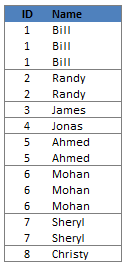
 Here is a quick formula trick you can use to generate sequence numbers that only increment when there is a change.
Assuming the sequence of values are in column C from C3,
- you can write the following formula in B4 onwards (B3 will be 1, wake up…)
=IF(C4=C3,B3,B3+1) - Now just copy paste the formula over the entire range B2:Bxxx to generate sequence numbers.
How it works?
- That is for your home work for the day 😛
Browse more excel quick tips and learn something cool.


20 Responses
I have used a similar technique using conditional formatting to identify when lists change. Our Production Scheduling Program gives a readout like this:-
Dept M/c Tool Job No
A A1 T1 J1
A A1 T1 J2
A A1 T2 J3
A A2 T2 J4
A A2 T3 J5
A A2 T3 J6
A A2 T4 J7
A A2 T5 J8
A A2 T6 J9
B B1 T7 J10
B B1 T7 J11
B B1 T7 J12
B B1 T8 J13
B B2 T9 J14
B B2 T10 J15
B B2 T10 J16
B B2 T10 J17
B B2 T10 J18
If you add 2 conditional formats to each cell:-
=A2=A1 – font colour equals white &
=A2A1 – add a line to the top of the cell it comes out like this:-
Dept M/c Tool Job No
A A1 T1 J1
J2
T2 J3
J4
A2 T3 J5
J6
T4 J7
T5 J8
T6 J9
B B1 T7 J10
J11
J12
T8 J13
B2 T9 J14
T10 J15
J16
J17
J18
With the proper spread sheet with the horizontal lines drawn this is much easier to read
Hi Chandoo
Sorry about the formatting of the above post.
I am new at this commenting game & dont know how to make the formatting come out correct
@Peter H: Welcome to PHD and commenting. 🙂 I like your idea. When I get sometime I will create a screenshot of this and post it here so that other readers will know how it would look.
Also, you dont need 2 conditional formats. You can set the cell font color to white for all in one stroke and then use conditional formatting to turn the color to black when a2 not equal to a1.
dilbert hello, my name is roni have 62 anos.vamos interesa what I’m learning to move in excel, as do combinations of 1.2.3 up to 25, using 15 numbers
Hi,
I’m trying to create a formula that generate sequence number for employees who have multiple lines. Example…
ID Name Seq. #
11 Smith, John 1
11 Smith, John 2
55 Perez, A
ID Name Seq. #
65 Matthews, Joe 1
65 Matthews, Joe 2
65 Matthews, Joe 3
65 Matthews, Joe 4
Hi guys,
I need help on sequence number for sheets.
could anyone guide me the correct formula for that?
I have a massive list of Data this needs to have sequence be numbers in sequence in the colum beside the data is raandom in cells, PLease see the example underneath it will be easier to explain
Data237828
Data237828
Data237828
Data237828
Data237828
Data237828
Data237828
Data237828
Data876378
Data876378
Data876378
Data876378
Data876378
Data876378
Data876378
Data7868
Data7868
Data7868
Data893798389
Data893798389
Data893798389
Data893798389
Data893798389
Data893798389
Data234352
Data234352
Data234352
Data234352
Anyone know how to write a sequence formula so the final product in the column beside will have a sequence numbering please see below
Data237828 1
Data237828 2
Data237828 3
Data237828 4
Data237828 5
Data237828 6
Data237828 7
Data237828 8
Data876378 1
Data876378 2
Data876378 3
Data876378 4
Data876378 5
Data876378 6
Data876378 7
Data7868 1
Data7868 2
Data7868 3
Data893798389 1
Data893798389 2
Data893798389 3
Data893798389 4
Data893798389 5
Data893798389 6
Data234352 1
Data234352 2
Data234352 3
Data234352 4
Any help is appreciated, thank you.
Hi Chris,
I had a similar requirement and I have achieved this using a simple formula…
=IF(A1A2,1,B1+1)
and apply this formula for all rows in B column… hope this solves your issue.
Thanks Charan!! I was looking for the similar for formula. Even though very simple, in crunch time, nothing will work. Thanks Charan for great help
Great!
Hello! I would like more help with this formula, please. I know it is exactly what I am looking for but I am having trouble on how to apply it. I have a list of schools (Column A) that have corresponding project numbers (Column B), and get a different phase number (Column C) each time a project comes in. It looks just like the data above but I can’t get it to sequence correctly.
Hello,
How can I have Excel auto number data in row B to match data in row D?
Column B Column D
Invoice Number Nurse Name
170111 Nurse 1
170111 Nurse 1
170112 Nurse 2
170112 Nurse 2
170113 Nurse 3
170113 Nurse 3
170113 Nurse 3
right now Excel does this:
Column B Column D
Invoice Number Nurse Name
170111 Nurse 1
170112 Nurse 1
170113 Nurse 2
170114 Nurse 2
170115 Nurse 3
170116 Nurse 3
170117 Nurse 3
Hello,
How can i have auto refill sequence number for 4 digit at the end.
DI-17-0076
help pls
HOW TO AUTOMATE THIS
A1
A2
A3
B1
B2
A4
B3
C1
C2
C3
A5
THANK YOU
@Lendl
Can you please explain the sequence?
A
5858 Bill 1
5858 Bill 1
5858 Bill 1
5859 Randy 2
5859 Randy 2
5860 James 3
5861 Jonas 4
5862 Ah med 5
5862 Ah med 5
5863 Mohan 6
5863 Mohan 6
5863 Mohan 6
5864 Sheryl 7
5864 Sheryl 7
5865 Ch ristv 8
Paste
=SUM(IF(FREQUENCY($A$1:A1,$A$1:A1)>0,1))
In C column.
Its worked for me as mentioned below.
I will be happy if anyone can get help from this.
A B C
5858 Bill 1
5858 Bill 1
5858 Bill 1
5859 Randy 2
5859 Randy 2
5860 James 3
5861 Jonas 4
5862 Ah med 5
5862 Ah med 5
5863 Mohan 6
5863 Mohan 6
5863 Mohan 6
5864 Sheryl 7
5864 Sheryl 7
5865 Ch ristv 8
I want to generate a sequence like; A-0001, A-0002….. but when change in Alpha happen it should be reset with like B-0001, B-0002….C-0001, C-0002…..could anyone help me out ???
How to generate sequential invoice number for multiple sheets. It will be a continuation number based on the input in different sheets.
for example:
Sheet1: 001,002
Sheet2: 003,004
whenever the sheet gets updated then the next number should appear in the both sheets. Please help.