

Hi everyone, I have a quick announcement for you.
Registrations for our VBA class will be closing in a few hours
As you may know, we have re-opened the doors for our VBA Class on September 5th. This program is aimed at beginners & intermediate level users. The aim of our VBA class is to make you awesome in Excel & VBA.
We will be closing registrations for this program in few more hours (exactly at 11:59 PM, Pacific time, on 19th September, 2011)
Click here to join our VBA Class now.
How many people have joined so far?
At the time of writing this post (around 11AM, Indian Time on 16th September), we have 217 participants in this program. We are eager to help as many more of you as possible before closing the doors. So go ahead and join the program, because, you want to be awesome.
3 Important Things about This batch of VBA Class
1. You can access all the lessons from Day 1
When you join, you no longer have to wait to access the material. Everything is available on Day 1. And as you go thru the material, we would be adding some bonus lessons to help you learn better. This applies to VBA, Excel & Dashboard lessons.
2. You get a certificate at the end
Once you finish the course, you will be awarded a participation certificate, so that you can show off your VBA proficiency in style.
3. More Payment Options
Since quite a few of you are not comfortable (or able) to use PayPal payment option, we have set up 2 pages with alternative payment links.
When Exactly are we closing Registrations for VBA Class?
We will be closing registrations Today (Sept 16) on Monday (Sept 19) at 11:59 PM, Pacific Time. See below map to understand what time the registrations close in your time zone.
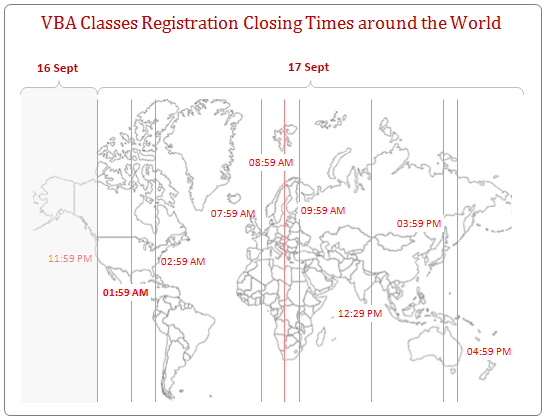
Count-down Timer for VBA Class Registrations [VBA Application]:
We also have built an interactive Timer Application (obviously in Excel) to tell you how much time you got. Download it here.
PS: More on the Count-down timer application here.
When is the Next Batch of VBA Class?
Some of you have asked me when we will re-open this program. October thru December is a time for festivities, fun & relaxation at our household (More than 3 birthdays, Christmas, Diwali & New Year to celebrate in a short span of 3 months!)
We will be re-opening VBA Class in January 2012. But we may delay the launch of 3rd batch if we need to spend more time with 2nd batch students.
So go ahead and join us today.
Thank you So Much
All of us at Chandoo.org & VBA Classes thank you so much for your support to this and other training programs. Each time I run a training program, I fear “Whether I will be able to satisfy so many hungry minds“. And every time, you have motivated me, supported me and been patient in learning. Thank you so much.
Yours,
Chandoo
PS: If you are wondering what VBA is & why you need it, take our crash course.
PPS: If you want to be wonderful in VBA, take our VBA class.


11 Responses to “Use Alt+Enter to get multiple lines in a cell [spreadcheats]”
@Chandoo:
One more useful trick.......
In a column you have no. of data in rows and need to copy in the next row from the previous row, no need to go for the previous rows but entering Alt + down arrow, you will get the list of data, (in asending order), entered in the previous rows...
This is another great tip. I use this all the time to make sense of some *very* long formulas. As soon as the formula is debugged I remove the break.
Great tip Chandoo!
I use this feature often and it has even gotten the, "how did you do that" response.
Thanks!
@Ketan: Alt+down arrow is an awesome tip. I never knew it and now I am using it everyday.
@Jorge, Tony: Agree... 🙂
[...] Day 1: Insert Line Breaks in a Cell [...]
how can we merge a two sheet.
excellent idea. Chandoo you are genious
Hi chandoo,
I have used ctrl+enter to break the cell. But I did not get the result.
Please tell me how can i break the cell in multiple lines.
Hi, Ranveer,
Its not Ctrl+enter to break the cell, use Alt+Enter to make it happen.
hi Chandoo....
how we can use Alt+Enter in multiple rows at the same time please reply hurry i have lot of work and have no time and i m stuck in this. 🙁
Alt+J worked once 🙁
So I found another more reliable way:
=SUBSTITUTE(A2,CHAR(13),"")
Where A2 is the cell that contains the line breaks which the code for it is CHAR(13). It will replace it with whatever inside the ""