Here is a quick productivity tip if you work with same set of excel (or word or powerpoint) documents everyday. Just pin the documents to recent documents list in the Office Menu in MS Office 2007.
See this:
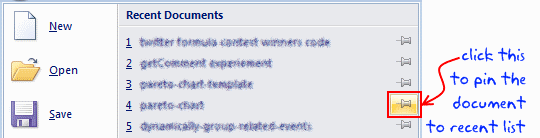


Here is a quick productivity tip if you work with same set of excel (or word or powerpoint) documents everyday. Just pin the documents to recent documents list in the Office Menu in MS Office 2007.
See this:

Simple, fun and useful emails, once per week.
Learn & be awesome.

Thank you so much for visiting. My aim is to make you awesome in Excel & Power BI. I do this by sharing videos, tips, examples and downloads on this website. There are more than 1,000 pages with all things Excel, Power BI, Dashboards & VBA here. Go ahead and spend few minutes to be AWESOME. Read my story • FREE Excel tips book


From simple to complex, there is a formula for every occasion. Check out the list now.

Calendars, invoices, trackers and much more. All free, fun and fantastic.

Power Query, Data model, DAX, Filters, Slicers, Conditional formats and beautiful charts. It's all here.

Still on fence about Power BI? In this getting started guide, learn what is Power BI, how to get it and how to create your first report from scratch.

This week, let’s try something new. I have a spreadsheet challenge for you. Solve it, post your answers by leaving a comment. No cheating or


3 Responses
I’ve been doing this for the last year or so, and my list of pinned workbooks has grown substantially. One additional tip: In Excel Options, under the Advanced/Display section, make sure to bump up the number of recent documents displayed (mine’s set to 30).
@Matthew… I have discovered this one recently. I find it pretty useful. 30 documents one is good too. I guess I would need lot of spreadsheeting before I end up accessing 30 documents everyday.
Hi Chandoo,
Can we add web links and folder path to customized ribbon?
Thanks,
Sainath