Hello awesome folks. It has been a while since I posted on Chandoo.org. And there is a reason for that. As you may know, recently (on October 12th) a category 3 cyclone (hurricane) passed thru our city devastating trees, power lines, cellular towers, old houses & roads on its way. This means our family was left without power, water, telephone and internet for almost 10 days. Early last week we got power & water. Then slowly the internet started working too. (more on this here)
I am swimming thru heaps of email & backlog work. Thanks to everyone who emailed me with kind thoughts, prayers and love. I can’t tell you how thankful I am for having you in my life.
I am really glad to be back online, sharing my stories, knowledge & tips with you all.
As it has been a while, I want to share a few quick announcements first.
#1 – The VLOOKUP Book Anniversary
Around this time last year, I published my first book – The VLOOKUP Book. As the name suggests, it’s a comprehensive guide to Excel lookup formulas. We sold more than 1300 copies of this book in first year. And the feedback has been overwhelmingly positive, with many 5* ratings on Amazon.
To celebrate the first anniversary of this book, I am running a VLOOKUP Sale on 30th & 31st of this month (Thursday & Friday). In this 2 day sale:
- You get 50% discount on The VLOOKUP Book
- You get 25% discount on The VLOOKUP Book + Video combo pack.
- Remember, the sale starts on 30th October morning (Japan time) and ends on 31st October midnight (Pacific time)
To avail this sale, just go to The VLOOKUP Book page.
#2 – Introducing ready to use Dashboard Templates from Chandoo.org
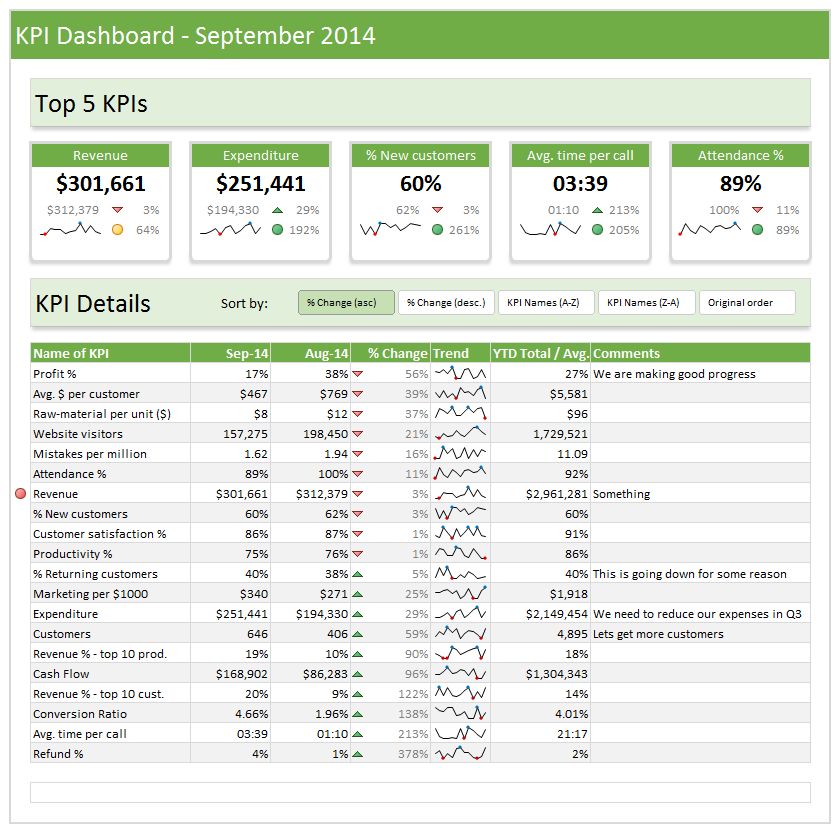
This is the top most request from our customers & readers. A ready to use dashboard template that is easy, intuitive & awesome. So during the cyclone inflicted downtime, I created a set of ready to use dashboard templates. I am still polishing the product. This will launched on 13th of November (Thursday).
This is how our templates can help you:
- Type your data and generate beautiful dashboards. That simple.
- Generate 9 different dashboards from one set of data. Click & choose what you want.
- Customize with ease. Change currency codes, financial year starts etc.
- Build your own calculations and the template displays them just as beautifully.
- Ready to show, ready to print, ready to publish – All in one awesome bundle.
- Save time & worry about things that matter.
Here is a sneak-peek (click on it to enlarge):
#3 – 50 Ways to Analyze Data – Coming in Jan 2015
Last month I asked you to tell me the challenges you face when analyzing data. Based on all your feedback, I am designing an analytics course to help you most. It is 15% done. I will be completing rest of the course development during November & December.

So the 50 ways to analyze your data course will be launched on 21st of January 2015 (Wednesday).
Click here to sign up for the waiting list of this course.
I will email you details about the course as they get ready.
So that is all for now. Tomorrow, I will come back with an awesome Excel tip. Until then…


23 Responses to “Displaying Text Values in Pivot Tables without VBA”
Its possible to display up to 4 text values.
Have a look at the screen shot of an example that I had posted way back at the EHA and figure out how its done !
http://tinypic.com/r/muzywk/6
With Excel 2010 you can use Conditional Formatting to apply custom number formats which can display text. (In older versions you can only modify text color and cell background color, but not number formats.) Using CF allows for an even larger number of different display values.
[...] Display text values in Pivot Tables without VBA [...]
Hey,
Thanks, this helps. But how do you do it for multiple values where there is a huge amount of non repeating text?
@Soumya
The only way to do more than 4 values is to make the Pivot Table manually with formulas, of course then it isn't a Pivot table
You can of course do it with VBA
You may want to have a look at this description of how to do it here: http://www.clearlyandsimply.com/clearly_and_simply/2011/06/emulate-excel-pivot-tables-with-texts-in-the-value-area-using-vba.html
@Soumya
The only way to do more than 4 values is to make the Pivot Table manually with formulas, of course then it isn’t a Pivot table
You can of course do it with VBA
You may want to have a look at this description of how to do it here: http://www.clearlyandsimply.com/clearly_and_simply/2011/06/emulate-excel-pivot-tables-with-texts-in-the-value-area-using-vba.html
[...] Pivot Tables take tables of data and allow the user to summarise and consolidate the data at the same time. This is a great and very fast method of analysis but is restricted to handling mathematical functions on the value field resulting in numerical summaries. – read more [...]
[…] Read more here: Displaying Text Values in Pivot Tables without VBA […]
There is a very good way actually for handling text inside values area.
First you create a special column on the very left side and call it ID, and put unique ID (numbers only), and then create a pivot table with:
Row Labels and Column labels as you like, and in the Values labels use the unique ID number.
Move the unique ID number (copy paste) somewhere to the right and use vlookup to load the data you need using the ID as reference.
It is a bit longer way but for me it works perfectly to combine values as you like in any moment.
hope helps.
Regards,
Jon
Thank you! I finally understand pivot tables thanks to your clear, concise explanations and examples.
Good Day. This is exactly what i have been looking for. However when i try it on my pivot table or even when i try to recreate this exercise using the sample worksheet, i get this error:
"Microsoft Excel cannot use the number format you typed. Try using one of the built-in number formats."
Same thing here, Excel quite did not like the format in my PowerPivot. Any clues as to what may be going on? Thanks.
I have the same thing happening on my end. I'm running a normal pivot table on a .xlsm file.
@Danzi
What format did you use?
can you post the file ?
pls. help in table there is name, pan. amount. i have to make pivot table for example
NAME PAN AMOUNT
MR.X AAAAC1254T 500.00
MR.Y AAABR1258C
MR.A CFVDE2458T
MR.Z AAVCR12548C
MR.X AAAAC1254T
MR.Z AADCD245T
pls. help in table there is name, pan. amount. i have to make pivot table for example
NAME PAN AMOUNT
MR.X AAAAC1254T 500.00
MR.Y AAABR1258C 1000
MR.A CFVDE2458T 2000
MR.Z AAVCR12548C 5451
MR.X AAAAC1254T 45564
MR.Z AADCD245T 4500
how to get pivot tabe so i get PAN no. against Name.
I found an easy way to get text values in pivot table.
I create an other worksheet in wich each cell has a formula that copy the pivot table. The trick is that the formula does a lookup for the numbers in the pivot table.
The formula looks like that:
=IF(ISNUMBER(table!A1);VLOOKUP(table!A1;Code!$A$1:$B$65;2);IF(ISBLANK(table!A1);" ";table!A1))
Code is a worksheet where there is a liste of text /numbers correspondance.
As a bonus The new sheet is easier to format
Additional trick:
In my case, i encoded differents codeid with a power(2, codeId-1) so that summing then is equivalent to concatenate them.
1-A
2-B
4-C
8-D
yields :
5 - AC
14 - BCD
Hi
I want to ask if pivot can display dates in pivot field. As in a column i have customers and in row different items i want to know there last purchase date. anyone help in this??
Hello Guys, Need your help
I am doing some analysis of the cycle time of the product i.e how much time a product takes from manufacturing to the central warehouse.
I have batch numbers for the product and against them i have to pull out the diff. dates
Like the base date is from where the manufacturing start. So i have the batch number,against it's manuf. date. Now i have to pull out the date when it was quality released.
I have the quality released data but the data have duplicates, like i will have two dates or may be three for the same batch. So my main objective is to pull out the date which is latest among them.
BATCH NO. DATE of Mfg. DATE of Quality release
A1 12/4/2014 (HERE I HAVE TO PULL value)
Next Sheet
BATCH NO. DATE of Quality Release
A1 14/5/2014
a2 23/5/2016
A1 12/5/2014
A1 13/6/2014
From this sheet i have to pull up the latest date format of date here is dd/mm/yyy
TIA
[…] needed to present text instead of counts in a pivot table value column. Here is an excellent resource for Excel manipulation, in addition to an overview of pivot […]
This is great thank you.
Wow!!! Excellent!! It helped me a lot.
I am developing training tracking sheet for 200 employees with training completed date. Each employee will be attending 25 courses. How to indicate actual dates in pivot table value field.