

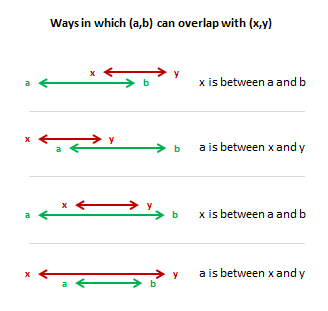
 Few days back we have learned how to find if 2 sets of dates overlap using Excel Formulas. For eg. we have learned that to check whether {1 July,2010 to 23 July 2010} overlaps with the date range {15 July, 2010 to 16 August 2010}, we can use a formula like,
=if(or(and(x>=a,x<=b),and(a>=x,a<=y)), "Overlap","Do not overlap")
where {x,y} are {1 July,2010 to 23 July 2010} and {a,b} are {15 July, 2010 to 16 August 2010}.
Robert, an Excel School student asked a question last week that adds an interesting twist to this problem.
I’m trying to calculate days using several nested IF functions, but I keep getting errors – was hoping you might be able to evaluate my formula and tell me what I’m doing incorrectly:
Here is my framework – I have a start date field which can be any date (let’s call this f6), and an end date field which can be any date (let’s call this g6). I want to calculate the number of days within the start date and end date that fall within the month May 2010.
Essentially Robert wants to find out how may days between {x,y} overlap with {a,b}.
Now, I have already figured out a simple enough solution for it. But it is no fun showing off what I know. So here is the homework for you.
Your homework:
Figure out how to find the number of days in overlap and post your answer in comments (click here).
PS: Today, I am attending a talk by Seth Godin at Hyderabad. I am super excited to finally hear him live. I have been reading his blog for almost 5 years now, and he has been one of the motivating forces for me. So naturally I will be slow to approve comments or reply to mails. Give me a day to get back to you.


72 Responses
Thought I had it, but it fails when x=a or y=b – must try harder 🙂
By looking at the arrow diagrams, the upper choice is either b or y depending on which is leftmost, and similarly, the lower choice is a or x on which is rightmost. So the formula is simply =MIN(b,y)-MAX(a,x). By extending, =AND(a=x)*(MIN(b,y)-MAX(a,x)) will result in 0 for non-overlaps.
O_ooooops, the second formula should be =AND(a<=y,b>=x)*(MIN(b,y)-MAX(a,x))
My guess
=MAX(MIN(y;b) – MAX(x;a)+1;0)
The best formula I got is:
=MAX(0,MIN(X,n)-MAX(Y,m))
In which X and Y are the target dates (may 1st and 31st in the example), and n and m are the interval to be tested start and end dates.
Cyril’s formula is the best solution I guess and this is why in the earlier case I suggested using MAX/MIN instead of IF/AND/OR..
@Vipul : didn’t see your comment in previous post, but you’re right. I’ll check for performance though.
I think I have cracked it – assuming I understood the brief…
Let me know your thoughts?
Thx
sorry – put the URL in the wrong place:
This is my attempts…
http://cid-95d070c79aef808e.office.live.com/self.aspx/.Public/CountOverLappingDays.xlsx
Oli
this is weird, comments aren’t sorted by GMT time…
generic 2 periods: s1 – e1 (start / end), and s2 – e2
overlap period (days, hours, whatever) = min(e1,e2)-max(s1,s2)
ah sorry – charlie got there first!
Cyril managed to perfect the version I was working on, but hadn’t quite got right. Damn you!
Nice work.
@Worm… Sorry 🙂
Note the +1 in the formula.
This is mandatory because without it, if x=y=a=b you will have 0 “full” days, which is obviously not the result expected.
May be it will be longest answer:
=(1-((D1<A1)+(B1<C1)))*(LARGE(A1:D1,2)-LARGE(A1:D1,3)+1)
Four dates in A1:D1, with no specific order.
Regards,
cALi
PD: Seth Godin is also one of my favorite Marketing (&+) authors.
=SUMPRODUCT(–(MONTH(ROW(INDIRECT($A1&”:”&$B1)))=5))
where A1 is the start date and B1 is the end date.
=MAX(0,MIN(A2,DATEVALUE(“31/5/10”))-MAX(A1,DATEVALUE(“1/5/10”))+1)
where A1=Start date & A2=End date
…but this is just the same as Charlie’s, except that I think Charlie could be on eday out.
“Great minds think alike, Fools seldom differ”
chandoo…this should have you scratching your head:
=SUM(- -(INDIRECT(“ZZ”&x&”:ZZ”&y) INDIRECT(“ZZ”&a&”:ZZ”&b)=0))
…where x,y,a,and b are named ranges that hold your desired parameters.
Formula must be array entered (i.e. enter with [Cntl]+[Shift]+[Enter].
I’ve put a space between the two minus signs in front of the Indirect function, otherwise WordPress turns them into one dash. You can leave the space in…excel will ignore it.
Note that wordpress has put the wrong “quotation marks” above…so if you’re going to cut and paste this to excel you’ll have to change the quote marks to the proper one.
I’ve uploaded this to http://cid-f380a394764ef31f.office.live.com/view.aspx/.Public/chandoo%20range%20example.xlsx
You have to select the download option…you can’t edit this in a browser for some reason.
Note that my formula doesn’t care if your x is larger than your y value. or if you b is larger than your a value.
I think the simplest answer would be to find the difference between second largest and third largest date of all four dates…. Isn’t it ?
Here is my formula where A1 to D1 are four dates :
=LARGE(A1:D1,2)-LARGE(A1:D1,3)
Let me know if you have any comments or suggestions..Thanks…
My formula solution (the longest no doubt!) to this would be
if {x,y} date range were inserted in cells A1 and B2 and
if {a,b} date range were inserted in cells A2and B3 and
then copy the below formula to any cell and enter it using the CTRL + SHIFT + ENTER. Also remove the space between the double minus.
=SUMPRODUCT(- -NOT(ISNA(IF(MATCH(ROW(INDIRECT(A2&":"&B2)), ROW(INDIRECT(A1&":"&B1)),0)>0,1))))@Those of you suggesting use of large for this: Awesome!! Like the use of this function here. Large and small are the under-used ones, but at times are extremely powerful. 🙂 Tx.
@ayush jain
great idea, but need to take into account the possibility that the date ranges don’t overlap at all, in which case your fmla would calculate the GAP between the date ranges.
what happens when there is no match, what happens when there’s several matches (i.e. the time between startdate and enddate covers more than a single year)
I humbly suggest this is the one to use: (array entered)
=SUM(- -(MONTH(ROW(INDIRECT(startdate &”:”& enddate)))=7))
I hadn’t thought about that – but now you have suggested it, when the values don’t overlap at all I get a minus figure. I’m happy with that. 🙂
Thanks Aleem….
I think we can incorporate Chandoo’s formula to find whether the date ranges is overlapped or not.
Best regards,
Ayush Jain
@Aleem: Ayush’s formula can be modified to following.
=IF(F13=MEDIAN(D13:F13),(LARGE(D13:G13,2)-LARGE(D13:G13,3)),0)
This will take care of non-overlapping ranges.
OK let’s see who can create the longest, most contorted way of solving this in a single formula! Preferably 2-3 lines… solutions with too many IFs will be disqualified 😉
The one from chrisham is a strong candidate. Unfortunately it is clipped.
@chrisham : could you add a `a the beginning and the end of your formula ?
It seems cALi works the best and the easiest. I’ve modified it to include Chandoo’s formula.
x=A2, y=b2, a=c2, b=d2
=IF(OR(AND(A2>=C2,A2=A2,C2<=B2)),"Overlaps by "&FIXED((1-((D2<A2)+(B2=C2,A2=A2,C2<=B2)),"Overlaps by "&FIXED((1-((D2<A2)+(B2<C2)))*(LARGE(A2:D2,2)-LARGE(A2:D2,3)),IF(ISERROR(FIND(".",(1-((D2<A2)+(B2<C2)))*(LARGE(A2:D2,2)-LARGE(A2:D2,3)))),0,LEN((1-((D2<A2)+(B2<C2)))*(LARGE(A2:D2,2)-LARGE(A2:D2,3)))-FIND(".",(1-((D2<A2)+(B2<C2)))*(LARGE(A2:D2,2)-LARGE(A2:D2,3)))),0),"Does not overlap")
=IF(OR(AND(A2>=C2,A2=A2,C2<=B2)), "Overlaps by " &FIXED((1-((D2<A2)+(B2<C2)))*(LARGE(A2:D2,2)-LARGE(A2:D2,3)), IF(ISERROR(FIND(".",(1-((D2<A2)+(B2<C2)))*(LARGE(A2:D2,2)-LARGE(A2:D2,3)))), 0, LEN((1-((D2<A2)+(B2<C2)))*(LARGE(A2:D2,2)-LARGE(A2:D2,3)))- FIND(".",(1-((D2<A2)+(B2<C2)))* (LARGE(A2:D2,2)-LARGE(A2:D2,3)))),0),"Does not overlap")@chrisham: for excel 2007 and later, you could rework your formula like this:
=SUM(IFERROR(MATCH(ROW(INDIRECT(x&”:”&y)),ROW(INDIRECT(a&”:”&b)),0)^0,0))
Or for any version of excel you could use this:
=SUM(IF(ISERROR(MATCH(ROW(INDIRECT(x&”:”&y)),ROW(INDIRECT(a&”:”&b)),0)),0,1))
…where x, y, a, b are named ranges that hold the start and end dates.
Note that your formula is quite similar in some regards to the one I posted above, which I’ve since simplified to this:
=SUM(- -(INDIRECT(x&”:”&y) INDIRECT(“ZZ”&a&”:ZZ”&b)=0))
…the difference is that mine only returns errors if there is no intercept, so I don’t have to filter out errors when summing the results like you do.
I re-read the requirements and have changed the formula to account for the year as well:
=SUMPRODUCT(–(MONTH(ROW(INDIRECT($A1&”:”&$B1)))=5),–(YEAR(ROW(INDIRECT($A1&”:”&$B1)))=2010))
Let X – Y be July 1 – 31 of 2010
Let A – B be the dates to analyze for overlap & count
Days of OVERLAP
=IF(B<=Y,IF(B=X,B-A+1,B-X+1)),IF(A>X,IF(A>Y,”NO OVERLAP”,Y-A+1),Y-X+1))
(Assuming a data validation method for ensuring that Y>=X and B>=A)
Formula revised:
=IF(B<=Y,IF(B=X,B-A+1,B-X+1)),IF(A>X,IF(A>Y,”NO OVERLAP”,Y-A+1),Y-X+1))
I know this is a “brute force” approach, but it works under all conditions (so long as Y>=X and B>=A)
Sorry for those first 2 mangled posts. The formula got truncated
=IF(B<=Y,IF(B=X,B-A+1,B-X+1)),
IF(A>X,IF(A>Y,”NO OVERLAP”,Y-A+1),Y-X+1))
Sorry again! I can’t get the formula to “take” in this data entry box — it gets truncated, mangled.
I go into my worksheet, press and copy the formula. But when I have pasted it into this box it has been changed.
@all.. Superb discussion again. Each time I do this, you surprise me and share such intelligent and fun answers…. Kudos..
Some general comments:
(1) the formula I went with is similar to what Cyril and others proposed. That is MIN(y;b) – MAX(x;a)
(2) But the use of MAX() like =MAX(MIN(y;b) – MAX(x;a)+1;0) is very clever. I used IF() to test if the values are non-overlapping, but MAX is killer.
(3) I think the SUMPRODUCT, INDIRECT approach proposed by Matt and others is clever too. (=SUMPRODUCT(–(MONTH(ROW(INDIRECT($A1&”:”&$B1)))=5))). Of course, there are a few limitations like the formula not working with dates across years etc. But you can fix that easily and it works like a charm.
(4) The approach by Jeff of using space as intersection operator is pretty intelligent too. In fact, that must be a very clean, no nonsense way of doing this (although, it is difficult to understand). Hats off.
(5) Use of LARGE() is also brilliant.
(6) My apologies for the crappy wordpress comment engine. I wish there is an easy way to paste code in comments without worrying about HTML issues. Let me explore this in the weekend and see if I can find a plug-in that can solve this problem.
Donuts to everyone solving this problem. Your answers inspired me and taught me valuable tricks. Keep them coming.. 🙂
=IF(AND(B1>A1,B2>A2),IF((MIN(B1:B2)-MAX(A1:A2))>0,(MIN(B1:B2)-MAX(A1:A2)),”DO NOT OVERLAP”),”DATE ERROR”)
Plz have a look at this formula.
Have covered everything in this
Overlap or not
If date is written properly
A1 & A2 are start dates
B1 & B2 are end dates
@Jeff (& @Chandoo) can you help me understand your formula? It does not seem to work for me. Am i missing something? What is ZZ in your formula? Tx.
@Jeff, yeah somehow the IFERROR was my original approach, strangely I didn’t suceed with it… Tks
@Jeff, that’s an amazing formula there! Never seen the intersect used in formula so efficiently!
@Cyril Z., my formula above is in its entirety…..
!! I just noticed the space in @jeff’s formula! I looked at his comment before, but it didn’t hit me – like looking at a painting by Escher and thinking it’s a normal staircase… Genius! ^_^
One LAST post (I promise)
Your solutions are elegant. Compact. Efficient.
BUT: you could wind up being held responsible for maintaining that spreadsheet for the rest of your life! (Or the client company’s whichever lasts the shortest.)
I’m fairly knowledgeable in Excel, and with some head-scratching can see what’s happening. However, most companies don’t have people of your caliber (or even mine) — that’s why they hire consultants. And by the time they realize they want to contact you, the author, you’ve probably moved on. Also, In my experience as a consultant I found it beneficial to include liberal comments. That way I had a hope of somebody else taking over the maintenance. Also, it helped me get back up to speed if I needed to come back to the code later.
@Vipul. Tell you what, I’ll write up a blog post on the INTERSECT operator and my use of it here, and post it on Chandoo’s site if he’s cool with that. I’m half way through it as I type this.
Thanks Jeff. Look fwd to it.
My answer is of course de longest one, but it works. It has been only made with the IF formula. It might be an alert to join the Excel School of Chandoo :).
If you set B1 as “x” and B2 as “y”; and D1 as “a” and D2 as “b”; and if with the formula chandoo has wrtitten in the newsletter has given “Overlap” in cell E1; here you have the formula that gives the number of days:
=IF(E1=”Overlap”;IF(AND(D1B1;D2B1;D1<B2;D2<B2);D2-D1;IF(AND(B1D1;B2D1;B2>D1;B2<D2);B2-B1;""))))).
However i will check all the other replies to learn more about other functions.
Best regards.
Here is my approach (must be array entered):
x,y,a,b are all named ranges with the date values.
{=SUM(IF(TRANSPOSE(ROW((INDIRECT(x&”:”&y))))=(ROW(INDIRECT(a&”:”&b))),1))}
This creates a 2d array (b-a) tall by (y-x) wide of true/false statements that compares each date value to the other array. The end result is achieved when all the TRUE values are counted and summed.
@Jeff Wier.
Your formula is not backwards compatible to 2003 because of the “ZZ” reference. You can change it to the following to help us still in the stone ages out:
=SUM(–(INDIRECT(x&”:”&y) INDIRECT(“IV”&a&”:IV”&b)=0))
I just noticed that the TRANSPOSE solution I posted does not need any additional error handling. If the ranges do not overlap and/or y<x and/or b<a it still produces the correct numeric answer.
@ Tim. Good pickup, thanks. I’ll amend the post i’m writing that covers this stuff. Good approach with your formula, too. Note that my formula is basically just a shortened (but more cryptic) version of yours, with the space between the two INDIRECT parts of my formula operating like your equals sign, and the double negative in front of the bracketed INDIRECT function bit operating like your IF.
Ok, all this looks VERY useful. I have somewhat of a twist on this problem.
I work in the electronics test engineering field and need some help with developing a formula / macro that will help analyze component values and tolerances. For example, I may have a list of components with varying values and tolerances, what I am looking to figure out is a quick way to mark potential overlapping values / tolerances in the list. This will help with identifying potential measurement overlaps that could then be used in developing more accurate component tests.
I have been trying some of the formulas sent in with some success. I would appreciate any help anyone could offer.
Thanks,
Doug Caudill
Sr. Test Engineer
Doug,
The solution that springs to mind first is a grid, with the test values and tolerances both across the top and down the side. In each intersection cell, put the formula to find whether the two intersecting components overlap.
To make this dynamic, try this:
A (component ID)
B (value)
C (tolerance)
D (lower bound = value – tolerance)
E (upper bound = value + tolerance)
all from row 4 downwards
In rows 1, 2 and 3 use TRANSPOSE to copy columns A, D and E into the rows above, from column *H* onwards. Use any of the formulae in the thread above to check for overlap in each grid cell and return TRUE if overlapping and FALSE if not.
Column F could then be an AND formula checking the grid row, to test whether that component overlaps with *any* other. The grid will provide the detail if any show up as TRUE. Alternatively you could put a MATCH in column F to find the first occurrence of TRUE in the grid row, then feed that into an INDEX on row 1 to return the component ID of the first component in the list that the component overlaps with.
Of course the top-left/bottom-right diagonal of the grid should be clear so they don’t flag up overlaps with themselves.
Hope that makes sense!
If you are interested in a VB solution, here is one that will tell you the first overlap day, the last overlap day and how many days are in the overlap range. I just developed and posted this as an answer to a microsoft.public.excel newsgroup question…
Assuming these values in the indicated cells…
A1: Start date for first range (1 July 2010)
B1: End date for first range (23 July 2010)
A2: Start date for first range (15 July 2010)
B2: End date for first range (16 August 2010)
Given that arrangement, you can use this code to get the values you asked for…
Dim FirstDateRange As Range, SecondDateRange As Range, Overlap As Range
Set FirstDateRange = Range(CLng(Range(“A1”).Value) & “:” &
CLng(Range(“B1”).Value))
Set SecondDateRange = Range(CLng(Range(“A2”).Value) & “:” &
CLng(Range(“B2”).Value))
Set Overlap = Intersect(FirstDateRange, SecondDateRange)
If Not Overlap Is Nothing Then
MsgBox “Number of days in overlap: ” & Overlap.Rows.Count & vbLf & _
“Start date for overlap: ” & CDate(Overlap(1).Row) & vbLf & _
“End date for overlap: ” & CDate(Overlap(Overlap.Count).Row)
Else
MsgBox “Those date ranges do not overlap!”
End If
Note that all I am doing here is converting each of the dates to their numerical offset from “date zero”, and then treating those converted numbers as Excel row numbers, creating Excel cell ranges from them and then intersecting them.
Here is the code reposted with line continuation characters inserted in order to avoid the Comment Processor from word-wrapping in awkward locations…
Dim FirstDateRange As Range
Dim SecondDateRange As Range
Dim Overlap As Range
Set FirstDateRange = Range(CLng(Range(“A1”).Value) & _
“:” & CLng(Range(“B1”).Value))
Set SecondDateRange = Range(CLng(Range(“A2”).Value) & _
“:” & CLng(Range(“B2”).Value))
Set Overlap = Intersect(FirstDateRange, SecondDateRange)
If Not Overlap Is Nothing Then
MsgBox “Number of days in overlap: ” & _
Overlap.Rows.Count & vbLf & _
“Start date for overlap: ” & _
CDate(Overlap(1).Row) & vbLf & _
“End date for overlap: ” & _
CDate(Overlap(Overlap.Count).Row)
Else
MsgBox “Those date ranges do not overlap!”
End If
Hi Sir,
do you mind to share what if I have multiple date range ?
For example
A1: Start date for first range (1 July 2010)
B1: End date for first range (23 July 2010)
A2: Start date for first range (15 July 2010)
B2: End date for first range (16 August 2010)
A3: Start date for first range ( 15 August 2010)
B3: End date for first range ( 21 August 2010)
A4: Start date for first range ( 22 August 2010)
A5 : End date for first range ( 29 August 2010)
A6 : Start date for first range ( 25 August 2010)
B6 : End date for first range ( 4 Sep 2010)
Appreciate on you kind assist.
Thank you in advance
Hi All,
On the original overlap problem, instead of checking for overlap, check for NOT overlap:
=IF(OR(x>a,b>=y),”Don’t overlap”,”Do overlap”)
This assumes that other checks ensure x<y and a‘ is changed to ‘>=’, since the room may have a departure in the morning and an arrival in the afternoon:
In terms of a pair of date ranges, Arrive1->Depart1 and Arrive2->Depart2:
=IF(OR(Arrive1>=Depart2,Arrive2>=Depart1),”Don’t overlap”,”Do overlap”)
(Bad formatting on last posted comment. How do I delete a comment?)
On the original overlap problem, instead of checking for overlap, check for NOT overlap:
=IF(OR(x>a,b>=y),”Don’t overlap”,”Do overlap”)
This assumes that other checks ensure x < y and a ” is changed ot “>=”, since the room may have a departure in the morning and an arrival in the afternoon:
In terms of a pair of date ranges, Arrive1->Depart1 and Arrive2->Depart2:
=IF(OR(Arrive1>=Depart2,Arrive2>=Depart1),”Don’t overlap”,”Do overlap”)
mmmmm, still not posting right. A greater-than in quotes seems to be causing the problem.
=ROWS (INDIRECT (x&”:”&y) INDIRECT (a&”:”&b))
Same approach as Jeff and Tim. This just seemed easier for me to get my head around.
Working days in the overlap:
=NETWORKDAYS( FirstDayInOverLap, LastDayInOverLap)
where
FirstDayInOverLap = ROW (INDIRECT (x&”:”&y) INDIRECT (a&”:”&b))
and
LastDayInOverLap = FirstDayInOverLap + ROWS (INDIRECT (x&”:”&y) INDIRECT (a&”:”&b)) – 1
@Jeff/Chandoo Still looking for your blog post on the INTERSECT operator
I keep getting sidetracked. I have something half written, and hope I’ll have some time soon to finish it, Vipul. Just in the middle of being made redundant and so am flat stick applying for other jobs.
@Jeff Thanks & look fwd to your blog. All the best Jeff. Do post the link to your blog.
Vipul
Here is a quick 2 minute intro to the Intersect Operator
The intersect operator is a space and so is hard to write in a blog, so I will use an _
It works like
=M14:P14_N11:N17
Best way is to setup Named Ranges around a table of data
Lets say you have Months down the side and Fruit Names across the top
you can use something like =March_Apples
You cant use =A2_A3 if A2 has March and A3 has Apples
but you can use =INDIRECT(A2)_INDIRECT(A3)
Be careful in its use as it makes reading formula very hard as most people miss it.
As a formula to determine the amount of overlap days a month with several date ranges.
This formula does not work with arrays:
=max(min(end date array,end month)-max(start date array,start month)+1,0)
I have a similar problem to Robert’s….
I have a spreadsheet where i have participants that enrollment start and end dates. i would like to know if there is a formula to determine if they were in active status for a particular month and since there is a group of them, to count a number people who were also active given the start and end dates with the same formula?
Example: Billy enrolled on 9/13/13 and ended 12/16/14. The question would be “Was he active for the month July 2014?” answer would be yes and he would be counted in the month August, September, October, November and December.
With the formula above, it seems as if i may use some, all or missing some of the formula. Is there anyway to this?
My solution is this:
Assume that StartDate1 and EndDate1 is in A1 and B1, respectively. StartDate2 and EndDate2 in A2 and B2.
=SUM(ISNUMBER(MATCH($A$1+ROW(OFFSET($A$1,0,0,$B$1-$A$1,1)),$A$2+ROW(OFFSET($A$1,0,0,$B$2-$A$2,1)),0))*1)+1
I’ve got the following:
=IF(AND(C3>=A3, C3B3), ABS(B3-C3)+1, IF(AND(D3>=A3, D3<=B3, C3=A3, C3=A3, D3=C3, A3=C3, B3<=D3), ABS(B3-D3)+ABS(A3-C3)+1, "No Overlap"))))
It's long and complicated by it seems to work.
Doesn’t want to post this properly, by the looks of it.
Basically if you subtract the overlapping dates from each other and add 1 to the absolute value, you should get the right answer.
Hi @Chandoo,
Can you share the page link for your solutions for these homeworks?