Red vs. Blue – 35 Cool Visualizations on 2008 US Presidential Election

Share

Facebook
Twitter
LinkedIn

With 2008 US Presidential elections around the corner everyone is busy including chart makers. There are hundreds of excellent visualizations on the presidential election campaign, speeches, issues, predictions that keeping track of what is best can be a tough task. We at PHD have compiled a list of 35 totally awesome visualizations on the 2008 election. Do check these to get more insights in to this election.

The visualizations are grouped in to these categories:

  • Campaigns & Speeches
  • Projections
  • Primaries & Caucuses
  • Other Politics
  • Trivia & Fun Facts

Like this list? Browse other cool visualizations here.

Visualizations on Campaigns & Speeches

Article References to Obama & McCain
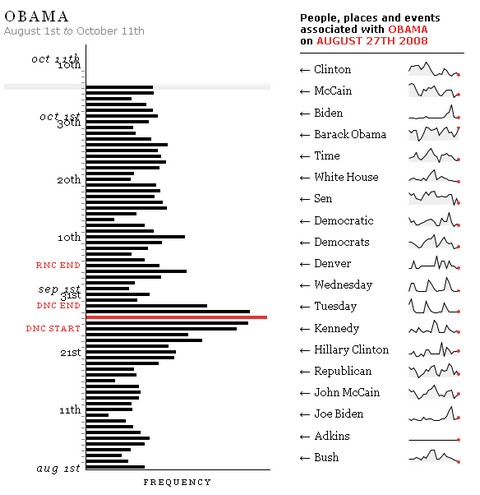
How many articles are referring to Obama and McCain

Donations Made to Political Candidates

Donations received by each candidate. The blue semi-circles in the center describe the size of the overall donations by both Obama and McCain. The lines indicate the amount of donation made.

Anatomy of Speech – Barack Obama’s Acceptance Speech at DNC
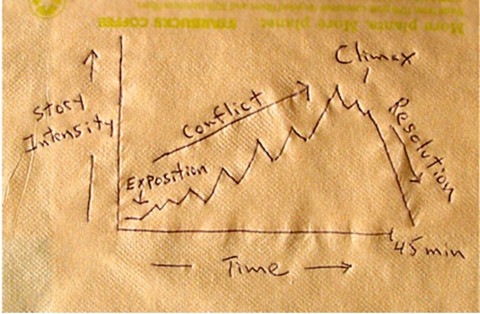
Presentation Zen takes a look at Obama’s acceptance speech at DNC and compares it with a symphony.

Wordtree – Obama Speaks at DNC

Obama’s speech, the word “WE” in a word tree.

Sarah Palin in VP Debates – Wordle Tag Cloud

Look at what Palin spoke in the VP debates recently, in a word cloud. More Wordle clouds : McCain, Obama @ DNC, Obama vs. King – the speeches I have a Dream vs. More Perfect Union

Marginal Taxes – Obama vs. McCain

How each candidates taxation policies effects the marginal taxes.

Campaign Finances – Breakup

Break up of campaign finance information by NY Times.

Tax Plans – McCain vs. Obama

How the tax plans of Obama and McCain are going to impact you?

Campaign Finances – Breakup

Campaign finances information visualization by BBC

Ad Spending

This info-graphic shows which candidate is spending how much in each state in advertising. Looks like Obama beat McCain hands down in most states as far as ad spending is concerned.

Candidate Visits to Each State

This visualization by CNN shows us how many times each candidate has visited each of the 50 states since the campaign has began. You can see that swing states have attracted unusually large amounts visits compared pre-decided states.

Issues and Agendas, What is their Stance?

This stacked chart shows how much each candidate has given preference to the various issues like health care, taxation etc.

Visualizations on 2008 US Presidential Elections – Projections & Polls

Vote Prediction Tracker – US Electoral College

Intrade – 2008 Electoral Projections

2008 Election Projections

Pollster – View & Analyze Polls

Perspctv – another Election Tracking Site

Presidential Watch – what various websites are saying

The Economist’s pole – Economists prefer Obama over McCain

NYTimes – Poll Tracker

Gallup poll tracker…

Google Maps Projections Tracker

Cartogram of Projections

Primaries & Caucuses

Who names who – Debates leading to Iowa Caucuses

This interactive visualization takes a look at the speeches made during primaries and caucuses and tells us who is naming who.

How they voted in primaries ? – Clinton vs. Obama

This brilliant visualization provides very good analysis of how people voted in democratic primaries.

Visualizations on Trivia & Fun Facts

The Measure of a President – NY Times

The height and weight of presidential candidates since the 1896.

Obama vs. McCain – Google Search Insights

Who is searched more? Obama or McCain, now you can find it with Google Search Insights

Compare Political Quotes – Google Labs

Compare quotations made by candidates on various issues.

Red vs. Blue – Popularity of Books – Amazon

Amazon plots their book sales data to show which states are reading what wrt. political orientation.

Presidential Demographics

This interactive chart shows the life of each president and when he became the White house inhabitant. A fun way to look at who got the opportunity very early and who waited long.

Amazon Halloween Mask Sales – Obama vs. McCain

Can Halloween mask sales predict who is going to be next president. Amazon has built a meter for us to track who is selling more masks – Obama or McCain. Looks like Obama is leading here.

Party Head Quarters

Want to findout more about party head quarters in each city / state? This google maps application is perfect for trivia mongers.

Visualizations on Other Politics

who voted No to the $ 700 Bn Bailout Plan

The NY Times interactive graphic tells the story behind the initial NO vote for the $ 700 Bn bailout package.

How republican and democratic senators voted in 2007

Another look at how both republicans and democrats voted in 2007, you can see why McCain calls him self a maverick. He is the only one not connected to the republican network.

National Debt by Political Party

This graph shows US National Debt by in years since 1975. The bars are colored based on the ruling political party at that time.

Bonus Visualizations – For Fun

Palinworld – New Yorker coverpage

A humorous take by New Yorker on how Palin Sees the world form her home

What your vote helps determine – PHD Comics

PHD Comics takes a look at the irony of what each vote determines.

So which one(s) do you like better?

Facebook
Twitter
LinkedIn

Share this tip with your colleagues

Excel and Power BI tips - Chandoo.org Newsletter

Get FREE Excel + Power BI Tips

Simple, fun and useful emails, once per week.

Learn & be awesome.

Welcome to Chandoo.org

Thank you so much for visiting. My aim is to make you awesome in Excel & Power BI. I do this by sharing videos, tips, examples and downloads on this website. There are more than 1,000 pages with all things Excel, Power BI, Dashboards & VBA here. Go ahead and spend few minutes to be AWESOME.

Read my storyFREE Excel tips book

Overall I learned a lot and I thought you did a great job of explaining how to do things. This will definitely elevate my reporting in the future.
Rebekah S
Reporting Analyst
Excel formula list - 100+ examples and howto guide for you

From simple to complex, there is a formula for every occasion. Check out the list now.

Calendars, invoices, trackers and much more. All free, fun and fantastic.

Advanced Pivot Table tricks

Power Query, Data model, DAX, Filters, Slicers, Conditional formats and beautiful charts. It's all here.

Still on fence about Power BI? In this getting started guide, learn what is Power BI, how to get it and how to create your first report from scratch.

20 Responses to “Simulating Dice throws – the correct way to do it in excel”

  1. alpha bravo says:

    You have an interesting point, but the bell curve theory is nonsense. Certainly it is not what you would want, even if it were true.

  2. Karl says:

    Alpha Bravo - Although not a distribution curve in the strict sense, is does reflect the actual results of throwing two physical dice.

    And reflects the following . .
    There is 1 way of throwing a total of 2
    There are 2 ways of throwing a total of 3
    There are 3 ways of throwing a total of 4
    There are 4 ways of throwing a total of 5
    There are 5 ways of throwing a total of 6
    There are 6 ways of throwing a total of 7
    There are 5 ways of throwing a total of 8
    There are 4 ways of throwing a total of 9
    There are 3 ways of throwing a total of 10
    There are 2 ways of throwing a total of 11
    There is 1 way of throwing a total of 12

  3. Chandoo says:

    @alpha bravo ... welcome... 🙂

    either your comment or your dice is loaded 😉

    I am afraid the distribution shown in the right graph is what you get when you throw a pair of dice in real world. As Karl already explained, it is not random behavior you see when you try to combine 2 random events (individual dice throws), but more of order due to how things work.

    @Karl, thanks 🙂

  4. Jon Peltier says:

    When simulating a coin toss, the ROUND function you used is appropriate. However, your die simulation formula should use INT instead of ROUND:

    =INT(RAND()*6)+1

    Otherwise, the rounding causes half of each number's predictions to be applied to the next higher number. Also, you'd get a count for 7, which isn't possible in a die.

    To illustrate, I set up 1200 trials of each formula in a worksheet and counted the results. The image here shows the table and a histogram of results:

    http://peltiertech.com/WordPress/wp-content/img200808/RandonDieTrials.png

  5. Chandoo says:

    @Jon: thanks for pointing this out. You are absolutely right. INT() is what I should I have used instead of ROUND() as it reduces the possibility of having either 1 or 6 by almost half that of having other numbers.

    this is such a good thing to learn, helps me a lot in my future simulations.

    Btw, the actual graphs I have shown were plotted based on randbetween() and not from rand()*6, so they still hold good.

    Updating the post to include your comments as it helps everyone to know this.

  6. Jon Peltier says:

    By the way, the distribution is not a Gaussian distribution, as Karl points out. However, when you add the simulations of many dice together (i.e., ten throws), the overall results will approximate a Gaussian distribution. If my feeble memory serves me, this is the Central Limit Theorem.

  7. Chandoo says:

    @Jon, that is right, you have to nearly throw infinite number of dice and add their face counts to get a perfect bell curve or Gaussian distribution, but as the central limit theorem suggests, our curve should roughly look like a bell curve... 🙂

  8. [...] posts on games & excel that you may enjoy: Simulating Dice throws in Excel Generate and Print Bingo / Housie tickets using this excel Understanding Monopoly Board [...]

  9. YourFifthGradeMathsTeacher says:

    I'm afraid to say that this is a badly stated and ambiguous post, which is likely to cause errors and misunderstanding.
    Aside from the initial use of round() instead of int(),.. (you've since corrected), you made several crucial mistakes by not accurately and unambiguously stating the details.

    Firstly, you said:
    "this little function generates a random fraction between 0 and 1"
    Correctly stated this should be:
    "this little function generates a random fraction F where 0 <= F < 1".

    Secondly, I guess because you were a little fuzzy about the exact range of values returned by rand(), you have then been just as ambiguous in stating:
    "I usually write int(rand()*12)+1 if I need a random number between 0 to 12".
    (that implies 13 integers, not 12)

    Your formula, does not return 13 integers between 0 to 12.
    It returns 12 integers between 1 and 12 (inclusive).
    -- As rand() returns a random fraction F where 0 <= F < 1, you can obviously can only get integers between 1 and 12 (inclusive) from your formula as stated above, but clearly not zero.

    If you had said either:
    "I usually write int(rand()*12) if I need a random number between 0 to 11 (inclusive)",
    or:
    "I usually write int(rand()*12)+1 if I need a random number between 1 to 12 (inclusive)"
    then you would have been correct.

    Unfortunately, you FAIL! -- repeat 5th grade please!

    Your Fifth Grade Maths Teacher

  10. Justin says:

    Idk if I'm on the right forum for this or how soon one can reply, but I'm working on a test using Excel and I have a table set up to get all my answers from BUT I need to generate 10,000 answers from this one table. Every time, I try to do this I get 10,000 duplicate answers. I know there has to be some simple command I have left out or not used at all, any help would be extremely helpful! (And I already have the dice figured out lol)

    Roll 4Dice with 20Sides (4D20) if the total < 20 add the sum of a rerolled 2D20. What is the average total over 10,000 turns? (Short and sweet)

    Like I said when I try to simulate 10,000turns I just get "67" 10,000times -_- help please! 😀

  11. Hui... says:

    @Justin

    This is a good example to use for basic simulation

    have a look at the file I have posted at:
    https://rapidshare.com/files/1257689536/4_Dice.xlsx

    It uses a variable size dice which you set
    Has 4 Dice
    Throws them 10,000 times
    If Total per roll < 20 uses the sum of 2 extra dice Adds up the scores Averages the results You can read more about how it was constructed by reading this post: http://chandoo.org/wp/2010/05/06/data-tables-monte-carlo-simulations-in-excel-a-comprehensive-guide/

  12. SpreadSheetNinja says:

    Oh derp, i fell for this trap too, thinking i was makeing a good dice roll simulation.. instead of just got an average of everything 😛

    Noteably This dice trow simulate page is kinda important, as most roleplay dice games were hard.. i mean, a crit failure or crit hit (rolling double 1's or double 6's) in a a game for example dungeons and dragons, if you dont do the roll each induvidual dice, then theres a higher chance of scoreing a crit hit or a crit failure on attacking..

  13. Freswinn says:

    I've been working on this for awhile. So here's a few issues I've come across and solved.

    #1. round() does work, but you add 0.5 as the constant, not 1.

    trunc() and int() give you the same distributions as round() when you use the constant 1, so among the three functions they are all equally fair as long as you remember what you're doing when you use one rather than the other. I've proven it with a rough mathematical proof -- I say rough only because I'm not a proper mathematician.

    In short, depending on the function (s is the number of sides, and R stands in for RAND() ):

    round(f), where f = sR + 0.5
    trunc(f), where f = sR + 1
    int(f), where f = sR + 1

    will all give you the same distribution, meaning that between the three functions they are fair and none favors something more than the others. However...

    #2. None of the above gets you around the uneven distribution of possible outcomes of primes not found in the factorization of the base being used (base-10, since we're using decimal; and the prime factorization of 10 is 2 and 5).

    With a 10-sided die, where your equation would be
    =ROUND(6*RAND()+0.5)
    Your distribution of possible values is even across all ten possibilities.
    However, if you use the most basic die, a 6-sided die, the distributions favor some rolls over others. Let's assume your random number can only generate down to the thousandths (0.000 ? R ? 0.999). The distribution of possible outcomes of your function are:
    1: 167
    2: 167
    3: 166
    4: 167
    5: 167
    6: 166

    So 4 and 6 are always under-represented in the distribution by 1 less than their compatriots. This is true no matter how many decimals you allow, though the distribution gets closer and closer to equal the further towards infinite decimal places you go.
    This carries over to all die whose numbers of sides do not factor down to a prime factorization of some exponential values of 2 and 5.

    So, then, how can we fix this one, tiny issue in a practical manner that doesn't make our heads hurt or put unnecessary strain on the computer?

  14. Freswinn says:

    Real quick addendum to the above:
    Obviously when I put the equation after the example of the 10-sided die, I meant to put a 10*RAND() instead of a 6*RAND(). Oops!

    Also, where I have 0.000 ? R ? 0.999, the ?'s are supposed to be less-than-or-equal-to signs but the comments didn't like that. Oh well.

  15. Andrew says:

    How do you keep adding up the total? I would like to have a cell which keeps adding up the total sum of the two dices, even after a new number is generated in the cells when you refresh or generate new numbers.

  16. kk says:

    So, how do you simulate rolling 12 dice? Do you write int(rand()*6) 12 times?

    Is there a simpler way of simulating n dice in Excel?

  17. Mohammed Ali says:

    I've run this code in VBA

    Sub generate()
    Application.ScreenUpdating = False
    Application.Calculation = False
    Dim app, i As Long
    Set app = Application.WorksheetFunction

    For i = 3 To 10002
    Cells(i, 3).Value = i - 2
    Cells(i, 4).Value = app.RandBetween(2, 12)
    Cells(i, 5).Value = app.RandBetween(1, 6) + app.RandBetween(1, 6)
    Next
    Application.ScreenUpdating = True
    Application.Calculation = True
    End Sub

    But I get the same distribution for both columns 4 and 5
    Why ?

Leave a Reply