

 Wow… I am very excited to announce that our little blog has breached the 10,000 RSS Subscriber mark. Our community has a total of 10,171 members as of yesterday.
To celebrate this milestone, I am opening another contest on this blog. Read on to know the details:
What is the contest:
Your mission, if you choose to accept it, is to design a tracker for personal expenses. Some of the glorified objectives of the mission are,
- Ability to track expenses under various heads (rent, food, entertainment etc.)
- Ability to track expenses at granular level (by day or week)
- Capability explore spending habits and trends thru graphs
- Should have an option to do earning vs. spending analysis
- Optionally, can track spending by account (savings, current, credit card 1, credit card 2 etc.)
- Bonus karma points if you can make the tracker look awesome!
What is the booty?
All the entries will be posted on Chandoo.org and a readers poll will be conducted. The winner (entry with maximum votes) will get,
wait for it,
Toshiba Mini 300 Series Netbook
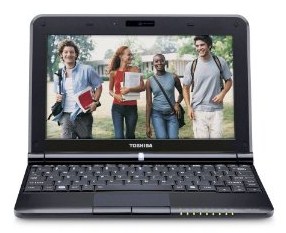
That is right. A Netbook. (find out more about the exact model and specs here
Contest Rules & Fine Print:
- No Email: Last time, when I did the sales dashboard contest, I got a ton of emails with entries. It took me countless hours to sort thru the email and get the files. While, I love your emails, I think email is not the format for something like this. So, No emails this time.
- Instead upload your entry and share URL: Simple. Upload your expense tracker to a website like skydrive. Copy the url and paste it in comments of this post. Add some details like what your tracker does. If possible, take some screenshots of your tracker and save them as images. Now upload these images too and post the URLs too.
- No protected files, no macros, no add-ins: Keep your tracker simple and to the point. Try to be innovative by providing options to explore spending trends, comparison options and more instead.
- Try to get your file work in Excel 2003 (no penalty if it doesn’t)
- Winner will be chosen by a poll conducted on this blog.
- You agree that your entry can be freely shared on this blog (as well as used by me in future for a post / training).
- The netbook will be mailed to countries where Amazon can mail it. If you are in a country where Amazon cannot mail this, I will send you equal amount in dollars thru PayPal so that you can purchase anything you want.
- Contest is open from 3rd, June 2010 to 20th June 2010 – both days inclusive.
Request for Sponsors:
If you would like to sponsor this contest, please write to me at chandoo.d @ gmail.com. You will get promotion thru-out contest pages and a link back to your website / product.
Congratulations once again for being part of our little community here. I am really thankful to you for the inspiration you give me. Thank you.


20 Responses
Hello Chandoo,
Nice contest, I’ll probably participate to this one.
Can the workbook be in local languages or in english only (not sure I can translate all categories in that language) ?
Regards.
@Cyril.. good question. Few more rules to be added:
(1) files should be in english (just so that most of our readers can enjoy them). However, the formulas can be in your localized excel version. If your entry wins the contest, I will translate it to English.
(2) you can use excel or any other spreadsheet software (google docs, zoho etc.) to make it. But you must follow all the rules above.
10,000 subscribers. Wow – Another milestone achieved. Congratulations!
Congrats – I’m going to write a blog entry on creating dashboards in Excel that work with different versions of Excel – maybe that could be useful for some of your contestants.
It’s a good idea in times of economic crisis, that we have to pull our belt tight, expecially for all of us that loss our job and have to cut drastically expenses because of a serious lack of money.
Personaly, I’m using my own tracker for personal expenses for many years but it is an old worksheet and now, with the excuse of your contest, I can revitalize it.
Congratulations for the round number 10.000!
Worth Applause Achievement !!!
Cheers Chandoo
And yeah soon I’ll be sending my version of personal tracker 🙂
I’m even going to send in an entry I think. Ummm, I’m sumproduct stupid, so I’m going to do it with sumifs. Good thing there’s no penalty:)
how sending my expense tracker?
Am I the only one interested in this challenge?
Chandoo, I just uploaded my own expense tracker and saved into my skydrive here:
http://cid-6b219f16da7128e3.office.live.com/view.aspx/.Public/pedrowavetracker.xls
Details like what my tracker does are in the Intro first sheet and I want bonus karma points because is a Multiyear Tracker.
Miguel, if are you interested leave a comment like mine as soon as possible because the last day is 20th June 2010.
Good luck to all excelent participants!!!
I have made my version in OpenOffice.org, just to find out how much I could do with it. Only real problem I ran into is that they don’t support dynamic charts (no named ranges allowed as chart data range).
Trying to convert it to Excel afterwards does give problems: the sumproducts in OOo do not require the ‘–‘-construction to convert true/false arrays (but I included them now) and the form elements and charts do not come across as desired. Fixing the latter two was going to be a lot of work, so I decided not to.
My workbook (in odf-format) is available here: http://tinyurl.com/3ymlb8z
A screenshot (in pdf) is available here: http://tinyurl.com/35pqvga
You can summarize data by day, week, month or year, choose which period you want to see and if you want normal or cumulative amounts.
I just completed mine minutes ago…
http://cid-c286ee1898539cea.office.live.com/self.aspx/New%20folder/Expenses%20tracker-^5Final^6.xls
– No macros.
– 2003 ok.
corrected link:
http://cid-c286ee1898539cea.office.live.com/self.aspx/New%20folder/Expenses-tracker-prsnl.xls
sorry..
Hi Chandoo,
I uploaded my “Personal Expense Tracker” and screenshots.
Link:
https://cid-1f3240ec5ade1405.office.live.com/self.aspx/.Documents/20100620%20Personal%20Expense%20Tracker%20v1.0.xls
https://cid-1f3240ec5ade1405.office.live.com/browse.aspx/.Documents
https://cid-1f3240ec5ade1405.office.live.com/self.aspx/.Documents/reports.png
or:
http://cid-1f3240ec5ade1405.office.live.com/self.aspx/.Public/20100620%20Personal%20Expense%20Tracker%20v1.0.xls
Hi Chandoo,
Phew… finally got some time to update the expense tracker that I was maintaining.
There are 2 fies uploaded per instruction on http://tinyurl.com/2vn8pwr
1. The “Personal expense tracker_Screenshot” contains the screenshot of the files
2. The “Personal Expense tracker_data” is the expense tracker with some dummy data.
May the best tracker win 🙂
Let me know if you have any issues in accessing the file.
Regards,
Karthik
Hi Chandoo
Talk about last minute…… Here’s my planner, though I’m missing some key bits of data validation and I wanted to do more ‘sexy’ graphs.
Notes:
– Only for 2007 I’m afraid as I don’t have a copy of 2003 to validate it, in theory it will work in 2003 but it may look odd.
– I also ran out of time to test thoroughly, no excuse for the competition but I’ll aim to fix anything anybody finds asap.
– What I did manage to cram inside was multi-person, multi-currency and user defined categories (Tags) with a dasboard that caters to these.
http://cid-6475bf2cc03ebe74.office.live.com/view.aspx/.Documents/Budget%20^0%20Expense%20Planner%20v1.xlsx
Anyway, hope everybody had fun building their trackers….
Keep up the good work…
All the best!
Bigtaff
Now I know why people used TinyURL…
http://tinyurl.com/2uba9h5
Let me know if there are anymore problems….
As an extra contribution related to personal expenses, without spirit of the contest, today I speak in my blog on How to Share Expenses in the Clouds with Windows Live, Google docs and Zoho Sheet:
http://pedrowave.blogspot.com/2010/06/how-to-share-expenses-in-clouds.html
Hope you like and share with us your spreadsheets on the cloud as I do!
Hey Chandoo,
Any chance on extending that deadline like you’ve done with previous contests??
Regards