

So how did your weekend go?
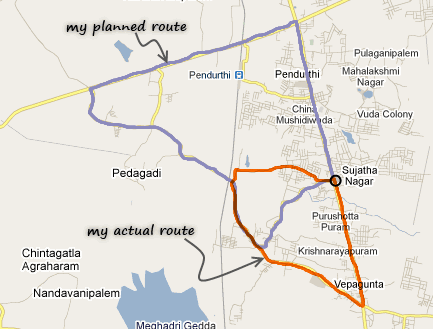 Recently I bought a bicycle. Naturally, outdoor biking has become my primary fitness activity now. So, I went to Google Maps on Sunday morning and found a nice route of 14 kilometers. So I set out on my bike.
Barely a kilometer on that route, I found myself at a cul-de-sac. So I asked a passer by how do I get to “Rampuram“, the place where my route would merge with a state high-way. He vaguely pointed to the left and told me to go right. And right I went, thru what I can call as a walking trial (and what Google tells me as a major road). After biking for a few more minutes, I ended up at an over bridge. And this is where I trusted my gut and took left. And I kept riding on a steep road. I saw 1-2 villages whose names I did not recognize. So I told myself, yeah, this must be the right route. And then, I came to an intersection that looked very familiar. And guess what?, I took a wrong turn and I ended up doing a shorter route. I rode back on the highway to home as it was getting too hot and too late.
But then the weekend ended on a brighter note as we watched a couple of good movies and played with kids.
How was your weekend?
Why did you tell me about the biking story?
Today, we have no excel post. Instead, I am going to ask you to fill-up a survey. And I realized, people always help whenever I lost my way. So…, 😛
Are you interested in online VBA Classes?
Many of you have emailed and asked me, “Chandoo, can you help us learn VBA too? Just like you do with Excel.”
 Well, as flattering as those requests were, the fact is, I was lousy at VBA. Well, I used to be very good at Visual Basic, back in the college days. But my programming skills have rusted over the years as I did very little coding. I guess, I have become a business-guy. So it took me time to re-learn VBA. And now, I am happy to announce that We are ready to start our very first batch of VBA Class.
We even have an awesome domain for the classes – VBAClasses.com. (Dont go there yet, it is still blank.)
But, before we start, I need some help from you. I want to know what is it that you want to learn, so that we can design the course curriculum & methodology around your needs.
So please take a few minutes and complete this survey:
(If you cannot see the survey, click here).
Thank you very much.
Thank you so much for your time. I promise that next time, I will tell a more exciting biking story. May be I will find a unicorn or double rainbow. Or, I can just throw in a VBA tip to make it worthwhile.


6 Responses
Very exciting! I hope this turns into as valuable a resource as the Excel content.
I must recommend “My Tracks”!
My Tracks is an application for your AndroidTM phone that enables you to record GPS tracks and view live statistics – such as time, speed, distance, and elevation – while hiking, biking, running or participating in other outdoor activities. Once recorded, you can share your tracks, upload them to Google Spreadsheets and visualize them on Google My Maps.
http://mytracks.appspot.com/
I cant see the survey as online spreadsheets are blocked on my system.
I would like to learn first basic coding of macro’s & then moving to expert level how to exploit macro for own use.
I do VBA coding, what facinates me is VBA for Google Docs Spreadsheet ..any idea where can i get more info on this? not sure..may be this would help people in cloud computing era..
My brother recommended I might like this blog. He was totally right. This submit truly made my day. You can not consider simply how so much time I had spent for this info! Thanks!