


Here is a very quick, very short excel tip. Add the “select objects” tool to Quick Access Toolbar.
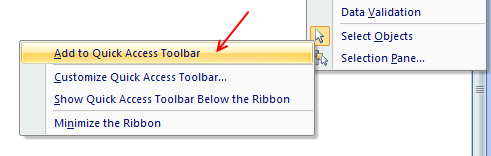
In excel 2003 and earlier, this button is available in the bottom left corner (on the drawing toolbar) so that whenever you are working with charts or drawing shapes, you could easily select multiple objects and drag, align, format them. But in Excel 2007 the tool bars have vanished and “Select Objects” tool was moved to a sub-menu inside home ribbon. Going there everytime you need to format a bunch of objects is a huge waste of time. Instead, you can save time by adding this tool to Quick Access Toolbar like this:
Related: Quick Access Toolbar Customization tips & tweaks | More Quick Excel Tips
What tools you have in Quick Access Toolbar? Share your QAT tips & tricks using comments


13 Responses
Thanks Chandoo – I needed that yesterday, do you think I could find it – I’ve now added it to my toolbar!
This is another reason why people should not switch to Excel 2007. Chandoo, can you name 10 reasons that prove 2007 is better than 2003?
I’ve been very happy with my 2003 so far.
Your readers might also like a previous article of yours:
http://chandoo.org/wp/2009/10/19/excel-2003-toolbar-in-2007/
You can customize the QAT to look just like Excel 2003’s menus.
Definitely worth having it at a click.
@ALL: What are the most common buttons added to the QAT. Seeing Chandoo’s image of the QAT, he surely does have a few.
Hi Chandoo,
I recently added this to quick access toolbar.
I wanted to remove objects that got copied along with web page data.
Thanks for the tip.
However, doesn’t Ctrl + Click do the same thing?
I always add Set Print Area, Print Preview, Print, Paste Values, Paste Formulas
I also add in a couple of custom buttons on there for a format macro and a loop macro that I use regularly
Wrong way of doing it. Heres the right way 🙂
http://i41.tinypic.com/24dg77c.jpg
I add Switch Windows if I don’t show all in the task bar.
Looks like you like playing with Autoshapes Chandoo. Me too 🙂
@Serhat: I found excel 2007 quite ok. Infact on the rare occasions when I work with 2003 I find it a bit rustic and old (although very fast). I think most of it is in the mind.
@Ninad and Andrew, yes, I use autoshapes and alignment tools alot to keep my dashboards crisp and elegant.
@Joseph: Yes, ctrl+click does the same, but it is a bit painful to use that as we have to hold down ctrl and move around. click, drag is much more intuitive and simple.
Note: Just to make this even more annoying the select object option does not select some type of objects (e.g. checkboxes added to the worksheet via a paste from html content) like excel 2003- did. It seems to have two types of objects now! You will need to enable design mode first to get to these “other objects”, then use the select object tool (isn’t this now making things more difficult for the user, as they don’t care what type of object it is, they just want to select it!) My advice is to add the Design mode icon to your Quick Launch toolbar also (so you can toggle it on and off). I hope this helps someone else, cause it stuffed me around for a while.