

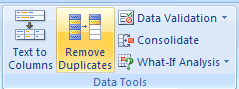
 It is very surprising that so many of us are still not aware of this extremely powerful tool in Excel 2007. Just with a click of the button, you can remove all the duplicate values from a list / table. To remove duplicates,
- Just select the list of values from which you want to remove duplicates
- Go to Data ribbon
- Hit the Remove Duplicates button
- Bingo…
Here is the 15 second video tutorial I have prepared on understanding this feature.
Click here to watch on youtube.
PS: 15 second tutorials idea inspired from google tutorials.
PPS: Learn more quick tips, they make you blazing fast.


5 Responses
@Excel Training: You are welcome.
Hello Chandoo,
I’ve just found another tip which is powerful in 2007.
Go to Data / Sort and Filter area -> Advanced… /
There is a checkbox “Extract without duplicate” in the dialog.
You can extract the list wihtout duplicate in another sheet (awesome for creating reference list for data validation)
Cyril
@Cyril.. good find. Pls. note that this approach works even in 2003. (more here: http://chandoo.org/wp/2008/06/19/quickly-display-unique-items-in-an-excel-list-using-advanced-filters/ )
This works perfectly! I always come to you before consulting the Excel help. Thanks for helping us Excel want-to-be experts look great!