

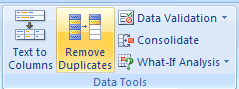
 It is very surprising that so many of us are still not aware of this extremely powerful tool in Excel 2007. Just with a click of the button, you can remove all the duplicate values from a list / table. To remove duplicates,
- Just select the list of values from which you want to remove duplicates
- Go to Data ribbon
- Hit the Remove Duplicates button
- Bingo…
Here is the 15 second video tutorial I have prepared on understanding this feature.
Click here to watch on youtube.
PS: 15 second tutorials idea inspired from google tutorials.
PPS: Learn more quick tips, they make you blazing fast.


One Response to “Loan Amortization Schedule in Excel – FREE Template”
The balance formula as given doesnt seem to work on my excel