Excel School is an Online Excel & Dashboard Training Program
Friends, readers of Chandoo.org, I am very glad to announce that Excel School – Online Excel & Dashboard Training Program is now available for your consideration. Please read this short page to understand the benefits of this program and how you can sign-up.
Click here if you want to skip the story and just get in to Excel School.
What is Excel School?
Excel School is structured and comprehensive online training program for learning Microsoft Excel. It is full of real world examples.
The aim of Excel School is to make beginners become productive and awesome in Excel. It has an optional module on Dashboards, which can teach you how to design awesome Excel Dashboards.
Why should you join Excel School?
These days, any managerial or analyst role requires that you work with data. Excel remains one of the most powerful and easy to use tools when it comes to crunching data. Learning Excel in a proper, structured way can not only help you save time, but it will also help you become better at your job and can give you time to focus on things and people that matter.
While we can argue that Excel can be learned by reading help and visiting blogs like Chandoo.org, it also takes good amount of time if you use that method.
Today, there are over 400 articles, tutorials and examples on Chandoo.org explaining almost every aspect of MS Excel. I am sure there are thousands of useful, free and fun articles on learning Excel across Internet. It would take almost 6 months if you read one article a day to master some of the core concepts of Excel. Even then you may not know some important things.
That is why I designed Excel School Program. This is a structured program with 12+1 topics. Each topic contains several videos and downloadable excel files for you to learn the concepts in detail. This is an intense, focused and clearly defined program to help you learn Excel in useful and fun way.
What Topics are Covered in Excel School?
| Excel School Topics: | |||
| Formulas | Formatting | Conditional Formatting | Basic Charting |
| Advanced Charting | Excel Tables | Pivot Tables | Data Validation, Filters |
| Advanced. Formulas | Importing External Data | Shortcuts, Productivity | Basic Form Controls, Macros |
| Optional: Excel Dashboards – 8 hours video instruction | |||
| See Detailed Course Plan & Lesson Topics. | |||
How does Excel School Work?
I have prepared a short document explaining the whole process, course contents to you. You can download it here:
Excel School Course Brochure [PDF]
What do you get when you Join Excel School?
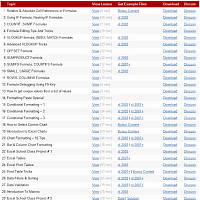
- 1,350 minutes excel lessons
Each of the 12 topics in Excel School come with several videos (for eg. we have 15 videos on Formulas) discussing various topics in-detail. There is a total of ~24 hours of video in Excel School at this moment. All these lessons are neatly structured in to a lesson plan with links to view, download and discuss. You can follow the lesson plan and boost your excel skills in a very short period of time. - 8 Hour Lessons on Excel DashboardsNEW
In this all new module (optional), you will learn how to build world-class Excel Dashboards from scratch. We will discuss dashboard design principles, best practices, see several examples, build 4 different dashboards. Also, you can download unlocked dashboard excel files and reuse them as you see fit. - 45+ example excel workbooks
Almost all the topics in Excel School include downloadable content – either excel files or ppts or pdf files. Using these files, you can easily improve your understanding and play with the concepts right-away. - 6 Month Access to Online Classroom
Online classroom is a blog-like area with secure userid and password for students. This is where you can ask questions related to lesson topics, discuss the lesson content or share your tips / ideas with other students. You can access the classroom for 180 days from date of joining. - Free Bonus – Formula Cheat-sheet
If you use Excel Formulas alot, then this cheat sheet can help you. It contains the syntax of most important formulas along with example uses and tricks to handle errors. - Free Bonus – List of Keyboard Shortcuts PDF
This one page PDF includes some really powerful and useful Excel Keyboard Shortcuts. - Free bonus – Chart Design E-book
In this short 24 page e-book, I explain the process you should follow to format your charts to wow your audience. It also includes guidance on colors to use. - 30 Day money back guarantee
Each Excel School membership comes with a 30 day money back guarantee. If you don’t like what you see in Excel School, just drop me an email and I will refund your money. No questions asked.
Join Excel School Now
| What you will get? |  |
|
|
| Download HD Quality Lessons |  24 Hrs. video |
32 Hrs. video |
|
| 8 Hours of Dashboard Lessons | |
||
| 3 Interviews with Dashboard Experts | |
||
| 24 Hours of Excel Lessons | |
|
|
| Example Excel Workbooks | 40 Files |
40 Files |
45 Files |
| 6 Month Access to Online Classroom | |
|
|
| Free Bonus – Formula Cheat-sheet | |
|
|
| Free Bonus – Useful Shortcuts PDF | |
|
|
| Free bonus – Chart Design E-book | |
|
|
| 30 Day Money Back Guarantee | |
|
|
|
|
|

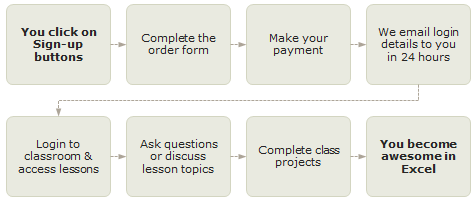
How the Purchase Process Works?
Frequently Asked Questions
I have answered 3 most frequently asked questions here:
- What payment methods are accepted?
You can pay by credit card (VISA, Master etc.), Debit card, Net banking, bank transfer, check or cash deposit. To pay by Check or bank transfer, just send an email to Chandoo.org @ gmail.com for instructions. - What version of Excel is used in Excel School?
We use Excel 2010 & 2007 in this program. Excel School works great if you are running Excel 2010 or 2007. If you are running Excel 2003, you can still benefit from a majority of lessons except the ones focusing on latest Excel features like Tables, Sparklines, Improved Conditional Formatting. - Can I upgrade later?
Yes, you can upgrade by paying fee difference + Rs. 200 processing charges anytime after joining. Write to chandoo.org@gmail.com for help.
Please check out Excel School FAQ page for more.
Problems During Signup?
If you have any problem during signup process or still have some un-answered questions, write to me at chandoo.org @ gmail.com or call me at +91 814 262 1090. I will be very glad to answer your questions.
I hope to see you in Excel School.
Microsoft and the Office logo are trademarks or registered trademarks of Microsoft Corporation in the United States and/or other countries.
About Your Teacher – Chandoo:

Welcome to Excel School.
At Chandoo,org, I have one goal – “to make you awesome in Excel”. I have started writing about Excel in year 2007. To date, I have authored more than 450 tutorials, articles and how-to guides and trained 3,000 students and made them awesome in Excel. I have received prestigious MVP award from Microsoft in years 2009, 2010, 2011 & 2012.
I hope to see you in Excel School.
Links & Downloads
| Excel School Main Page |
| Excel School FAQs |
| Testimonials from Past Students |
| Excel School Demo |
| Excel School Brochure [PDF] |
| FREE Excel School Newsletter |
| Detailed Lesson Plan of Excel School |
Which Version of Excel?
Excel School works in Excel 2010, Excel 2007. A majority of Excel School files will open and work the same in Excel 2003 too.
Testimonials from Past Students
I can view the lessons at my own leisure. They are very clear and easy to understand. Completely packed with information that it is almost overload.
I was very surprised that even in the lessons that went over Excel functions that I use every day, there were tidbits of info that I didn’t know about but found very useful. The shortcuts, tips and tricks are so important to anyone who depends on excel to do all/part of their job.
– Monique Ballard
It was so easy to be able to understand the methods. Being able to start and pause the video whilst working alongside on a second screen is my preferred method of learning. Most of the downloads can be adapted to my job and suddenly I have, in the eyes of my boss, become an excel expert. cannot think of a better or more efficient method of learning excel. I could never had learned this much from books.
Thank you Purna
– Terry Price
The Best thing about the school is, its really simple, easy to understand and loads of fun
– Rajatha Rao
Good examples, very open and responsive teacher, overall very positive experience
– Greg
I can take the classes whenever I have time, the lessons are easy to follow, all of the information is extremely helpful, I can use what I learn immediately
– Allison
Your sense of humor, kindness and enthusiasm for Excel are fantastic. The numerous shortcuts that you teach are invaluable.
– Mary Scott
First, the quality of the lessons, but the delivery via the easy of download and ability to go at your own pace is HUGE! That and having access to all the example files to review is invaluable. I get my most benefit from first reviewing the lesson but then “reverse engineering” the sample files. Well Done!
– Gaston Wilson