Jagdev Singh
Active Member
Hi Experts
Please let me know, how to deal with this situation.
I have reference numbers in column A, Each number’s last 5 digit vary and rest of the above number is similar
Ex
18236A14000003BCD2
18236A14000004BCD2
The numbers before “03BCD2” and “04BCD2” are of same entry. What I want I have 3 columns next to these numbers where I have to use the Letter “Y” to indicate they belong to same entry.
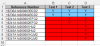
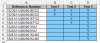
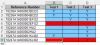
Is it possible if we consider the above example in the attached sample file, they are the first 2 entries. If I add “Y” for “18236A14000003BCD2” in all three columns and missed adding “Y” in the second entry “18236A14000004BCD2” in any one column, it should throw me a pop stating that I missed adding “Y” in the cell.
Regards,
JD
Please let me know, how to deal with this situation.
I have reference numbers in column A, Each number’s last 5 digit vary and rest of the above number is similar
Ex
18236A14000003BCD2
18236A14000004BCD2
The numbers before “03BCD2” and “04BCD2” are of same entry. What I want I have 3 columns next to these numbers where I have to use the Letter “Y” to indicate they belong to same entry.
Is it possible if we consider the above example in the attached sample file, they are the first 2 entries. If I add “Y” for “18236A14000003BCD2” in all three columns and missed adding “Y” in the second entry “18236A14000004BCD2” in any one column, it should throw me a pop stating that I missed adding “Y” in the cell.
Regards,
JD