
You are using an out of date browser. It may not display this or other websites correctly.
You should upgrade or use an alternative browser.
You should upgrade or use an alternative browser.
Table range
- Thread starter Pierre
- Start date

NARAYANK991
Excel Ninja
Hi Pierre ,
Certainly ; why not ?
Excel will alert you to the fact that the formula is inconsistent with the other formulae in the column , assuming you have checked this error-checking option , but there is no reason why you cannot do it.
Narayan
Certainly ; why not ?
Excel will alert you to the fact that the formula is inconsistent with the other formulae in the column , assuming you have checked this error-checking option , but there is no reason why you cannot do it.
Narayan

@Hui: I just want the same formula in the last row as in all other rows.
I'm not sure if I was very clear: I would like to know if it is possible to make the range of table (and by that I specially mean where the last row of the table is) by incorporating a formula in the "resize table")
In my example it would mean replace the "14" (=value of the last row) by a formula refering to the value which is in I2.
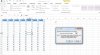
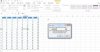
I half-succeded when entering =Indirect("$A$1:$G$"&$I$2) in the resize table window, however as soon as the table is updated, the formula disappear and the range comes back to =$A$1:$G$20 (see the print screen "before" and "after")
I'm not sure if I was very clear: I would like to know if it is possible to make the range of table (and by that I specially mean where the last row of the table is) by incorporating a formula in the "resize table")
In my example it would mean replace the "14" (=value of the last row) by a formula refering to the value which is in I2.
I half-succeded when entering =Indirect("$A$1:$G$"&$I$2) in the resize table window, however as soon as the table is updated, the formula disappear and the range comes back to =$A$1:$G$20 (see the print screen "before" and "after")
Attachments
NARAYANK991
Excel Ninja
Hi Pierre ,
What is the reason to use a formula to resize a table ? The whole raison d'etre for a table is that it automatically resizes as you add data.
Narayan
What is the reason to use a formula to resize a table ? The whole raison d'etre for a table is that it automatically resizes as you add data.
Narayan
Hello Narayan,
The reason is that I have a table with formulas taking information from a matrix (monthly financial review) in an other sheet. My table transform the matrix information into a database style. I would like the table to add automatically rows as new data (=a new month) are entered in the matrix (the cell I2 in my example would detect the number of month with information and tell how many rows long the table should be). Hope my explanation is clear
The reason is that I have a table with formulas taking information from a matrix (monthly financial review) in an other sheet. My table transform the matrix information into a database style. I would like the table to add automatically rows as new data (=a new month) are entered in the matrix (the cell I2 in my example would detect the number of month with information and tell how many rows long the table should be). Hope my explanation is clear
NARAYANK991
Excel Ninja
Hi Pierre ,
I don't think what you want done can be done using formulae ; using VBA it can be done.
Narayan
I don't think what you want done can be done using formulae ; using VBA it can be done.
Narayan