Stephan
Member
Hello. 2 issues with Visual Basic Macros, ultimately what I'm trying to do with existing code/sheet/book is to:
Copy WorkSheet into another WorkBook, to include VB Code, & for Assigned Macros to look in the Existing Open WorkBook.
Hence not to automatically link to previous WorkBook.
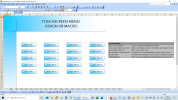
ATTACHED WORKBOOK, no there is nothing wrong with it in 1st place! But how to edit so FUTURE "START" copies don't need MOD COPY + OBJECT RE-ASSIGN!
Yes I know how to copy Module code, & edit re-assign Macros will achieve same thing, but is annoying messing about.
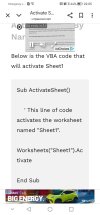
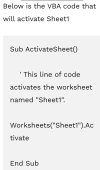
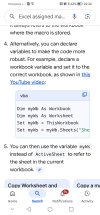
Googling this issue, possibly Activate Sheet VB code will work with assigned macros of open WorkBook?
If to be believed, none attached with working workbook! CODE extract, scarce details of where it goes, & will this do what u want, or sumt entirely "Different" etc.
Also perhaps what I'm asking isn't really feasible/possible, just with lots of vague info on internet imply u can, or u don't know what to edit right etc.
Well, not seen a working example yet! Also yes I can re-Create, but it is time consuming, & overtime, this possibly (probably!) can be avoided, bewildering it is.
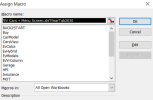
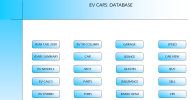
Issue1. Assigned Macros in Text Objects (Graphics with editable Text) of Copied Sheet, aren't Directed within Open WorkBook.
Instead annoyingly they make Reference to the original Source Workbook.
Question: Method to re-Assign Macros in Sheet Objects of copied WorkSheet, to use Existing Open Sheet?
Perhaps use ActivateSheet Code in Module to use that Open WorkBook & Sheet?
Current Solution: Re-Assign all the Text Objects to Module Code that I've already pasted in, as wasn't included in Sheet copy!
Issue2. Copied Worksheet from WorkBk1 to WorkBk2 excludes Module1 Code.
Question: Method to put same Module code (& Work!) into WorkSheet & for it to copied across?
For some reason same VB code only works in Module1, not WorkSheet, not WorkBook.
Guess right etiquette isn't well obvious, or documented in Forums.
Current Solution: copy & paste Code into Module1, of 2nd WorkBook.
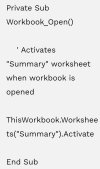
ThisWorkBook: RE-OPENS START, just in case didn't press BACK whilst browsing etc
MODULE1 CODE:
MMMM, oh right, yes. CHEERS
Copy WorkSheet into another WorkBook, to include VB Code, & for Assigned Macros to look in the Existing Open WorkBook.
Hence not to automatically link to previous WorkBook.
ATTACHED WORKBOOK, no there is nothing wrong with it in 1st place! But how to edit so FUTURE "START" copies don't need MOD COPY + OBJECT RE-ASSIGN!
Yes I know how to copy Module code, & edit re-assign Macros will achieve same thing, but is annoying messing about.
Googling this issue, possibly Activate Sheet VB code will work with assigned macros of open WorkBook?
If to be believed, none attached with working workbook! CODE extract, scarce details of where it goes, & will this do what u want, or sumt entirely "Different" etc.
Also perhaps what I'm asking isn't really feasible/possible, just with lots of vague info on internet imply u can, or u don't know what to edit right etc.
Well, not seen a working example yet! Also yes I can re-Create, but it is time consuming, & overtime, this possibly (probably!) can be avoided, bewildering it is.
Issue1. Assigned Macros in Text Objects (Graphics with editable Text) of Copied Sheet, aren't Directed within Open WorkBook.
Instead annoyingly they make Reference to the original Source Workbook.
Question: Method to re-Assign Macros in Sheet Objects of copied WorkSheet, to use Existing Open Sheet?
Perhaps use ActivateSheet Code in Module to use that Open WorkBook & Sheet?
Current Solution: Re-Assign all the Text Objects to Module Code that I've already pasted in, as wasn't included in Sheet copy!
Issue2. Copied Worksheet from WorkBk1 to WorkBk2 excludes Module1 Code.
Question: Method to put same Module code (& Work!) into WorkSheet & for it to copied across?
For some reason same VB code only works in Module1, not WorkSheet, not WorkBook.
Guess right etiquette isn't well obvious, or documented in Forums.
Current Solution: copy & paste Code into Module1, of 2nd WorkBook.
ThisWorkBook: RE-OPENS START, just in case didn't press BACK whilst browsing etc
Sheets("START").Select
End Sub
MODULE1 CODE:
Sub YearTab2030()
Sheets("2030").Select
End Sub
Sub YearsSummary()
Sheets("YR SUMMARY").Select
End Sub
Sub EvModels()
Sheets("EV MODELS").Select
End Sub
Sub EvCalcs()
Sheets("EV CALCS").Select
End Sub
Sub EvHybrid()
Sheets("EV HYBRID").Select
End Sub
Sub EvYrColumn()
Sheets("EV YR COLUMN").Select
End Sub
Sub CarModel()
Sheets("Car").Select
End Sub
Sub MOT()
Sheets("MOT").Select
End Sub
Sub Parts()
Sheets("PARTS").Select
End Sub
Sub Tyres()
Sheets("Tyres").Select
End Sub
Sub Service()
Sheets("SERVICE").Select
End Sub
Sub Quotes()
Sheets("QUOTES").Select
End Sub
Sub Insurance()
Sheets("Ins").Select
End Sub
Sub RadioGen2()
Sheets("RADIO VID GEN2+").Select
End Sub
Sub Garage()
Sheets("Garage").Select
End Sub
Sub Speed()
Sheets("SPD").Select
End Sub
Sub CarsView()
Sheets("Cars View").Select
End Sub
Sub Buy()
Sheets("Buy").Select
End Sub
Sub Sell()
Sheets("Sell").Select
End Sub
Sub HPI()
Sheets("HPI").Select
End Sub
Sub BACK2START()
Sheets("START").Select
End Sub
MMMM, oh right, yes. CHEERS