• Hi All

    Please note that at the Chandoo.org Forums there is Zero Tolerance to Spam

    Post Spam and you Will Be Deleted as a User

    Hui...

  • When starting a new post, to receive a quicker and more targeted answer, Please include a sample file in the initial post.

Sheet Copy, Assigned Macros not re-pointed within, Mod Code not within existing open WorkBk

Stephan

Member
Hello. 2 issues with Visual Basic Macros, ultimately what I'm trying to do with existing code/sheet/book is to:
Copy WorkSheet into another WorkBook, to include VB Code, & for Assigned Macros to look in the Existing Open WorkBook.
Hence not to automatically link to previous WorkBook.

ATTACHED WORKBOOK, no there is nothing wrong with it in 1st place! But how to edit so FUTURE "START" copies don't need MOD COPY + OBJECT RE-ASSIGN!

Yes I know how to copy Module code, & edit re-assign Macros will achieve same thing, but is annoying messing about.
Googling this issue, possibly Activate Sheet VB code will work with assigned macros of open WorkBook?
If to be believed, none attached with working workbook! CODE extract, scarce details of where it goes, & will this do what u want, or sumt entirely "Different" etc.
Also perhaps what I'm asking isn't really feasible/possible, just with lots of vague info on internet imply u can, or u don't know what to edit right etc.
Well, not seen a working example yet! Also yes I can re-Create, but it is time consuming, & overtime, this possibly (probably!) can be avoided, bewildering it is.

Issue1. Assigned Macros in Text Objects (Graphics with editable Text) of Copied Sheet, aren't Directed within Open WorkBook.
Instead annoyingly they make Reference to the original Source Workbook.
Question: Method to re-Assign Macros in Sheet Objects of copied WorkSheet, to use Existing Open Sheet?
Perhaps use ActivateSheet Code in Module to use that Open WorkBook & Sheet?
Current Solution: Re-Assign all the Text Objects to Module Code that I've already pasted in, as wasn't included in Sheet copy!
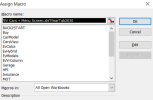
TEXTBOX RE-ASSIGN.png

Issue2. Copied Worksheet from WorkBk1 to WorkBk2 excludes Module1 Code.
Question: Method to put same Module code (& Work!) into WorkSheet & for it to copied across?
For some reason same VB code only works in Module1, not WorkSheet, not WorkBook.
Guess right etiquette isn't well obvious, or documented in Forums.
Current Solution: copy & paste Code into Module1, of 2nd WorkBook.

ThisWorkBook: RE-OPENS START, just in case didn't press BACK whilst browsing etc
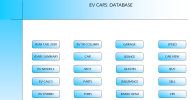
Sheets("START").Select

End Sub

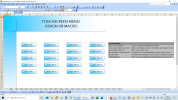
START SCREEN.png

MODULE1 CODE:
Sub YearTab2030()

Sheets("2030").Select

End Sub

Sub YearsSummary()

Sheets("YR SUMMARY").Select

End Sub
Sub EvModels()

Sheets("EV MODELS").Select

End Sub

Sub EvCalcs()

Sheets("EV CALCS").Select

End Sub

Sub EvHybrid()

Sheets("EV HYBRID").Select

End Sub

Sub EvYrColumn()

Sheets("EV YR COLUMN").Select

End Sub

Sub CarModel()

Sheets("Car").Select

End Sub

Sub MOT()

Sheets("MOT").Select

End Sub

Sub Parts()

Sheets("PARTS").Select

End Sub

Sub Tyres()

Sheets("Tyres").Select

End Sub

Sub Service()

Sheets("SERVICE").Select

End Sub

Sub Quotes()

Sheets("QUOTES").Select

End Sub

Sub Insurance()

Sheets("Ins").Select

End Sub

Sub RadioGen2()

Sheets("RADIO VID GEN2+").Select

End Sub

Sub Garage()

Sheets("Garage").Select

End Sub

Sub Speed()

Sheets("SPD").Select

End Sub

Sub CarsView()

Sheets("Cars View").Select

End Sub

Sub Buy()

Sheets("Buy").Select

End Sub

Sub Sell()

Sheets("Sell").Select

End Sub

Sub HPI()

Sheets("HPI").Select

End Sub

Sub BACK2START()

Sheets("START").Select

End Sub

MMMM, oh right, yes. CHEERS
 

Attachments

Hello, my two cents ...​
For some reason same VB code only works in Module1, not WorkSheet, not WorkBook.
So some bad code as just respecting Excel Objects Model a VBA procedure still works in particular in the worksheet module here​
when the purpose is to copy a worksheet with its relative code, so the very easy way !​
And maybe in that case no need to reallocate the procedure for each text object, I can't remember​
but you can easily try yourself manually in order to check if it's necessary or not ...​
 
Hello, my two cents ...​

So some bad code as just respecting Excel Objects Model a VBA procedure still works in particular in the worksheet module here​
when the purpose is to copy a worksheet with its relative code, so the very easy way !​
And maybe in that case no need to reallocate the procedure for each text object, I can't remember​
but you can easily try yourself manually in order to check if it's necessary or not ...​
Hello. OK, Understand vague implied suggestions, instead of COPY SHEET & PASTE VB CODE:
# Do it from Fresh aka > Start from Blank Sheet > edit VB Code in Module1 > Assign Text Objects.
# Copy whole Workbook > Edit to suit.

I know that. However when dealing with ASSIGNING OBJECTS in DBL FIGURES, it gets onerous, repetitive, tedious, and tbh individual efforts is retro approach isn't it. A rhetorical statement really.

For example "FORMULA" EXTERNAL LINKS can all be RE-DIRECTED to be repointed to EXISTING OPEN WORKBOOK instead of ORIGINAL SOURCE, hence perhaps there is an EQUIVALENT for VB MACRO CODE, perhaps ACTIVE/ACTIVATE SHEET, but I dunno hence Question in 1st Place:
EXCEL NEW 2010: Data > WorkBook Links > Change Source
EXCEL OLD 2003: EDIT > LINKS > BREAK LINKS by reDirecting to EXISTING WORKBOOK

That is what I'm saying, if VB code is already in MODULE1 of other workbook, insteading of RE-ASSIGNING every individual object, just because they originally created in workbook other then EXISTING etc..
 
Alternatively if above suggestion not palatable as TECHNICALLY.... ASSIGNED OBJECTS aren't VB, since not created/made via VB MACRO edit screen, then maybe correct SUBTLE correction to VB to alter.

What I'm saying my question, is about NOT created from a blank fresh sheet, but a COPY of EXISTING..

Hence what would be correct VB MACRO subtle edit for for SHEET COPIED into another WORKBOOK, for... ASSIGNED MACRO to look within EXISTING OPEN WORKBOOK, not out in External Workbooks! In other Words copied SHEET with ASSIGNED MACROS not to use old FILE PATH, but to look at Existing Workbook.

Sub YearTab2030()

Sheets("2030").Select

End Sub

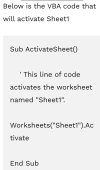
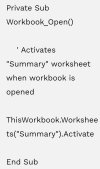
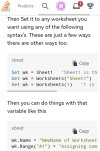
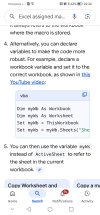
Attached or Referenced are variations of WORKBOOK ACTIVATE, or ACTIVATE SHEET etc, from the internet such as the answer is out there, hence maybe potential solutions...

Workbooks("EV_CARS.XLS").Activate

VB ActivateSheet (1).jpg VB ActivateSheet (2).jpg VB ActivateSheet (3).jpg VB ActivateSheet (5).jpg VB ActivateSheet (6).jpg
 
Last edited:
Guess realistically, re - ASSIGNING MACROs from sheet COPY from another Workbook will do, afterall the SHEETS (TABNAMES, samething different name..) will be different anyway (ha ha).

or Copy WorkBook, Edit Tab Name, Edit VB Code with known SHEET NAME (ha ha), then ASSIGN auto-shapes to VB MACRO.... DONE.

if any1 has anything genuinely useful (a joke), to add in a concise clear way, let us know...

such as an ACTUAL WORKBOOK with WORKING MACRO, that when you make a COPY of a SHEET with AUTOSHAPES ASSIGNED to it, to another WORKBOOK. then file path is the OPEN (EXISTING) WORKBOOK, not the file path workbook it was from....

imagine that, instead of a waffle contradiction & useless examples, to obviously leave you, searching for something else different... like something you've never heard of.....yes I know VB is behind the scenes function, cheers...
 
anyway for any1 else looking for TEMPLATE for TOUCHSCREEN MENU, here it is GENERIC SHEET TAB NAMES: TAB1- TAB2.

Yes best to START with EDITS in this ORDER:
# SHEET TAB NAMES EDIT
# VB MODULE1 SHEET TAB NAMES EDIT
# AUTOSHAPE RENAME EDIT
# AUTOSHAPE ASSIGN MACRO

Alot quicker then... from blank fresh sheet!

Screenshot (367).png

Takes away alot of the guess work, and time wasting leads amass on internet, aledged tutorials, other forum posts, and vids of excel tutorials.... like u want to write it down after pausing multi several times!

cheers my name is Stephan...
 

Attachments

Stephan

Why do You have 20 different macros for those 20 buttons?
Could You use ... eg one macro for all of those buttons?
... check one sample from START-sheet's code Select_Tab
( Other sample code is for renaming those buttons. )
Hello. Thanks, this works, I will keep this as working Macro workbook, which is lacking on Forums, bit parts of CODE string..
At a glance as a VB novice, I would not have known its purpose, it wasn't obvious to me, but its function is, hence it is of use, when replicating AUTOSHAPE BUTTONS >TAB MACRO.
However I did notice the MODULE1 CODE was BACK button is needed for it to work. Like most things a BACK or < symbol is a return to START
Sub BACK2START()

Sheets("START").Select

End Sub
 

Attachments

Last edited:
That sample code works as it has written.
If You'll use other logic with those buttons then that code still works as it has written ... but the result could be different!
I commented only about those 20 buttons and Your '20' same kind of codes.
 
That sample code works as it has written.
If You'll use other logic with those buttons then that code still works as it has written ... but the result could be different!
I commented only about those 20 buttons and Your '20' same kind of codes.
Thanks for Re-Ply, they are infrequent on For-ums. Code doesn't coherently mean anything to me, but it works for my purposes, appreciate this Code, I couldn't break up its routine for what it does though, Clueless, Oblivious to its meaning.

Cheers
 

Stephan

Other sample
Those visible worksheet tabs make mess by user ... while editing by mistake those
Thanks I like this version, initially surprised couldn't see TABS, even though ADVANCED option was to DISPLAY sheet TABS.

Guess that is via MACRO? ie VB code, not edit each individual sheet visible status?

Nice Front End start for many to give an impressive front to their work, perhaps even confuse prying persons?

Anyway think it kind of cool. I know there are lots of STATS DASHs, which are complicated, but can't seen many actual MENUs or CONTENTS PAGES...
 
If there is a 'Front Menu' then why to see all tabs?
... User can see/use one tab in one time or how?
That sample feature has made with VBA.
 
He
If there is a 'Front Menu' then why to see all tabs?
... User can see/use one tab in one time or how?
That sample feature has made with VBA.
Hello.

True, hidden sheets prevents Users mixing up Results with Dataset!

Like choice, ease of navigation.

But my question was:

What Command has HIDDDN SHEETS here?

Also..
Protect Sheet on Front GUI Sheet so Locked Cells prevents wandering Cell Marks when users have been selecting Tabs!

Minor annoyance without it, but... With it.. I find it improves the experience vastly ! No false clicks, & rearrange Cells to hide the Cursor, away in A1...

Navigation on Mobile Phone Apps!

Macros generally not recognised & Front Screen generally acts as annoyance, hence moved START tab to far right to prevent hindering on Mobiles..

Also GUI MENUS not had much use for them in the past except this, has had its uses, think it was for EPOS XL few years ago, I'll look for it to attach, as example.
 
HIDDDN SHEETS
... eg Sheets(itsname).Visible with option
or did You mean to hide all tabs?
... ActiveWindow.DisplayWorkbookTabs with option

Protect
... what is Front GUI sheet?
... if enable to select tabs ... there'll case that user has start to edit tabs-name (by mistake) - and that'll cause mess with VBA!
... check .Protect UserInterfaceOnly

Navigation on Mobile Phone Apps!
Do macros work there?

Macros generally not
If You cannot use macros then You should forget that my sample.

Your the last also ...
What did You try to explain?
I tried to gave some samples - how to work with 'start' and other sheets (You can see/use one sheet in time.)
Many things depends - how to write the code
- what do You have there?
- what do You really need to be there?
 
HIDDDN SHEETS
... eg Sheets(itsname).Visible with option
or did You mean to hide all tabs?
... ActiveWindow.DisplayWorkbookTabs with option

Protect
... what is Front GUI sheet?
... if enable to select tabs ... there'll case that user has start to edit tabs-name (by mistake) - and that'll cause mess with VBA!
... check .Protect UserInterfaceOnly

Navigation on Mobile Phone Apps!
Do macros work there?

Macros generally not
If You cannot use macros then You should forget that my sample.

Your the last also ...
What did You try to explain?
I tried to gave some samples - how to work with 'start' and other sheets (You can see/use one sheet in time.)
Many things depends - how to write the code
- what do You have there?
- what do You really need to be there?
Hi your macro codes are great, this answered my question.

However since you're a person with great skills & knowledge in Excel, I do have a few pertinent questions:

Q1. SPILL FORMULA, best method to retain existing FORMAT CELLS? Ex: EV Car Specs various columns of differing data, £, bhp, torque, chrg time etc. Apparently there is some conditional format method, but those I've seen are for same type, like a blanket approach to all.

Q2: SORT UNIQUE FILTER, is it possible to construct a non complicated formula for 4 COMBOs to work independently?
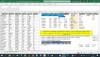
Instead of 1>2>3>4 aka Column A-B-C-D, to this effect I constructed a basic template for such purposes, file attached:
# Data Validation COMBO4 # Easy # UNIQUE SORT DYN SPILL # Mobile Works XL21 ####
Combo 1 = CELL A25
Combo 2 = CELL B25
Combo 3 = CELL C25
Combo 4 = CELL D25

I do have 2 other 4COMBO TEMPLATES, but they utilise SEARCH or SEQUENCE, and FORMULA is more involved then I'd prefer, files attached, what I'm looking for it easier just more concise multi combo or any order via SORT UNIQUE FILTER:
# ComboBox4 FILTER # SEARCH XL21 Dyn Spill SRCH + CAM SLICER ##
# ComboBox4 FILTER # SEQUENCE XL21 Dyn Spill SRCH + CAM SLICER ###


Also re the FRNT PG MENU, my initial annoyed reason was re-ASSIGING multiple OBJECTS, if was using FRONT MENU SCREEN elsewhere, and had copied that WORKSHEET, re-Assigning 20x Sheet Tab Objects and 20x Back objects is/was repetitive.

MACROs don't work on MOBILES even with MS OFFICE 365 APP, however WORKBOOK will open , & other WORKSHEETs are accessible, majority of time, I'd make reference to data values, such as personal curosity of work schedule, car specifications, etc.

GUI, is an old expression really, GRAPHICAL USER INTERFACE, meaning buttons, images & objects instead of blank or fully editable.

What I was trying to explain is that even though XL DASH REPORTS are very popular, I can not even remember seeing another persons XL CONTENTS or MENU BASED FRONT PAGE with ASSIGNED MACROS to designated SHEET TABS, with exception of XL TRAINING PROVIDERS,
Most of these, appears to be 1st SHEET with individual IMAGE OBJECTS with HYPERLINK within same document to relevant NAME RANGE.

I was asking if you have any XL STYLED CONTENT MENUs to attach for inspiration that are interesting, functional & cool!

My XL EPOS (SALES CATEGORY attached) from several years ago did use my FRONT SCREEN, I like it, it was an inspiration for more workbooks recently, so definately a good choice for others too?
 

Attachments

You seems to skip to Your one of previous threads ... Data Validation
Did You checked that my sample file; which You skipped to comment.
... I did one minor modification today.

You've named this thread as Sheet Copy, Assigned Macros not re-pointed within, Mod Code not within existing open WorkBk
So let this thread be for that only.

I can check those files later ... except .zip ... but there should thread for those to reply.
 
Hello absolutely, just trying to draw from your XL skills experience etc.

SPILL QUESTION retain Format Cells, answer maybe out there, thought I'd ask if genuinely a method that works... Surely around the World almost every XL user must be... Asking this to!

That Sequence or Search Formulas devised by OTHERS, in that Post.. on Top of Sort Unique Filter, is absolutely total solution of any order A<>B<>C<>D...

Multi... Together, or Individually on its own..

Which you're right is my question again, was intrigued if LOGIC to achieve same but in simpler more concise Formula!

Ultimately I can understand why you'd ask, it is for personally curiosity of EV CARS to buy shortlist, such as the fastest car 0-62.. And with Electric Cars these days, what the question is..

RANGE (MILES per FULL CHARGE) .. so any order multi dynamic combo box is v useful.

Via Combo, instead of Auto Filter, as via Mobile Genuine Office 365 works with combos well, but not well, with Auto Filter, probably due to Merged Cells.

That is why Data Sets tend to be always of... lots of... CARS

At least it is a set of Statistics other ppl can relate to, ah. Yes..

File Attached.
 

Attachments

EV Cars Unique.xlsm
> back to Your original ... start ...hmm?
> why so many times same routine?
> if only mobile then ... why start?

Hyperlink ...
> why same routine many times?

Comboboxes ...
As You've noticed ... I'm using VBA ... You're using .... formulas.
Why only four columns should able to take care?
Could 'selection' make without comboboxes?
If more lines of data then ... layout should be different or how?

Data Validation ...
As I wrote in my previous post ... please reread it.
... as well as those three sentences below snapshot.
 
EV Cars Unique.xlsm
> back to Your original ... start ...hmm?
> why so many times same routine?
> if only mobile then ... why start?

Hyperlink ...
> why same routine many times?

Comboboxes ...
As You've noticed ... I'm using VBA ... You're using .... formulas.
Why only four columns should able to take care?
Could 'selection' make without comboboxes?
If more lines of data then ... layout should be different or how?

Data Validation ...
As I wrote in my previous post ... please reread it.
... as well as those three sentences below snapshot.
Hello

Yes the Macro xlsb yes I did, once managed to figure out how to unblock macro, via File Explorer as internet untrusted Source apparently!
However it didn't Function as intended, other then MAKE Column, enter value POP UP appears via other COMBOS. Perhaps it created in Office 365, my XL newest version is 2021.

But plz don't feel obliged to do anything else, unless it few paragraphs, useful formula, or attachment for me to browse & contemplate its uses.
Your macro edit of FRONT TOUCH SCREEN menu answered my question!

HYPERLINK MENU, is just a non graphic alternative, which depending on clientel maybe less confusing to them, as many will consider graphics, as not interactive, percieve as image, to get attention.

My other questions, are considerations I don't see an obvious answer too, mostly likely there isn't, I know what are the Range or real world alternatives...

& yes DATA VALIDATION is important! Why same routine, u ask, mm fair question... well original edits where...
1st : INDIRECT NAME RANGE (not Dynamic), then..
2nd: INDEX MATCH (Dynamic)
3rd: SORT UNIQUE FILTER
4th: SORT UNIQUE FILTER + SEARCH or SEQUENCE
5th: DATA was DIESEL CARS, now with emergence of EV CARS, there is important consideration of:
# CHARGING COST + CHARGING TIME based on DIFFERENT TRACTION BATTERY & HOME or EV CHARGERS, which vary in POWER KW.
# RUNNING COST COMPARISON differences from DIESEL (liquid) MPG > to MILE KW (elec).

4 COMBOS, is generally differation between MODELS, the rest is specifications such as RANGE, 0-60, etc.

Not just for mobile, but buying an EV and/or CHARGING, invaluable to have EV CAR XLSX on my mobile, hence to get my head round what car I'd invest in, I wanted Dynamic reliable worksheets, specifically 1 of MODEL, & 1 of DATA, which is the 1st 2 tabs of unique file, & index file version, for retro xl03 fans, both attached, purely for reference for persons considering an ev or owners, to look up likely costs & charge time, important considerations, which compared to DIESEL, topup didn't take long, & variations in prices didn't vary much, but EV CHARGERS vary widely in PRICE, POWER & LOCATION availability, and alot less visible or apparent then fuel garages.

anyways HAPPY XMAS & NEW YEAR.... Hope u won't have your head buried in sheets? xl fabulous ain't it...
 

Attachments

Last edited:
Also on the DATA VALIDATION is important, yes it sure is.

After Re-visiting the SEARCH or SEQUENCE workbooks, these are ideal, easily replicated, especially compared to retro XL equivalents!

&
MOBILE PHONE question, on ANDROID GOOGLE PLAY:

# GOOGLE SHEETS "APP" does not work with DATA VALIDATION COMBO BOXES

However, the good news is..

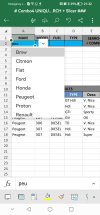
# MICROSOFT EXCEL "APP" does work with DATA VALIDATION COMBO BOXES!

Also both APPS are FREE to download & use.

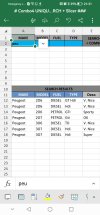
Also XL APP impressively works with the UNIQUE SEARCH or SEQUENCE COMBO Workbook.

Even PART WORD SEARCH works on APP in SEARCH VERSION.
Screenshot_20251224_213156_com.microsoft.office.excel.jpg

COMBO SELECTION in APP:
Screenshot_20251224_213204_com.microsoft.office.excel.jpg


Excel App on ANDROID GOOGLE PLAY:
Screenshot_20251224_213319_com.android.vending.jpg
 

Attachments

Back
Top