• Hi All

    Please note that at the Chandoo.org Forums there is Zero Tolerance to Spam

    Post Spam and you Will Be Deleted as a User

    Hui...

  • When starting a new post, to receive a quicker and more targeted answer, Please include a sample file in the initial post.

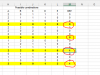
I want countif row in color yellow

Hi,

This will require a SMALL old VBA macro function. Is this acceptable? As normal excel functions don't have this features.

Regards,
 
I assume the same rows wont always be yellow

What answers should be in Column M?

Why are there errors in Columns A:F?
 
I'm not clear on what you're trying to do, and it appears that your formula references an exterior table.

Are you attempting to have a specific result turn a certain color? If so, use Conditional Formatting, and do the following:
Select the range you want to 'turn yellow'
In the Home Tab, click on Conditional Formatting
New Rule
Select - Cells That Only Contain
Equal to (this would appear to be the best option from the data I see)
Click on Format - then select Fill and choose a color

Any cell that meets the criteria you outlined will turn the color you've chosen

HTH!
 
Febusa

You still haven't explained why the values in Column M are what they are ?

Do you only want to put values in the highlighted cells?
upload_2015-2-24_9-29-23.png


What are those values based on ?
Why is the 3rd Circled cell 1 but the others 0?
what range do you want to add up ?
Is that summation based on some other criteria?
 
Back
Top