
• Hi All

    Please note that at the Chandoo.org Forums there is Zero Tolerance to Spam

    Post Spam and you Will Be Deleted as a User

    Hui...

  • When starting a new post, to receive a quicker and more targeted answer, Please include a sample file in the initial post.

Want to delimeted and then transpose but all has to be done by using formula

Sarthak987654

New Member
Hey Community,

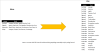
Can anyone help me with this problem I have to convert this file. I have mentioned before and after in the file how I want my data to be cleaned . I have done this manually by using delimited, Transpose and then flash fill.

Can Anyone have a better trick that can help me do this by using the formula I have attached my file in the Thread.
Thanks In Advance
 

Attachments

  • File.xlsx
    File.xlsx
    11.2 KB · Views: 2
  • fileee.png
    fileee.png
    34.3 KB · Views: 4
The question is, do you have access to Excel 365? If so
Code:
= REDUCE({"name","fruit"}, name,
     LAMBDA(list, person,
        LET(
            fruits, TEXTSPLIT(
                XLOOKUP(person, name, fruit), ,
                ","),
            output, HSTACK(IF(ISTEXT(fruits), person), fruits),
            VSTACK(list, output)
        )
     )
  );
 

Attachments

An alternative is with Power Query

Code:
let
    Source = Excel.CurrentWorkbook(){[Name="Table2"]}[Content],
    #"Split Column by Delimiter" = Table.ExpandListColumn(Table.TransformColumns(Source, {{"fruit", Splitter.SplitTextByDelimiter(",", QuoteStyle.Csv), let itemType = (type nullable text) meta [Serialized.Text = true] in type {itemType}}}), "fruit")
in
    #"Split Column by Delimiter"

Excel 2016 (Windows) 64 bit
[Table="width:, class:head"][tr=bgcolor:#E0E0F0][th] [/th][th]
B
[/th][th]
C
[/th][/tr]
[tr=bgcolor:#FFFFFF][td=bgcolor:#E0E0F0]
11
[/td][td=bgcolor:#000000]
name
[/td][td=bgcolor:#000000]
fruit
[/td][/tr]

[tr=bgcolor:#FFFFFF][td=bgcolor:#E0E0F0]
12
[/td][td=bgcolor:#5B9BD5]Sarthak[/td][td=bgcolor:#5B9BD5]mango, banana, apple,Passion Fruit[/td][/tr]

[tr=bgcolor:#FFFFFF][td=bgcolor:#E0E0F0]
13
[/td][td=bgcolor:#DDEBF7]Jignesh[/td][td=bgcolor:#DDEBF7]guava, Apricots, Crab apples, Dewberries, Honeydew melon, Jackfruit[/td][/tr]

[tr=bgcolor:#FFFFFF][td=bgcolor:#E0E0F0]
14
[/td][td=bgcolor:#DDEBF7]Satendra[/td][td=bgcolor:#DDEBF7]Nashi Pear, Apricots, Persimmon, Paw Paw, Honeydew melon, Peach, Pomegranate, Pineapple[/td][/tr]

[tr=bgcolor:#FFFFFF][td=bgcolor:#E0E0F0]
15
[/td][td=bgcolor:#DDEBF7]Uday[/td][td=bgcolor:#DDEBF7]mango, Grapes, Persimmon, Voavanga[/td][/tr]

[tr=bgcolor:#FFFFFF][td=bgcolor:#E0E0F0]
16
[/td][td][/td][td][/td][/tr]

[tr=bgcolor:#FFFFFF][td=bgcolor:#E0E0F0]
17
[/td][td=bgcolor:#70AD47]name[/td][td=bgcolor:#70AD47]fruit[/td][/tr]

[tr=bgcolor:#FFFFFF][td=bgcolor:#E0E0F0]
18
[/td][td=bgcolor:#E2EFDA]Sarthak[/td][td=bgcolor:#E2EFDA]mango[/td][/tr]

[tr=bgcolor:#FFFFFF][td=bgcolor:#E0E0F0]
19
[/td][td]Sarthak[/td][td] banana[/td][/tr]

[tr=bgcolor:#FFFFFF][td=bgcolor:#E0E0F0]
20
[/td][td=bgcolor:#E2EFDA]Sarthak[/td][td=bgcolor:#E2EFDA] apple[/td][/tr]

[tr=bgcolor:#FFFFFF][td=bgcolor:#E0E0F0]
21
[/td][td]Sarthak[/td][td]Passion Fruit[/td][/tr]

[tr=bgcolor:#FFFFFF][td=bgcolor:#E0E0F0]
22
[/td][td=bgcolor:#E2EFDA]Jignesh[/td][td=bgcolor:#E2EFDA]guava[/td][/tr]

[tr=bgcolor:#FFFFFF][td=bgcolor:#E0E0F0]
23
[/td][td]Jignesh[/td][td] Apricots[/td][/tr]

[tr=bgcolor:#FFFFFF][td=bgcolor:#E0E0F0]
24
[/td][td=bgcolor:#E2EFDA]Jignesh[/td][td=bgcolor:#E2EFDA] Crab apples[/td][/tr]

[tr=bgcolor:#FFFFFF][td=bgcolor:#E0E0F0]
25
[/td][td]Jignesh[/td][td] Dewberries[/td][/tr]

[tr=bgcolor:#FFFFFF][td=bgcolor:#E0E0F0]
26
[/td][td=bgcolor:#E2EFDA]Jignesh[/td][td=bgcolor:#E2EFDA] Honeydew melon[/td][/tr]

[tr=bgcolor:#FFFFFF][td=bgcolor:#E0E0F0]
27
[/td][td]Jignesh[/td][td] Jackfruit[/td][/tr]

[tr=bgcolor:#FFFFFF][td=bgcolor:#E0E0F0]
28
[/td][td=bgcolor:#E2EFDA]Satendra[/td][td=bgcolor:#E2EFDA]Nashi Pear[/td][/tr]

[tr=bgcolor:#FFFFFF][td=bgcolor:#E0E0F0]
29
[/td][td]Satendra[/td][td] Apricots[/td][/tr]

[tr=bgcolor:#FFFFFF][td=bgcolor:#E0E0F0]
30
[/td][td=bgcolor:#E2EFDA]Satendra[/td][td=bgcolor:#E2EFDA] Persimmon[/td][/tr]

[tr=bgcolor:#FFFFFF][td=bgcolor:#E0E0F0]
31
[/td][td]Satendra[/td][td] Paw Paw[/td][/tr]

[tr=bgcolor:#FFFFFF][td=bgcolor:#E0E0F0]
32
[/td][td=bgcolor:#E2EFDA]Satendra[/td][td=bgcolor:#E2EFDA] Honeydew melon[/td][/tr]

[tr=bgcolor:#FFFFFF][td=bgcolor:#E0E0F0]
33
[/td][td]Satendra[/td][td] Peach[/td][/tr]

[tr=bgcolor:#FFFFFF][td=bgcolor:#E0E0F0]
34
[/td][td=bgcolor:#E2EFDA]Satendra[/td][td=bgcolor:#E2EFDA] Pomegranate[/td][/tr]

[tr=bgcolor:#FFFFFF][td=bgcolor:#E0E0F0]
35
[/td][td]Satendra[/td][td] Pineapple[/td][/tr]

[tr=bgcolor:#FFFFFF][td=bgcolor:#E0E0F0]
36
[/td][td=bgcolor:#E2EFDA]Uday[/td][td=bgcolor:#E2EFDA]mango[/td][/tr]

[tr=bgcolor:#FFFFFF][td=bgcolor:#E0E0F0]
37
[/td][td]Uday[/td][td] Grapes[/td][/tr]

[tr=bgcolor:#FFFFFF][td=bgcolor:#E0E0F0]
38
[/td][td=bgcolor:#E2EFDA]Uday[/td][td=bgcolor:#E2EFDA] Persimmon[/td][/tr]

[tr=bgcolor:#FFFFFF][td=bgcolor:#E0E0F0]
39
[/td][td]Uday[/td][td] Voavanga[/td][/tr]
[/table]
[Table="width:, class:grid"][tr][td]Sheet: Sheet1[/td][/tr][/table]
 
The nice thing about @AlanSidman's code is that it is accessed from the PQ user interface and generated automatically.

81053

If you had to be able to write the code from scratch it would not be fun!
Bear in mind that PQ needs to be refreshed manually; that can be a plus or a minus depending on your desired workflow.
 
Back
Top