• Hi All

    Please note that at the Chandoo.org Forums there is Zero Tolerance to Spam

    Post Spam and you Will Be Deleted as a User

    Hui...

  • When starting a new post, to receive a quicker and more targeted answer, Please include a sample file in the initial post.

Turn a range w/ several columns into one long list using Excel

dourpil

Member
Hi!

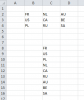
I'd like to go from

FR NL AU
US CA BE
PL RU SA

to

FR
US
PL
NL
CA
RU
AU
BE
SA


I know there is a way of doing that without formulas and without VBA. I knew the way 3 months ago but I can't find it anymore.
From what I recall, a keyboard shortcut would open a box where I'd choose my input and output range and enjoy my list.

Edit: I'm using Excel 2010

Thanks in advance,
Regards
 
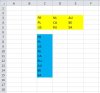
Try this beauty:
=INDEX($B$2:$D$4,MOD(ROW(OFFSET($A$1,,,COUNTA($B$2:$D$4),1))-1,3)+1,INT((ROW(OFFSET($A$1,,,COUNTA($B$2:$D$4),1))+2)/3)) Ctrl+Shift+Enter

upload_2014-8-13_21-53-47.png
It needs to be customised for the location of the array and formula

See attached:
 

Attachments

Hi,

See another formula approach, non-array formula.

Capture.JPG

Formula:
=INDEX($C$3:$E$5,MOD(ROWS(C$7:C7)-1,3)+1,INT((ROWS(C$7:C7)-1)/3)+1)

Regards,
 
Hi and thank you to both of you for providing elegant formula solutions !


What really bugs me out is that, a few months ago, I knew a procedure that was formula-free (and vba-free too. It was using Excel "built-in" functionalities). I wish I could remember it or find it somewhere but I've been unlucky so far..

I'll go with formulas but I'm keeping a cookie for the person that reminds me how I used to do it ^.^
 
Hi,

You can use the Office Clipboard option to do this (no formulas, no VBA here).

Here is a video from Mike Girvin's "Excelisfun" YouTube channel :


Cheers!!!
 
Back
Top