
You are using an out of date browser. It may not display this or other websites correctly.
You should upgrade or use an alternative browser.
You should upgrade or use an alternative browser.
Splitting single data
- Thread starter paradise
- Start date

YasserKhalil
Well-Known Member
Not so clear logic but try
Code:
Sub Test()
    Dim t As Long, x As Long, i As Long
    t = Range("D4").Value
    Range("L4:L8").Value = Range("K4:K8").Value
    For i = 4 To 8
        Range("L" & i).Value = Range("L" & i).Value - 1
        If Range("L" & i).Value < 0 Then Range("L" & i).Value = 0
        x = WorksheetFunction.Sum(Range("L4:L8"))
        If x <= t Then Exit Sub
        If i = 8 And t < x Then i = 4
    Next i
End Sub
Marc L
Excel Ninja
Hi,Thanx for the reply.
In this case,answer is correct but when I change the value in D4 it gives me wrong answer.
Plz check the file in sheets called Scenario 2 and 3.The correct answer I have mentioned manually in O column.
I have also mentioned the logic in M column.It will simply take each data from below uptill that point where the D4 value might get match or will be less then then difference will be there.
In this case,answer is correct but when I change the value in D4 it gives me wrong answer.
Plz check the file in sheets called Scenario 2 and 3.The correct answer I have mentioned manually in O column.
I have also mentioned the logic in M column.It will simply take each data from below uptill that point where the D4 value might get match or will be less then then difference will be there.
Attachments
X is the name that must match with J column.Here,in above post,I have attached file where,I have mentioned the same name 'X'.This would be a matching criteria.Hi, what A4=X stands for ?
Marc L
Excel Ninja
According to your initial post a VBA demonstration for starters :
Code:
Sub DemoAX0()
        A = [D4]
        X = [K4:K8].Value
    For R = 5 To 1 Step -1
        If A Then X(R, 1) = Application.Min(X(R, 1), A): A = A - X(R, 1) Else X(R, 1) = Empty
    Next
        [L4:L8] = X
End Sub
Do you like it ? So thanks to click on bottom right Like !
There are no words how to thank u Marc L.
I want to go to one step further.
I have added 1 more name 'Y'.I have added the manually the result by highlighting in N column.Process is the same as you have done for 'X'.
One most important thing,
1.Matching of column C and I
2.I have added month in A column and J column.So as to get the result N column whose month is 1.
for e.g if I alter fully it to Month to 2 at column A and J,the result must shift to column P.
I want to go to one step further.
I have added 1 more name 'Y'.I have added the manually the result by highlighting in N column.Process is the same as you have done for 'X'.
One most important thing,
1.Matching of column C and I
2.I have added month in A column and J column.So as to get the result N column whose month is 1.
for e.g if I alter fully it to Month to 2 at column A and J,the result must shift to column P.
Attachments
 .
.
Marc L
Excel Ninja
This is very not the right way as the initial post must well elaborate the complete need.
As according to your blurry, cryptic, unclear, vague […] initial post this thread is solved
(with a procedure for starters : so meaning you may have to fit it for what you forgot / misexplained)
as Yasser was the first to answer so I let him first - or anyone else (at beginner level) - to give it a try …
Marc L
Excel Ninja
According to your post #7 attachment my post #6 VBA demonstration just needs two additional codelines
with a better worksheet design if you can get rid of the useless columns A:D just using column H for values
like D4 value in cell H4 and D5 value in cell H10 in order to work directly on column K blocks :
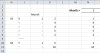
Columns I:J grey cells are useless. Column L can be used rather than column H …
Or do you prefer to keep the dramatic layout as it is ?
Dramatic layout would sure exist.This is so becoz,if u see properly,data month 1 is mentioned in both A:D and H:K.But what happens when,I alter month from 1 to 2 in A4. Naturally,data should move from N to P column.
Secondly,columns I:J grey cells are useless
This is not useless,why ? becoz suppose J8=2 instead of 1.What will be effect on N column ?The result which is displaying in N column from N8 and above will now be displaying from N7 and above.The month 2 is not equal to month 1,so no match i.e.J8<>A4 but match C4=I8.Both case does not matches.Hence,this results in shifting in at above where last matching exist which will be J7=A4 and C4=I7 which results in Month 1 column as A4=N column.
I hope this information is suffice.
Above is sample data only.In actual I have more than 2k,hence range can't be fixed.So,I request u to make flexible in coding that can take any ranges.
Secondly,columns I:J grey cells are useless
This is not useless,why ? becoz suppose J8=2 instead of 1.What will be effect on N column ?The result which is displaying in N column from N8 and above will now be displaying from N7 and above.The month 2 is not equal to month 1,so no match i.e.J8<>A4 but match C4=I8.Both case does not matches.Hence,this results in shifting in at above where last matching exist which will be J7=A4 and C4=I7 which results in Month 1 column as A4=N column.
I hope this information is suffice.
Above is sample data only.In actual I have more than 2k,hence range can't be fixed.So,I request u to make flexible in coding that can take any ranges.
Last edited:
Marc L
Excel Ninja
As J8 can't be 2 as K2:K8 is a block for only 16 X 1 !
Hoping the months are separated in non consecutive blocks in order the most efficient way can be used
- aka comparing first the column K block sum versus H value,
as working cell by cell on more than 2k rows will takes far more time than working directly on blocks ! -
or rather than such poor workbook you must attach a better workbook well reflecting at least all the possible cases …
make flexible in coding that can take any range
That's easy according to your post #7 attachment but as it does not well reflect your real workbook
so I won't waste any second to write a well working procedure with this attachment but should fail with your real workbook …