• Hi All

    Please note that at the Chandoo.org Forums there is Zero Tolerance to Spam

    Post Spam and you Will Be Deleted as a User

    Hui...

  • When starting a new post, to receive a quicker and more targeted answer, Please include a sample file in the initial post.

Separate text and number

ridwanr

New Member
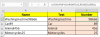
Hi everyone. Just wanted to know how do we separate text and numbers in several rows if possible by making use of an excel formula.

Plz see attached example for better understanding.

Thanking you in advance for your help.

Kind regards,
Ridwan
 

Attachments

Power Query Solution

Code:
let
    Source = Excel.CurrentWorkbook(){[Name="Table1"]}[Content],
    #"Split Column by Character Transition" = Table.SplitColumn(Source, "Name", Splitter.SplitTextByCharacterTransition((c) => not List.Contains({"0".."9"}, c), {"0".."9"}), {"Name.1", "Name.2"})
in
    #"Split Column by Character Transition"
 
Formula solution

In C2, formula copied down :

=LOOKUP(9^9,0+RIGHT(A2,ROW($1:$99)))

In B2, formula copied down :

=SUBSTITUTE(A2,C2,"")

77427
 
Back
Top