@Dear All,
For rotating text, there is an option for "Orientation in the Alignment Tab. However, range is limited from 90 to -90. I want to rotate text within any range of 360 Degrees. Just like X and Y Axis of 4 coordinates with option for user entry.
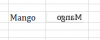
For example, Typing "MANGO" and apply the rage beyond -90, display text something like a mirror image of the text.
I tried with the below code as suggested by Mr Jon Von Hayden
The rage of this function is fixed. Is it possible to rotate text within any range of 360 degrees with user entry / help of macro ?
VDS
For rotating text, there is an option for "Orientation in the Alignment Tab. However, range is limited from 90 to -90. I want to rotate text within any range of 360 Degrees. Just like X and Y Axis of 4 coordinates with option for user entry.
For example, Typing "MANGO" and apply the rage beyond -90, display text something like a mirror image of the text.
I tried with the below code as suggested by Mr Jon Von Hayden
Code:
Public Function ReverseText(ByVal strText As String) As String
    Dim strResult   As String
    Dim lngChar     As Long

    strResult = vbNullString

    If Len(strText) Then
        For lngChar = Len(strText) To 1 Step -1
            strResult = strResult & Mid$(strText, lngChar, 1)
        Next lngChar
    End If

    ReverseText = strResult
End FunctionVDS
Last edited by a moderator: