• Hi All

    Please note that at the Chandoo.org Forums there is Zero Tolerance to Spam

    Post Spam and you Will Be Deleted as a User

    Hui...

  • When starting a new post, to receive a quicker and more targeted answer, Please include a sample file in the initial post.

read last row of data from an excel file without opening it

Jason F

New Member
Hello,

I am trying to create a macro that will read in the last row of data from 4 different .xls files and then insert that data into my spreadsheet. These 4 files update every 10 minutes so the "last row" changes every 10 minutes.

I've gotten something to work (see "Current Code" below), but the problem is, it takes forever to run this program the way I've coded it. I think the reason is that the macro is actually opening each file, then closing each file.

I want to be able to read in the last row of data from each of the 4 .xls files without opening them. I've seen ways to get data from an excel file without opening it, but I do not know how to figure out which row is the last row without opening the file.

I did find a snippet of code from user SirJB7 from a previous thread that does this for .csv files (see "SirJB7 code" below), but it doesn't seem to work for .xls files - it always just returns "1" for some reason. Can this code be modified to work for a .xls file, or does anyone know another way of doing this?

FYI: I'm new to VBA so I'm sure my code is pretty ugly...sorry!

Thank you!!
Jason

Current Code:
Code:
For I = 0 To 3

   worksheetName(I) = Left(fileArray(I), 31)
     
   Dim xlApp As Excel.Application
   Dim wb As Workbook
   Dim ws As Worksheet

   Set xlApp = New Excel.Application

   Set wb = xlApp.Workbooks.Open(pathArray(I) & fileArray(I) & ".xls")

   Set ws = wb.Worksheets(worksheetName(I)) 'Specify your worksheet name

   LastRow = ws.Cells.End(xlDown).Row

   cycleCount1 = ws.Cells(LastRow, 81).Value
   cycleCount2 = ws.Cells(LastRow, 82).Value
   cycleCount3 = ws.Cells(LastRow, 83).Value
   cycleCount4 = ws.Cells(LastRow, 84).Value
   cycleCount5 = ws.Cells(LastRow, 85).Value
   cycleCount6 = ws.Cells(LastRow, 86).Value

   cycleCount = Array(cycleCount1, cycleCount2, cycleCount3, cycleCount4, cycleCount5, cycleCount6)

   wb.Close

   xlApp.Quit

   Set ws = Nothing
   Set wb = Nothing
   Set xlApp = Nothing

Next I

SirJB7 Code (thank you!):
Code:
Option Explicit

Sub IDidNotLikeAnyOfTheOtherTwoSolutionsButNeitherLikedTooMuch()
    ' constants
    Const ksFileName = "how-to-count-the-number-of-rows-without-opening-an-excel-file (for K Raghavender rao at chandoo.org).csv"
    ' declarations
    Dim I As Long, J As Integer, A As String
    ' start
    J = FreeFile()
    Open ThisWorkbook.Path & Application.PathSeparator & ksFileName For Input As #J
    ' process
    I = 0
    Do Until EOF(J)
        Line Input #J, A
        I = I + 1
    Loop
    ' end
    Close #J
    Debug.Print I
End Sub
 
Hi, Jason F!

The thread you're referring to is this:
http://chandoo.org/forum/threads/how-to-count-the-number-of-rows-without-opening-an-excel-file.11887

I want to be able to read in the last row of data from each of the 4 .xls files without opening them. I've seen ways to get data from an excel file without opening it, but I do not know how to figure out which row is the last row without opening the file.
From that link I quote myself:
"Actually is very difficult to achieve that(*) without opening the file"
where (*) was how to count the no. of rows, but it's valid for anything that involves retrieving data from a file.

Or you directly or indirectly open the file or no data can be read/extracted/got but just guessed or imagined.

Said so, let us go on.

The snippet that you found and posted works only for text files, since it uses the VBA instruction Open For Input which does that (open a file), and with the Line Input # instruction it reads full lines from a text file, a .csv in this case. That's why you can't make it work on an .xls Excel file, as it has a completely different internal structure than text files.

Now for the 4 Excel files last row (in fact for the last row of one worksheet -let us assume the 1st one- of 4 Excel files), you'll have to do something different for which I ask you:
a) where are the names and full paths of the 4 files stored?
b) which are the involved worksheets for each one?
c) what data from their last rows should be retrieved (cells range, columns)?
d) where in your actual workbook should that retrieved data be inserted?
e) regarding d), could you provide a sample manually written set of 5 files with the desired output?

Regards!
 
Hello JB7,
I was wondering if this can be done without VBA..
Make dynamic ranges in 4 excel files, give link to the last row of that dynamic ranges in master workbook,Refresh the links whenever u need to update it.
Correct me if i'm wrong..
 
Hi, Ranjith kumar!
It's a good idea, maybe it works, I neither have done nor will do anything at this thread, for the time being and while OP doesn't answer or uploads its file. In the meanwhile I prefer Carslberg, NFS The Run and Candy Crush, if not sex. ;)
However it'll all depend on how many columns per file are required to avoid bunch of links. And how/when/where the 4 files are updated too.
Regards!
 
Hi Jb7,
Nice to hear from u n what i expect always is use vba only whenever it is required and reduces the work :)
as there's a lot more which can be done without vba :)
 
Hi, Ranjith kumar!
In this case a priori I'd go with VBA, and let others (you) play with formulas. In other cases, only if necessary or smarter (aka unless unavailable or very cumbersome with formulas). :P
Regards!
 
Hi, Jason F!

The thread you're referring to is this:
http://chandoo.org/forum/threads/how-to-count-the-number-of-rows-without-opening-an-excel-file.11887


From that link I quote myself:
"Actually is very difficult to achieve that(*) without opening the file"
where (*) was how to count the no. of rows, but it's valid for anything that involves retrieving data from a file.

Or you directly or indirectly open the file or no data can be read/extracted/got but just guessed or imagined.

Said so, let us go on.

The snippet that you found and posted works only for text files, since it uses the VBA instruction Open For Input which does that (open a file), and with the Line Input # instruction it reads full lines from a text file, a .csv in this case. That's why you can't make it work on an .xls Excel file, as it has a completely different internal structure than text files.

Now for the 4 Excel files last row (in fact for the last row of one worksheet -let us assume the 1st one- of 4 Excel files), you'll have to do something different for which I ask you:
a) where are the names and full paths of the 4 files stored?
b) which are the involved worksheets for each one?
c) what data from their last rows should be retrieved (cells range, columns)?
d) where in your actual workbook should that retrieved data be inserted?
e) regarding d), could you provide a sample manually written set of 5 files with the desired output?

Regards!

Hi JB7!
Thank you for responding to my post!

Here are the answers to your questions:
a) The names and full paths are stored in the same excel file that I want the data (from each of the 4 excel files) to go into. In other words, all the data will be pasted into sheet 1, and the file and path names of the four .xls files are in sheet 2.
b) There is only one worksheet in each of the four .xls files. The worksheet has the same name as the .xls file.
c) I need the data in columns 81 through 86 of the last row of the .xls file.
d) See a), as well as the uploaded files.

Also, another weird thing is that the program that saves the data files saves them automatically as .xls files, even though they seem to be tab delimited files. I am unable to change what the program saves them as.

Lastly, it seems I can only upload 3 files. The remaining two data files have the same structure as the first two, just more rows of data.

Thanks again,
Jason F
 

Attachments

Hello Jason,
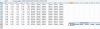
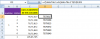
I tried to solve this without vba n it worked..U can try this way if u like it :) I'm posting the screenshots of formula :)
upload_2014-4-25_22-40-49.png


upload_2014-4-25_22-41-58.png
 
Last edited:
:) can i know why u dont want to open the file?

I don't want to open the file because it takes too long for the computer to open, extract data, then close each file. These data files get pretty large, up to 20MB with 35,000 rows in them. When I started this project I thought it would be fairly easy thing to do, but it is not!! :confused:
 
Back
Top