• Hi All

    Please note that at the Chandoo.org Forums there is Zero Tolerance to Spam

    Post Spam and you Will Be Deleted as a User

    Hui...

  • When starting a new post, to receive a quicker and more targeted answer, Please include a sample file in the initial post.

INDEX MATCH not working with &"_"

Hello

I'm having trouble getting index/match to work with a search.

I have a 16 column matrix divided into 4 color sections - blue, green, red, yellow or B G R Y. columns AA-AP

in each of these sections are a name, a p count, a score & a color code. i.e.: freakygirl 4 225 66

names can repeat in each column & can be in any of the 4 sections multiple times.

I need to summarize each player with a total of what they made each color and it has to be done for both singles & pards.

to pull out the single player games from the pard and to make each name unique for adding scores I added a code at the end of each name that I can remove piece by piece giving me what I need.

now I have a new matrix AT-BI. the code at the end of each name is a _ followed by the 1st letter of color played (B,G,R,Y) followed by "S" for singles & then a COUNTIF.

starting with column AJ I start making unique lists & add scores by color groupings removing the code little by little until I get a final unique list with the original names & totals.

I then rank the names & get an alphabetical list that I will use for the summary. everything works up to this point as it should.


now I want to take all the info in that matrix AT-BI & fill in diff parts of the summary. this is where I'M having a problem.

column N is my alphabetical list of names. to the right of each name I need to fill in each cell based on the values in the AT-BI matrix using index/match.

O11 worked great with index/match. Q11 not so much. my formula in Q11 is:

Code:
=INDEX($BQ11:$BQ11,MATCH(N11&"_G",$BP11:$BP11,0))

column BP has each name with a total they got for each color.

the logic is that it will take the name in N11 & depending on what column it is add the "_(colorletter)" to it so name can be found in column BP & return the number next to it in BQ.

for example: Q11 looks in column BP for __Tracey___G..... R11 looks for __Tracey___R..... S11 looks for __Tracey___Y

P11 should show 8 (BP60/BQ60) Q11 should show 3(BP24/BQ24) R11 should show 5 (BP35/BQ35) i do not see a _Y for her - will use iserror.

*scratches head* what am I doing wrong?

Thanks in advance,
FreakyGirl
 

Attachments

=INDEX($BQ11:$BQ11,MATCH(N11&"_G",$BP11:$BP11,0))
Index 'array' is ONE CELL
Match 'lookup array' is ONE CELL

That formula would be more useful if those arrays would be more large...
 
I need to summarize each player with a total of what they made each color and it has to be done for both singles & pards.
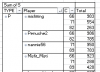
Is this the sort of thing:?
upload_2016-8-2_22-43-16.png
It's showing only type P (pard?), for 4 players, the colour is in column headed C and their total score (S) is showing under Total.
 
=INDEX($BQ11:$BQ11,MATCH(N11&"_G",$BP11:$BP11,0))
Index 'array' is ONE CELL
Match 'lookup array' is ONE CELL

That formula would be more useful if those arrays would be more large...

Hello vletm

Thanks so much, that fixes the problem. i cant believe it was so simple!

It's showing only type P (pard?), for 4 players, the colour is in column headed C and their total score (S) is showing under Total

Thanks p45cal for offering a possible solution but i need to have it all displayed on a webpage without dropdowns. so everything can be seen at once.

have a great day!
FreakyGirl
 
Thanks p45cal for offering a possible solution but i need to have it all displayed on a webpage without dropdowns. so everything can be seen at once.
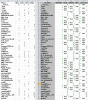
Like this:?
Yours on the right, mine on the left. Visual appearance can be tweaked of course. The main difference is that the one on the left took less than 5 minutes to prepare from the raw data and calculates in an instant, whereas the one on the right took so long to calculate that I went and did something else.
upload_2016-8-5_1-1-27.png
 
The main difference is that the one on the left took less than 5 minutes to prepare from the raw data and calculates in an instant, whereas the one on the right took so long to calculate that I went and did something else.

LOL @ took so long I went & did something else. you have no idea the amount of time it has taken me to do because of that reason.

compared to how long it takes me to do this manually I figured it was the lesser of two evils.

I assumed the time it took was from the INDIRECT formulas for the unique lists.

PLEASE share your insight on how you can do all the calculations needed in that short of a time.

The workbook has changed from what was last posted here. I have uploaded the newer version. In this one, 90% of the calculations are done & summarized.

I had to remove some of the values in order to keep the file size under 1MB.

In case it matters...

Right now there are only 67 rows being used to get everything working... in reality there will be over 400 rows.

Also, the data provided in columns AA to AN will be coming from another worksheet thats to large to include.

PAWN = number of pawns for player
SCORE = score for player
HIGH = getting a 3-4 in singles or 6-7 in pards
MAX = getting a 4 in singles or 7 in pards
TYPE = S for singles or P for pards
FREQ = number of times player has played

I just realized I'm missing a total pawn count for singles & pards individually.

Thanks for your time,
FreakyGirl
 

Attachments

on how you can do all the calculations needed in that short of a time.
See attached. Working with your original file. First I made sure calculation was set to manual. Then 2.5 minutes was spent rearranging your data on a separate sheet; columns Y:Z were copied 4 times vertically and columns AA: DD. AE:AH, AI:AL and finally AM:AP copied. Only one header of course, and I changed the BLUE(66)/GREEN(71) etc. to just Player. Now we have the data in a database-like format as in the attached. The next 2 minutes was taken up doing the rest:
This is the bit that often elicits an audible groan from readers: I used a pivot table to summarise the data. The time invested in putting a pivot table to use is FAR, FAR LESS than the time it takes to devise and maintain, wait for it, 10,264 formulae, among which 999 formulae of this ilk:
=INDIRECT(TEXT(MIN(IF((COUNTIF(BJ$1:BJ1,$AT$11:$BH$509)=0)*ISTEXT($AT$11:$BH$509),ROW($11:$509)/1%+{46,47,48,49,50,51,52,53,54,55,56,57,58,59,60},4^8)),"R0C00"),)&"",
3,400 cells with countif formulae like:
=INDIRECT(TEXT(MIN(IF((COUNTIF(BW$1:BW11,$BT$11:$BT$509)=0)*ISTEXT($BT$11:$BT$509),ROW($11:$509)/1%+{72},4^8)),"R0C00"),)&""
along with 6000 other formulae!
And that's not including how long it takes to re-calculate.

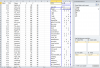
Set up a pivot like so:
upload_2016-8-8_12-7-33.png


Now in the pivot table just replace the 67, 71, 82 etc. with Blue, Yellow, whatever.

Number of formulae required: 0.
File size about <15% of original.

If you want further help setting this up for your other data it's best if you describe what you need along with a small amount of data laid out as you want with the correct values in place.

In the attached, note that, just for appearance's sake, I added a row with the headers Player, Blue,Red Green, Yellow, and hid some rows at the top. You should unhide those rows to see what's going on.
 

Attachments

thanks for your suggestions

i have never done a pivot table before so i will have to read up on that.

wow at the number of formulas. lol what can i say, when i find one that works i use it for everything.

i will download the workbook & play around with it. if i understand you correctly, i can summarize all the data for each player into a pivot table & then be able to pull out what i need for posting on the web.

the data source that the pivot table uses consists of many columns breaking down the game report into each catagory. there is alot of unnecessary info in the report so i use text formulas to extract only what i need & put in the correct color order.

At [18:21] on Table 20: luckylyle99 G( 4 - 288 ) Amber2Play Y( 1 - 135 ) sanbil B( 1 - 122 ) Born2fish R( 0 - 8 )

becomes

sanbil 1 122 B luckylyle99 4 288 G Born2fish 0 8 R Amber2Play 1 135 Y

AA11 on another worksheet will then be =code!CC11 & so on.

with the pivot table way i wont have to copy onto a new worksheet first. i can just use the data as is. very nice.

thanks for your help & insight. im sure i will have questions down the line lol
FreakyGirl
 
Back
Top