
Hello There,
I have a sub 'Worksheet_SelectionChange'. When the user clicks on a row, the current row height is changed to size 28. When the user goes to another row, the previous row is restored to it's normal size. Below is the code:
I would like to make the selected row marked as Bold, values centered. When the control goes to another row it should to normal. Same working as above (row height).
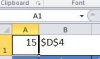
Attached printscreen values of A1 and B1
Could you please advise how can this be achieved?
Many thanks & regards,
Don
I have a sub 'Worksheet_SelectionChange'. When the user clicks on a row, the current row height is changed to size 28. When the user goes to another row, the previous row is restored to it's normal size. Below is the code:
I would like to make the selected row marked as Bold, values centered. When the control goes to another row it should to normal. Same working as above (row height).
Attached printscreen values of A1 and B1
Could you please advise how can this be achieved?
Many thanks & regards,
Don
Code:
Private Sub Worksheet_SelectionChange(ByVal Target As Range)

Dim tbl3 As ListObject

Set tbl3 = ListObjects("Table3")

'On Error Resume Next
If Not (Application.Intersect(Target, Me.ListObjects("Table3").DataBodyRange) Is Nothing) Then
  If Target.CountLarge > 1 Then Exit Sub
  Target.Calculate

  'Reflect current value in cell E1
  Range("E1") = Intersect(tbl3.ListColumns("Container").DataBodyRange, Target.EntireRow).Value

  Application.ScreenUpdating = False
  Application.EnableEvents = False
  'Cells.RowHeight = 15
  If Not Intersect(Target, Range("Table3")) Is Nothing Then
  Range(Range("B1").Value).RowHeight = Range("A1").Value
  Range("A1") = Target.RowHeight
  Range("B1") = Target.Address

  ' Change row
  Target.RowHeight = 28

  'Mark row bold and when cursor leaves, make it normal
  'Make row Center and when cursor leaves, make it normal

  End If

  Application.ScreenUpdating = True
  Application.EnableEvents = True
Range(Range("B1").Value).Font.Bold = False
End If
End Sub
Attachments
Last edited: