
Ethun_Hunt
New Member
Hi, I am using "top-100-cities-chart" sheet by chandoo to convey my query. When a cell is selected and in edit mode, the cells used in the formula gets highlighted if they are from same sheet. For example (see following image) cell K6 is selected from sheet "data" and cells used in the formula are highlighted with red, blue and purple color rectangles.
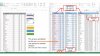
But when formula contains the cell from other sheet it will not be highlighted. For example (see following image) cell D5 from sheet"Chart" is selected. The cell uses X6 cell from sheet "data" but it is not highlighted when we are editing formula in cell D5 from sheet "Chart". It will be very helpful to debug the sheets if it was possible to highlight cells from other sheet while editing the formulas in cell. Is there any way to do this?

Thanx for your time
But when formula contains the cell from other sheet it will not be highlighted. For example (see following image) cell D5 from sheet"Chart" is selected. The cell uses X6 cell from sheet "data" but it is not highlighted when we are editing formula in cell D5 from sheet "Chart". It will be very helpful to debug the sheets if it was possible to highlight cells from other sheet while editing the formulas in cell. Is there any way to do this?
Thanx for your time

