Hi,
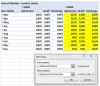
I have created a pivot table with a field represented as a percent of another field.
I now want to create a graph based on this report.
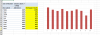
However, the base columns show up (always 100%) and I do NOT want them in the graph!
If I wanted to print the report I could simply hide the base columns BUT for graphing I am unable to suppress the bars for the base columns.
In the attached spreadsheet:
1. Sheet "Proportion", I want to graph just "Discharge / Death" (the yellow column).
2. Sheet "SPINE vs HIMS" I want to graph only Admission, Death and Discharge for SPINE only (The yellow columns)
I can click on a data series, select "format data series"and set fill to "no fill". This might be if i Have only one series. But with several series as in (2) above it is visually wrong. More importantly this is not the correct way to do it....!
Any Idea how I could resolve this?
Clemens
I have created a pivot table with a field represented as a percent of another field.
I now want to create a graph based on this report.
However, the base columns show up (always 100%) and I do NOT want them in the graph!
If I wanted to print the report I could simply hide the base columns BUT for graphing I am unable to suppress the bars for the base columns.
In the attached spreadsheet:
1. Sheet "Proportion", I want to graph just "Discharge / Death" (the yellow column).
2. Sheet "SPINE vs HIMS" I want to graph only Admission, Death and Discharge for SPINE only (The yellow columns)
I can click on a data series, select "format data series"and set fill to "no fill". This might be if i Have only one series. But with several series as in (2) above it is visually wrong. More importantly this is not the correct way to do it....!
Any Idea how I could resolve this?
Clemens