• Hi All

    Please note that at the Chandoo.org Forums there is Zero Tolerance to Spam

    Post Spam and you Will Be Deleted as a User

    Hui...

  • When starting a new post, to receive a quicker and more targeted answer, Please include a sample file in the initial post.

Getting the data for a particular date in a separate worksheet.

VDS

Member
Dear All experts,

I am attaching herewith an excel file of two worksheets.

Sheet 1 is named Master Data and Sheet No.2 is named Daily Report.
Output is required in the “Daily Report” worksheet for a particular day the same date is entered manually by the user. The dates in the Master Data file is changed when that particular date is over.

The query has to be entered in the Cell E2 of “Daily Report”. The process should be looking through entire data from “Master Data” based on query and display as per format in “Daily Report”. and don’t want to disturb the Master Data worksheet by any other commands like sorting, conditional formatting, etc.

I am using excel in the Office Professional Plus 2010 version.

Any function like Vlookup, Index+match or any of the array commands most welcome.

Thank you all in advance.

Regards
VDS
 

Attachments

Create a parameter query in Power Query as shown in the attached.

Code:
let
    Source = Excel.CurrentWorkbook(){[Name="Table1"]}[Content],
    #"Changed Type" = Table.TransformColumnTypes(Source,{{"NDOH", type date}}),
    #"Filtered Rows" = Table.SelectRows(#"Changed Type", each ([NDOH] =Table3))
in
    #"Filtered Rows"
 

Attachments

Thanks for reply.

Is it a macro ? Some error message is coming.

pls see the screenshot.

I am using excel in the Office Professional Plus 2010 version.

VDS
 

Attachments

VDS

Why do Your sample expected result has only two rows with 13/Dec/2025?
... missing row 6 from MASTER DATA or how?

Could You use Auto-Filter -option with MASTER DATA-sheet to get Your 'daily report'?
... without Daily Report-sheet
 

VDS

Why do Your sample expected result has only two rows with 13/Dec/2025?
... missing row 6 from MASTER DATA or how?- Answer. This is a sample report not generated through function or formula.

Could You use Auto-Filter -option with MASTER DATA-sheet to get Your 'daily report'?
... without Daily Report-sheet: Answer: There are few templates to be added in the Daily report sheet and later on to be generated as PDF.

Hence both worksheets are required. In fact there are so many live data to be entered in the excel file. Once any formula is ready, I am so happy to use it.

Regards
VDS
 
Even a sample report should be valid.

Few samples:

Scroll down until
>> Filtering without FILTER function
 
Is it a macro ? Some error message is coming.
Power Query is a free AddIn for Excel 2010 and 2013, and is built-in functionality from Excel 2016 onwards (where it is referred to as "Get & Transform Data").

It is a powerful yet simple way of getting, changing and using data from a broad variety of sources, creating steps which may be easily repeated and refreshed. I strongly recommend learning how to use Power Query - it's among the most powerful functionalities of Excel.

- Follow this link to learn how to install Power Query in Excel 2010 / 2013.

- Follow this link for an introduction to Power Query functionality.

- Follow this link for a video which demonstrates how to use Power Query code provided.
 
Sir

Happy new year 2026 and wish you a good success throughout the year.

I have few queries in this regard.

Attaching herewith the revised excel file. Here I have added sheet no.3 which contains two columns. first column is the serial number and second column is the name of court.

The daily report is to be generated in such a way that the first column "COURT" take the data from "Master Data" as per the excel file of sheet 3.
In the the daily report sheet, total number of cases may come depending on the situation of sheet named "sheet 3". For eg. As on 5th Jan, the report is generated wherever applicable after checking the sequence of "sheet 3" from Sr no. 1 to 15. Depending on situation it may vary more or less. The daily report is to be sorted as per the "Helper Column". I would also be happy to add more serial numbers since there is so much data to be entered daily.

It is good to use power query, still my small office does not permit to use the power query due to server issues.

Kindly help me to solve the issue as per the revised query.

regards

VDS
 

Attachments

@vletm,

Custom List is so far good and working fine. Few queries are to be sorted.

I have tried to colour for the rows as per sequence.

All the rows highlighted with red should come first i. e "SC" should be taken together and come first.
the Yellow marked DHC below. Here, the SC are displaying separately.
Any entry in between SC and DHC should come after SC. This is the sequence as per "Sort worksheet"
the Columns heading with "ARB" should come last.

Please correct me if anything is required from my end.

If a report is taken as per the specified date, this is the sequence of date wise report.

Sample sheet attached.

Regards
VDS
 

Attachments

As written Dec 20, 2025:
usage: modify E2 cells date
... means that You has had to (at least try to ) modify that cell E2 (date) before the code will sort data.
Did You do that?

>> Next, it'll sort while activate that sheet too.
 

Attachments

Yes. I modified the data in both the excel sheets. Here there are two issues. Issue No.1 is changing the dates in the master file and putting a new date in the E2 cell so that the entire row for that particular date is displayed. I have modified the date and put enter. The system takes the new data as per the new date. Hence code for this issue is working perfect.

The second issue is to get the data sorted with each date focusing on the COURT column. starting with SC and ending with ARB. For each CRT name there may be one row or more than one even NIL.

Any command like SORT and FILTER clubbed together will solve this ?

VDS
 
My usage means only about Daily Report-sheets cell E2.
The most smoothest thing would solve this that You could explain - what do You really need at once?
The original is/was Getting the data for a particular date in a separate worksheet ... done?
Next to sort with specific COURT-list ... done?
... or what is missing, if something missing?
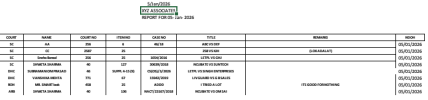
Below, You could see output after sorting (after modified E2 or activate that sheet) ...
Screenshot 2026-01-04 at 14.19.34.png
 
Next to sort with specific COURT-list ... done?. This needs to be sorted out. As per your picture/screenshot, it is fine. Anyway, I will study each and everything very carefully and revert.

Thank you for your support.

VDS
 
Back
Top