• Hi All

    Please note that at the Chandoo.org Forums there is Zero Tolerance to Spam

    Post Spam and you Will Be Deleted as a User

    Hui...

  • When starting a new post, to receive a quicker and more targeted answer, Please include a sample file in the initial post.

Fit picture in cell and filter

Thomas Kuriakose

Active Member
Dear Sirs,

I prepared a sheet with pictures for identification. The pictures are manually adjusted within the cell.

Is there a way to fit the pictures within the cell.

Also, when using filter for any column, all the pictures are overlapped, can this be displayed as a value or text entry without overlaps.

Thank you so much,

with regards,
thomas
 

Attachments

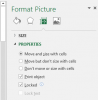
Right click on image. Format Pictures.

Select Properties and Select "Move and Size with Cells".

upload_2015-10-21_13-32-37.png

P.S. To select all picture at once and change property for all. Click on one picture and hit Ctrl + A. Then follow same process.
 
Last edited:
Thomas

a few issues here

You can use Alt+Drag to snap an image to the cell boundaries
Chihiro explains how to stop the images moving/resizing

But the issue is that Images don't belong to a cell, they simply float infront of the cell.

Images hence don't respond to hidden/grouped properties of cells, Rows or Columns
 
Respected Sirs,

Thank you so much for all the information.

So, this means if we filter the overlaps will be there as the image does not belong to a cell.

Correct me if I have understood this.

Secondly can we have a VBA to size the image to the cell width and height.

Thank you so much once again.

with regards,
thomas
 
Thomas,

If you follow my instruction it will work with filter (tested with 2013).

For VBA just record the macro as you follow the steps and modify it a bit.

If you have issue after you apply the steps and record macro. Post the code and I'm sure I or others in the forum can help you.
 
Respected Sirs,

Thank you so much once again for all the valuable inputs and solution.

I have Excel 2010. I will try as suggested and get back for any clarifications.

Thanks once again,

with regards,
thomas
 
Back
Top