• Hi All

    Please note that at the Chandoo.org Forums there is Zero Tolerance to Spam

    Post Spam and you Will Be Deleted as a User

    Hui...

  • When starting a new post, to receive a quicker and more targeted answer, Please include a sample file in the initial post.

Find the last cell with data

Pierre

Member
I was looking for a formula which gives the row of the last cell with data. I found the following formula: =MATCH(9.9E+307,A:A,1)

(found here: http://www.mrexcel.com/forum/excel-...2-formula-find-last-cell-data-return-row.html)

But I couldn't understand how the formula works, (especially why use 9.9E+307), so I was hopping that someone could give some explanations?

Furthermore this formula will only give the row of the last cell with a number, but doesn't work with text. What formula would work if there is both number and text in the range?

Thank you
 
Morning Pierre,

The MATCH function, with the last argument being 1, is looking down through the list, and will stop when it finally finds a value greater than or equal to the search value. That bit is the key to knowing how this formula works.

By giving an arbitrary large number (it doesn't have to be 9.9E+307, just has to be guaranteed to be bigger than any number in your list), the MATCH function will end up looking at every number, and when it gets to the end, it goes "well, I couldn't find what you wanted, but this is as close as I got!" and return position of last cell it looked at. So, for numbers, it tried to find BigNumber in your list, and can't find it (by design), so it gives the last cell with a number.

Why just the numbers? Because of what we said to look for. MATCH is "smart" and knows that since you gave a number input, it doesn't need to look at cells with text. If we wanted to check last cell with just text, we could do:
=MATCH("ZZZ",A:A,1)

The "ZZZ" is again, somewhat arbitrary, we just need a text that will come after any other text alphabetically.

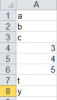
So, if we had data like this:
upload_2015-2-3_9-18-42.png
the first formulas would return 6, and the second formula would return 8.

What if we want the absolute last cell? We can combine the two together, knowing that we want the bigger of the two numbers.
=MAX(MATCH(9.9E+307,A:A,1),MATCH("ZZZ",A:A,1))
 
Pierre

You can use any large number that is likely to be larger than the largest possible number you will ever use
So If you are certain of only using numbers from 1 to 10 you can use:
=MATCH(11,A:A,1)

For text use a text string that will be greater than any Text likely to be used
eg: =MATCH("ZZZZZZZZZZZ",A:A,1)

But to be sure I'd use
=MATCH(Rept("Z",15),A:A,1)
 
Back
Top