
You are using an out of date browser. It may not display this or other websites correctly.
You should upgrade or use an alternative browser.
You should upgrade or use an alternative browser.
Find duplicate rows
- Thread starter Kyrre
- Start date


Kyrre
Member
Select range A2:D41. Go to Conditional Formatting and choose "Use a formula to determine which cells to format".
Thanks a lot for helping me out. Could u please post book with formula? BEcause of my norwegian language, it is trouble with translation.
Kyrre
Member
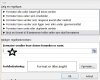

It worked, but I got errormessage when i used copy paste. I have 2000 rows to check, so it is a bit annoying,.,.Here you go.
Does picture show correct place to add formula?
Last edited:
Kyrre
Member
I tried to paste formula , but got error message. I used same sheet as u have, but without formula. However, thanks a lot. I will figure it out!Yes. But you will need to edit the range of the formula. As it only checks for existing data on your sample sheet.
Kyrre
Member
It was syntax error in my brain,.,. I figured it out! Thanks a lotOh, depending on language. You may need to replace "," with ";".
