Hi
My data table has 2 date columns in this format i.e. 23/12/2015. I have created a pivot table. In the Pivot Table Fields, I have dragged all the date columns to 'Rows'.
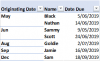
However, in the pivot table, 1 column (Date Due) show dates though not in correct format i.e. 23/12/2015 but the in other column (Originating Date), instead of the date itself, month is shown e.g. December.
Of the little that I know of Pivot, I have exhausted my avenues. Any help would be greatly appreciated.
Show/Collapse buttons - I don't want these hence unticked the box.
for Date Due also, I want Pivot Table to show 5/06/2019 not 5-Jun, and so on.
Copy pasted hereunder: First three columns from the data-set whereas the last three columns is from the Pivot Table
Regards
Tony
My data table has 2 date columns in this format i.e. 23/12/2015. I have created a pivot table. In the Pivot Table Fields, I have dragged all the date columns to 'Rows'.
However, in the pivot table, 1 column (Date Due) show dates though not in correct format i.e. 23/12/2015 but the in other column (Originating Date), instead of the date itself, month is shown e.g. December.
Of the little that I know of Pivot, I have exhausted my avenues. Any help would be greatly appreciated.
Show/Collapse buttons - I don't want these hence unticked the box.
for Date Due also, I want Pivot Table to show 5/06/2019 not 5-Jun, and so on.
Copy pasted hereunder: First three columns from the data-set whereas the last three columns is from the Pivot Table
Regards
Tony
| Originating Date | Name | Date Due | Originating Date | Name | Date Due | ||
| 23/12/2015 | Sam | 18/09/2019 | May | Black | 5-Jun | ||
| 11/05/2016 | Nathan | 14/06/2019 | Nathan | 14-Jun | |||
| 31/05/2016 | Black | 5/06/2019 | Jun | Sammy | 9-May | ||
| 21/06/2016 | Scott | 24/06/2019 | Scott | 24-Jun | |||
| 13/09/2016 | Jamie | 16/09/2019 | Aug | Goldie | 2-Jul | ||
| 23/06/2008 | Sammy | 9/05/2019 | Sep | Jamie | 16-Sep | ||
| 30/08/2016 | Goldie | 2/07/2019 | Dec | Sam | 18-Sep | ||