• Hi All

    Please note that at the Chandoo.org Forums there is Zero Tolerance to Spam

    Post Spam and you Will Be Deleted as a User

    Hui...

  • When starting a new post, to receive a quicker and more targeted answer, Please include a sample file in the initial post.

Delta on the status bar

Alan Ramsay

New Member
Hi there,

I have been hoping to find an "easy", (for that read non VBA), way of getting the difference between two values to be displayed on the status bar - does anyone know of an add-in or alternative to provide that facility?

Cheers,
Alan
 
Hi Alan ,

I find this somewhat strange ; you don't want VBA , but you don't mind an add-in !

The status bar cannot be accessed by formulae , so a formula-based solution is not possible , unless there is some esoteric Excel 4.0 macro function which can do this.

As far as an add-in is concerned , you can convert the code which is available on the net. See these two links for ideas :

http://dailydoseofexcel.com/archives/2004/12/09/selection-stats/

http://superuser.com/questions/476690/adding-a-function-to-customized-status-bar-in-excel

Narayan
 
Hi Alan ,

I find this somewhat strange ; you don't want VBA , but you don't mind an add-in !

The status bar cannot be accessed by formulae , so a formula-based solution is not possible , unless there is some esoteric Excel 4.0 macro function which can do this.

As far as an add-in is concerned , you can convert the code which is available on the net. See these two links for ideas :

http://dailydoseofexcel.com/archives/2004/12/09/selection-stats/

http://superuser.com/questions/476690/adding-a-function-to-customized-status-bar-in-excel

Narayan


Hi Narayan,

Many thanks for the respons and help. I mentioned trying to stay away from VBA due to my inability to use it effectively :-)

I looked at the solutions in the links you provided but not sure they would give me what I was hoping for, (an easy answer). I wonder why MS don't add something like the IMSUB function to the status bar selections, I get the point that the order of selection matters but isn't that really down to the user?

Anyway thanks again for being so helpful.

Cheers,
Alan
 
Alan

I know you said you don't want VBA but it's pretty simple

1. Copy the code below
2. In your model press Alt F11
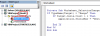
3. Double click the worksheet in the VBA Project window (Left Pane - see below)
Capture.PNG

4. Paste the code in the right pane
5. Go back to Excel Alt F11
6. Save as a *.xlsm file type
7. Enjoy

Code:
Private Sub Worksheet_SelectionChange(ByVal Target As Range)
If TypeName(Target) = "Range" Then
  If Target.Cells.Count > 1 Then
  Application.StatusBar = "Delta (Max-Min): " & Application.WorksheetFunction.Max(Target) - Application.WorksheetFunction.Min(Target)
 
  End If
End If
End Sub
 
Hi Hui!

Please allow me to make lil bit modification in your code..

Hi Alan!
Dont forget to re-set the status bar.. Its really annoying and its stays with the application forever.

something like this...
Code:
Private Sub Worksheet_SelectionChange(ByVal Target As Range)
If TypeName(Target) = "Range" Then
  If Target.Cells.Count > 1 Then
Application.StatusBar = "Delta (Max-Min): " & Application.WorksheetFunction.Max(Target) - Application.WorksheetFunction.Min(Target)
  Else
  Application.StatusBar = False
  End If
End If
End Sub
 
Last edited by a moderator:
Back
Top