Haroon Rashid
New Member
Hello
I am using a huge excel sheet and want to create a macro which can check each cell in a row and if its below 1, hides it and in future if number changes, un-hides it.
Just to explain briefly:
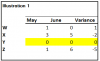
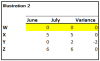
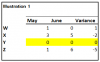
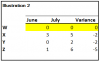
I want Macro to hide the row "Z" only since all the values in the column are Zero, but next month if value changes, I want macro to un-hide.
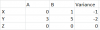
Please also help me, to use the same macro, on rest of the sheets in file.
I used below macro but it check only Column 2 and hides the row even colum 3 has a value.
"
Sub HideRowsWithZero()
BeginRow = 1
EndRow = 500
ChkCol = 2
For RowCnt = BeginRow To EndRow
If Cells(RowCnt, ChkCol).Value < 1 Then
Cells(RowCnt, ChkCol).EntireRow.Hidden = True
Else
Cells(RowCnt, ChkCol).EntireRow.Hidden = False
End If
Next RowCnt
End Sub
"
Your help is really appreciate.
Regards
Haroon
__________________________________________________________________
I am using a huge excel sheet and want to create a macro which can check each cell in a row and if its below 1, hides it and in future if number changes, un-hides it.
Just to explain briefly:
I want Macro to hide the row "Z" only since all the values in the column are Zero, but next month if value changes, I want macro to un-hide.
Please also help me, to use the same macro, on rest of the sheets in file.
I used below macro but it check only Column 2 and hides the row even colum 3 has a value.
"
Sub HideRowsWithZero()
BeginRow = 1
EndRow = 500
ChkCol = 2
For RowCnt = BeginRow To EndRow
If Cells(RowCnt, ChkCol).Value < 1 Then
Cells(RowCnt, ChkCol).EntireRow.Hidden = True
Else
Cells(RowCnt, ChkCol).EntireRow.Hidden = False
End If
Next RowCnt
End Sub
"
Your help is really appreciate.
Regards
Haroon
__________________________________________________________________
Mod edit : thread moved to appropriate forum !