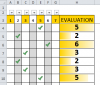
T tomas Active Member Jun 3, 2015 #1 Hi I have a group of options buttons which influences a value in cell to the right. I need many of this group and every group referring to a cell on the right . Is it possible ? see attachement Attachments test.xlsx test.xlsx 60.7 KB · Views: 0
Hi I have a group of options buttons which influences a value in cell to the right. I need many of this group and every group referring to a cell on the right . Is it possible ? see attachement
Hui Excel Ninja Staff member Jun 3, 2015 #2 Tomas Of course it is possible, but is it worth the effort Have a look at the technique Daniel Ferry has described here http://www.excelhero.com/blog/2011/03/excel-dynamic-checkmark.html This may be a better solution
Tomas Of course it is possible, but is it worth the effort Have a look at the technique Daniel Ferry has described here http://www.excelhero.com/blog/2011/03/excel-dynamic-checkmark.html This may be a better solution
T tomas Active Member Jun 3, 2015 #3 THanks Hui , looks interesting , hope to be able to adjust to my needs. Hui said: Tomas Of course it is possible, but is it worth the effort Have a look at the technique Daniel Ferry has described here http://www.excelhero.com/blog/2011/03/excel-dynamic-checkmark.html This may be a better solution Click to expand...
THanks Hui , looks interesting , hope to be able to adjust to my needs. Hui said: Tomas Of course it is possible, but is it worth the effort Have a look at the technique Daniel Ferry has described here http://www.excelhero.com/blog/2011/03/excel-dynamic-checkmark.html This may be a better solution Click to expand...
Hui Excel Ninja Staff member Jun 3, 2015 #4 See how this goes Double click in Columns A:G and the macro will place the column Number 1 to 7 in the cell Column H just sums the Row to the left Enjoy Attachments test.xlsm test.xlsm 58.7 KB · Views: 0
See how this goes Double click in Columns A:G and the macro will place the column Number 1 to 7 in the cell Column H just sums the Row to the left Enjoy
T tomas Active Member Jun 3, 2015 #5 Wonderfull !!!! really great !!! Hui said: See how this goes View attachment 19473 Double click in Columns A:G and the macro will place the column Number 1 to 7 in the cell Column H just sums the Row to the left Enjoy Click to expand...
Wonderfull !!!! really great !!! Hui said: See how this goes View attachment 19473 Double click in Columns A:G and the macro will place the column Number 1 to 7 in the cell Column H just sums the Row to the left Enjoy Click to expand...