JensBCN
New Member
Hello from Barcelona,
just signed up ... my first question ... excited
I have 2 tabs. Tab 1 shows in column B the employee number and in column F a project name.
Tab 2 shows in column C the employee number (named "Codigo") as well and in column F the project name.
This project name needs to be copied if employee number matches.
Copied automatically into a blank field ... see red arrow Tab2
TAB1
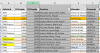
Nr.Empleo (above) = Codigo (below)
TAB2
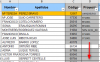
Looking forward to a smart solution.
Thanks / Jens
just signed up ... my first question ... excited
I have 2 tabs. Tab 1 shows in column B the employee number and in column F a project name.
Tab 2 shows in column C the employee number (named "Codigo") as well and in column F the project name.
This project name needs to be copied if employee number matches.
Copied automatically into a blank field ... see red arrow Tab2
TAB1
Nr.Empleo (above) = Codigo (below)
TAB2
Looking forward to a smart solution.
Thanks / Jens