
• Hi All

    Please note that at the Chandoo.org Forums there is Zero Tolerance to Spam

    Post Spam and you Will Be Deleted as a User

    Hui...

  • When starting a new post, to receive a quicker and more targeted answer, Please include a sample file in the initial post.

Change Custom Formatted Date into dd-mmm-yyyy

Khalid NGO

Excel Ninja
Hello Everyone,
Greetings...

I have a sheet where I have manage the dates in Column A with custom format 00"-Dec-2011" (fast way for data entry purpose).

See below image:
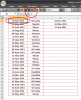
Custom Formatted Date.PNG

You can see that the custom format is not same in all rows.
Sample sheet also attached.

Is there any way to get the actual date instead of a single number in Column D?

Thanking you in anticipation.

Khalid
 

Attachments

Side note, with all the custom formatting that this would require, is it really that much faster than using the keypad to input a proper date? Or even, using some helper columns to store years and months, and then you could use the DATE function to build a date. I guess my point is that there are ways to work with what we have, but you may want to reconsider how the data is being input originally.

Back to solution ideas, this macro would also do the conversions
Code:
Sub ConvertTextDates()
Dim c As Range
Application.ScreenUpdating = False
With Range("A2:A20")
    For Each c In .Cells
        c.Value = c.Text
    Next c
    .NumberFormat = "dd-mmm-yyyy"
End With
Application.ScreenUpdating = True
End Sub
 
If you need to automate it you will need to use a User Defined Function to access the displayed text of the dates

In VBA (Alt F11) add a new code module
insert the following code
upload_2014-8-6_21-52-41.png

Code:
Function myText(myCell As Range) As Variant
  myText = myCell.Text
End Function


Then you can use a function like
D1: =DATE(RIGHT(mytext(B1),4),MONTH(1&MID(mytext(B1),4,3)),LEFT(mytext(B1),2))

upload_2014-8-6_21-53-55.png
 
Hi Khalid,
Sathish's way is the cleanest & easiest way to do it. If you are ok to use a custom function and if you want it to be dynamic - write something like this

Code:
Function getNumberFormat(cell as range)
  getNumberFormat = cell.NumberFormat
End Function
This function would return your number format with which you can construct the date using date / datevalue functions

Anand
 
Side note, with all the custom formatting that this would require, is it really that much faster than using the keypad to input a proper date? Or even, using some helper columns to store years and months, and then you could use the DATE function to build a date. I guess my point is that there are ways to work with what we have, but you may want to reconsider how the data is being input originally.

Back to solution ideas, this macro would also do the conversions
Code:
Sub ConvertTextDates()
Dim c As Range
Application.ScreenUpdating = False
With Range("A2:A20")
    For Each c In .Cells
        c.Value = c.Text
    Next c
    .NumberFormat = "dd-mmm-yyyy"
End With
Application.ScreenUpdating = True
End Sub


Hi Sir Luke,

Actually i mentioned the "fast way" coz my data is look like this:
Custom Formatted Date-2.PNG

therefore it is easy to enter just one or two number and get full date.

Using helper columns for month / year is a very good idea, i will happy to use this technique from onward.

Now i will convert my formatted dates into original ones and keep your idea in my mind. You are Awesome Sir Luke.
Many thanks,
God Bless You.
 
If you need to automate it you will need to use a User Defined Function to access the displayed text of the dates

In VBA (Alt F11) add a new code module
insert the following code
View attachment 9127

Code:
Function myText(myCell As Range) As Variant
  myText = myCell.Text
End Function


Then you can use a function like
D1: =DATE(RIGHT(mytext(B1),4),MONTH(1&MID(mytext(B1),4,3)),LEFT(mytext(B1),2))

View attachment 9128

Excellent solution Sir Hui,
You are a Genius.

Thanks,
God Bless You.
 
Hi Khalid,
Sathish's way is the cleanest & easiest way to do it. If you are ok to use a custom function and if you want it to be dynamic - write something like this

Code:
Function getNumberFormat(cell as range)
  getNumberFormat = cell.NumberFormat
End Function
This function would return your number format with which you can construct the date using date / datevalue functions

Anand

Thanks Ananda Kumar for your response.

Although my problem is solved, I am trying to get result keeping in mind Sir Hui's formula mentioned above.
 
Back
Top