• Hi All

    Please note that at the Chandoo.org Forums there is Zero Tolerance to Spam

    Post Spam and you Will Be Deleted as a User

    Hui...

  • When starting a new post, to receive a quicker and more targeted answer, Please include a sample file in the initial post.

Can not hide/Delete Sheet oR Workbook from personnel.xlsb

Dear All Experts,

I have a problem that personnel.xlsb explicitly unhidden.
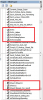
can not delete visible extra file thisworkbook1.jpg

It's Extra Sheet Can not Hide/ Delete
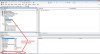
VBA.jpg

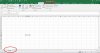
Personnel.xlsb explicitly displayed though hide tick mark is ok.
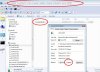
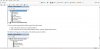
personnel  SCREENSHOT.jpg

can not hide sheet from personel.xlsb file.jpg


Please guide what to do

Regards,

Chirag Raval
 
Last edited:
Dear Sir @AlanSidman,

Thanks for reply.

Already done that job.
"Can not change class of sheet " something like that displayed .
Sorry for forgot to mention in my main thread.

So? It's currupted forever?
Or any other solution available.

Hope there are some way found.

Regards,
Chirag Raval
 
Dear Sir @vletm ,

Thanks for you reply.

I know that if only 1 sheet there in the file, can not hide or delete.

May be I loss the hierarchy structure of VBA Project file that's
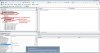
cover, forms, Sheet object, Modules.. as per attached screen shot.

because of may be I accidently delete all class modules from this project.

STRUCTURE DISTROYED.png

I think there if we use statement "ThisWorkbook" in personal.xlsb for work on active workbook, "Thisworkbook" means that workbook in which code resides ...and in terms of personal.xlsb, we must not use this "workbook " words
iof we want to work on workbook except persona.xlsb. what your guide line sir?

I have doubt that I used thisworkbook in my personal.xlsb that create this issue.

How to recover this structure.. ?

hope your guide because I think lost everything from my project.

Regards,

Chirag Raval
 
Last edited:
Chirag R Raval
Your original wish was to hide or even delete the last sheet...
and now You wrote that You knew that ... hmm?
#5 reply ..
You have created 'all-in-one' and then something unwanted happen.
That would happen ... and that would a/effect to many of Your files.

Have You checked Your backups?
Could there find a file, which would work better?
 
Dear Sir @vletm ,

Something unexpected happen in normal personal.xlsb which already hidden.
so its visible that sheet though hidden personal.xlsb so I want to hide or delete that sheet created from one unknown macro run this sheet created in personal.xlsb and visible I want to just delete that sheet.

but after check my personel.xlsb i found this file lost its structure.
hierarchy of modules, class modules, forms are lost & its transform in general 1 hierarchy in other word all '+" signs lost that differential or part this project
in 3 types of structure.

may be "Thisworkbook" make all mess-up in personal.xlsb

Though all macro work okay but I lost hierarchy. I don't know what is effect of this in future.

I already repair Ms office. create new personal .xlsb but its created as same with error in single hierarchy.


may be I must now un-install excel and re-install it.

sir, what is your opinion?

Regards,

Chirag Raval
 
Chirag R Raval
My opinion is ...
forget that personal.xlsb
and
use files which has needed features.

Also Un-install Office,
power off and
install Office again
would sometimes help.
 
Back
Top