Dear All,
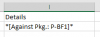
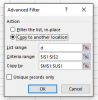
With reference to the attach sample file, I would like to drag the detail from “Data” Sheet to “Sheet1” with the help of Advance Data Filter only that have “[Against Pkg.: P-BF1]” in the column “I” of “Data” Sheet.
Please help me how to sort out my problems?
With reference to the attach sample file, I would like to drag the detail from “Data” Sheet to “Sheet1” with the help of Advance Data Filter only that have “[Against Pkg.: P-BF1]” in the column “I” of “Data” Sheet.
Please help me how to sort out my problems?