• Hi All

    Please note that at the Chandoo.org Forums there is Zero Tolerance to Spam

    Post Spam and you Will Be Deleted as a User

    Hui...

  • When starting a new post, to receive a quicker and more targeted answer, Please include a sample file in the initial post.

VBA formula not working

harukofumiyo

New Member
Hi!

I have a workbook with 2 worksheets; worksheet 1 was given a name as "Names" and worksheet 2 was given a name as "Data".

In worksheet 1, I have a list of data which consist of column A - Name, column B - number, column C - Tpass, column D - pic,etc. I have a total of 60 rows with these data. Each row in column A has a different name. Eg: Row A1 is Jasmine, Row A2 is Wicha, Row A3 is Won and so on until row 65. I wan to, when I click on row A1, Jasmine's name, it will appeared all the details sheet 2 (meaning to say, once i click on Jasmine, Jasmine will appear is C2 data tab and that it will show the rest of the details. And if I click on Wicha, Wicha's details will be shown in sheet 2. However I do not know how to put into macro formula. Pls check if my formula is right. Pls kindly assist me. Thanks alot!
 

Attachments

harukofumiyo

You seems to have same challenge as this thread...
Is Your data-sheet now as it should be?
 
i think thats my colleague. we are working on setting up a database but cant find a solution. yes that attached is the data. thanks alot!
 

harukofumiyo

Please, give a message to Your colleague too.

Your thread's title could be better
- or where is connection with it?

Here one sample for both of You.
Instructions:
#1 Apply to names-sheet's row 4 all references to data-sheet as I've done few of those.
... be careful to apply those to avoid overwriting
... missing reference cells are yellow
#2 Before modify names-sheet's the 1st column, make sure that names-sheet's cell A5 is not bold.
... select names-sheet cells A5 to swap bold
#3 for 'normal' use - names-sheet's cell A5 should be not bold
... select any the 1st column's text to refresh data-sheet's value (as You've applied in #1)
 

Attachments

harukofumiyo

Please, give a message to Your colleague too.

Your thread's title could be better
- or where is connection with it?

Here one sample for both of You.
Instructions:
#1 Apply to names-sheet's row 4 all references to data-sheet as I've done few of those.
... be careful to apply those to avoid overwriting
... missing reference cells are yellow
#2 Before modify names-sheet's the 1st column, make sure that names-sheet's cell A5 is not bold.
... select names-sheet cells A5 to swap bold
#3 for 'normal' use - names-sheet's cell A5 should be not bold
... select any the 1st column's text to refresh data-sheet's value (as You've applied in #1)

Hi Vletm! Thanks for the fast response.

So sorry i couldnt quite understand the below:
#1 Apply to names-sheet's row 4 all references to data-sheet as I've done few of those.
... be careful to apply those to avoid overwriting
... missing reference cells are yellow

May i know if you had applied a few? Which are the codes and where should i continue?

I am so sorry that i am really very confused. :(

May i know what is the 4 and what the 5?

Thank you!
 

harukofumiyo
#1 Apply to ...

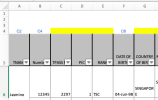
Below is a snapshot from left-top of names-sheet.
Screenshot 2023-07-16 at 12.48.28.png
> 4 and 5 are rows numbers ( as written Apply to names-sheet's row 4 )
> I applied few references as a sample for You ... C2, C4 and C8 in row 4 - You'll apply other references, which are marked with yellow.
> eg C2 makes possible that selected rows A-columns values will paste to Data-sheet's cell C2.

The code is as You've written before ( Means that You can use it as it is now ).
I write three steps in my instructions, which You should follow (with Your colleague).
 

harukofumiyo

#1 Apply to ...

Below is a snapshot from left-top of names-sheet.
View attachment 84669
> 4 and 5 are rows numbers ( as written Apply to names-sheet's row 4 )
> I applied few references as a sample for You ... C2, C4 and C8 in row 4 - You'll apply other references, which are marked with yellow.
> eg C2 makes possible that selected rows A-columns values will paste to Data-sheet's cell C2.

The code is as You've written before ( Means that You can use it as it is now ).
I write three steps in my instructions, which You should follow (with Your colleague).
Hi!

The code that I’ve written before which is the one inside my attachment? Hmm how can I add on?
 
Hi!
harukofumiyo
Did You get this work?
... You opened a new thread, which could use something same too.
Hi! I really loved it and it can work!

But I’m having this problem. Marco can’t work on sharepoint?

I and creating this database and my colleagues will be using this together.

Can this work with formula if I dun use Marco?

thanks!
 
Your Can this work with formula if I dun use Marco?
No, it cannot work as You ... or harukofumiyo has written in #1 reply.
Why did harukofumiyo asked to do something which cannot use?
There are possibilities to do something same kind, which give same results with formulas.
If You or harukofumiyo really have own time to do it, You have a clear idea in my file.
 
Dear @harukofumiyo the problem seems to be solved, pending the #1 task that @vletm has assigned to you. The VBA macro is functioning good in background.

What you have to do is -
1. Get the Cell Address of the field that is required in ("data") sheet and copy that address above the corresponding column in "Names" Sheet.
2. All other cells in the 4th row of 1st sheet must be colored yellow.
3. The font type of the A5 Cell acts as a "Lock/Unlock" feature. If it is BOLD, the code is now enabled and will update the "data" sheet when you click on individual cell. If A5 is NOT BOLD, the code is now disabled but this will allow you to add additional entries in the first column of the "Names" Sheet.

Hope this makes it clear.

Great job @vletm.


*Edit 1 - Apologies for error in spelling your name
 
Your Can this work with formula if I dun use Marco?
No, it cannot work as You ... or harukofumiyo has written in #1 reply.
Why did harukofumiyo asked to do something which cannot use?
There are possibilities to do something same kind, which give same results with formulas.
If You or harukofumiyo really have own time to do it, You have a clear idea in my file.
There are possibilities to do something same kind, which give same results with formulas. — serious? I would like to learn / know more!
 

amohan826

What did You try to explain with Your reply?
It worked as it has asked... but ...
... now, those would like to use something different.

Gredang

About Your: I would like to learn / know more!
Did You read If You or harukofumiyo really have own time to do it, You have a clear idea in my file.
Above means ...
# You needs some time
# You needs to check that clear idea from my file
# You needs to write basically one formula and paste it few times
... plus You gotta do some other minor things.
>> then You could learn / know something.
 

amohan826

What did You try to explain with Your reply?
It worked as it has asked... but ...
... now, those would like to use something different.

Gredang

About Your: I would like to learn / know more!
Did You read If You or harukofumiyo really have own time to do it, You have a clear idea in my file.
Above means ...
# You needs some time
# You needs to check that clear idea from my file
# You needs to write basically one formula and paste it few times
... plus You gotta do some other minor things.
>> then You could learn / know something.
Hi. Yes I’m just checking if this could still work the same if I do not use Marco but only formula.
 
Back
Top