
• Hi All

    Please note that at the Chandoo.org Forums there is Zero Tolerance to Spam

    Post Spam and you Will Be Deleted as a User

    Hui...

  • When starting a new post, to receive a quicker and more targeted answer, Please include a sample file in the initial post.

Variable Column Widths

NikkiDull

New Member
Hi, I am trying to create a chart that has General Margin along with dollars and make each of the columns different widths based on the their dollar amounts. I have read through Google a ton of examples of how to do this with changing the axis to Time Scale. However, I have Excel 2010 and cannot figure this out. Any help would be greatly appreciated. I have spent hours this morning trying to accomplish this.

Thanks.
 
Hello, and welcome to the forum!
Do you have some sample data, and/or a picture of what you're trying to accomplish? You can use a time-axis in XL, I'm just not sure what image you are trying to create.
 
Hello, and welcome to the forum!
Do you have some sample data, and/or a picture of what you're trying to accomplish? You can use a time-axis in XL, I'm just not sure what image you are trying to create.
I have Excel 2010 and do not see the Time Axis - where is that? For example I have a total of say $20M and I have different items that make up the $20M - some more than others. I want each bar that represents part of that $20M to be a thickness of the % it makes up. For example if eggs are only worth $4M of the $20M and $25%, the bar should not be as thick as milk that represents $10M
 
Sounds like a stacked chart. In the attached, I have a stacked bar chart.
No, that is not what I want. Say you have a line that is worth 20M across. 11.9 is made up of eggs, 4.5 is made up of milk. So I want to show bars going across that touch each other, but are the width on the line of what they are worth. So eggs would be thicker than milk and milk could be thicker than cheese.
 
No, that is not what I want. Say you have a line that is worth 20M across. 11.9 is made up of eggs, 4.5 is made up of milk. So I want to show bars going across that touch each other, but are the width on the line of what they are worth. So eggs would be thicker than milk and milk could be thicker than cheese.
I'm sorry, but I'm not understanding. :( What you described is the same way I would describe a stacked chart.
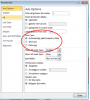
Is there an image somewhere on the web you could point me to, or paste a screenshot of what you want?
 
Follow the directions that Jon shows, but for XL 2007+, changing the Axis option is found by Select Axis, Format axis, then go here:
upload_2014-5-7_12-59-42.png
You want to select "Date Axis". The attached workbook was built in XL 2010, following Jon's instructions.
 

Attachments

Thank you. I cannot figure out how to plot it on the Excel like he has. This is what I have. I have a total of 6 regions and each of them have a value that adds up to 26.1 M - how would I plot this here?
 
You'll need to re-arrange the data, as Jon shows in section "Laying out the data". Each of the points in your series have a width and a height that you can control. The overall value doesn't matter so much, it's each individual part of the whole that you'll need to set. If your data currently looks like the first image in "Laying out the data", I'd recommend using linked formulas to build the 2nd table (again, under Laying out the data), in case your values need to change in the future.
 
Hi ,

If your data has only one variable , why do you have to use variable-width column charts ?

Can you clearly explain what your data is like ?

If you have a total of 26 million , which is divided into 6 unequal parts , any kind of chart , even a pie-chart will show the percentage of each of these parts , since the total will add up to 100 %.

Narayan
 
Back
Top