• Hi All

    Please note that at the Chandoo.org Forums there is Zero Tolerance to Spam

    Post Spam and you Will Be Deleted as a User

    Hui...

  • When starting a new post, to receive a quicker and more targeted answer, Please include a sample file in the initial post.

Using Text as a Prompt to Multiply The Value in Another Column

Doug Holman

New Member
I'm trying to get Excel to recognize text as to perform multiplication.

In Column J, I have Yes/No as a drop-down.

In Column H, I have a dollar value.

I need to know how to get Column H to recognize if Column J reads Yes or NO.

When Yes, I want to multiply my dollar value by 0. This will bring the value to $0.00

And, I want Column H to recognize No and multiply the dollar value by 100%.

How would I write this code, and where do I put it.

Thanks in advance,

upload_2016-11-18_12-24-9.png
 
Times 1 would work. I just want the $ Value to remain the same if the text reads No.

My real problem is getting the $ Value to change to zero when the text reads Yes.

My solution was multiplying the Value by zero. Though, I'm open to any suggestions that will convert my $ Value to zero (0.00) when Yes is selected.

My challenge is that the formula applies to one Column, with two words - Yes and No.
 
How would I write this code, and where do I put it.
I thought you are looking for vba.
Do you want formula solution to change col.H itself?
If col.H has formula, you can do it something like
=ExistingFormula*If(J2="Yes",0,1)
But if col.H is a contant, you need vba.
 
I know very little about Excel. No idea what VBA is. I may have confused things by saying I had a solution. What I meant was, logically it would work, but not sure it can be done.

In my Excel Column H will contain only Dollar amounts. Column J has either Yes or No.

Trying to write a formula to apply to column H that accomplishes two things:

1. When column J is Yes it converts the Dollar amount in Column H to $0.00.
2. When column J is No it keeps the Dollar amount the same.

Is there a way to write this?
 
.......
1. When column J is Yes it converts the Dollar amount in Column H to $0.00.
2. When column J is No it keeps the Dollar amount the same.........

Try,

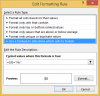
Select H2:H9 >> Conditional Formatting >>

choose , "Use a formula" >>

Format rule enter formula : =$J2="Yes"

upload_2016-11-20_11-57-34.png

>> Click "Format" >> Number >> Custom, enter : "$0" >> OK

upload_2016-11-20_11-58-17.png

>> Finish

Then,

Try to select Yes/No in Col J dropdown list :

If Col J is "Yes" >> Col H will change to $0

If Col J is "No" >> Col H will return to the original value

Regards
Bosco
 

Attachments

Last edited:
Back
Top