
• Hi All

    Please note that at the Chandoo.org Forums there is Zero Tolerance to Spam

    Post Spam and you Will Be Deleted as a User

    Hui...

  • When starting a new post, to receive a quicker and more targeted answer, Please include a sample file in the initial post.

UNIQUE FILTER with ISNA LET: 1 Cell Method Sort? instead Multi Helper Columns>Merge?

Stephan

Member
Hello

To Sort a list of NAMES with exam PASS or FAIL, however some FAIL 1st time but PASS next attempt, however using UNIQUE, some NAMEs appear TWICE.

So far FORMULA with numerous helper columns, is there better way then this on XL2021? ie VStack or HStack is 365 only.

To demonstrate error, kylies appears twice, UNIQUE will display name twice, as 2nd column there is 2 entries for same name, hence 2 unique entries:
=SORT(UNIQUE(FILTER(I2#,(J2:J9="PASS")+(J2:J9="FAIL"))))

Start simple, but quickly desends to more columns
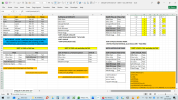
PASS LIST: =SORT(UNIQUE(FILTER(I2#,(J2:J9="PASS"))))
FAIL LIST: =SORT(UNIQUE(FILTER(I2#,(J2:J9="FAIL"))))
PASS LIST comparing FAIL LIST to exclude DUPLICATE:
=UNIQUE(FILTER(A17:A21,ISNA(MATCH(A17:A21,C17:C21,0)*0)))
XLOOKUP for EXAM STATUS of EXCLUDE DUPLICATE LIST:
=XLOOKUP(K15,H$2:H$9,I$2:I$9)
COLUMN MERGE of PASS exc DUPLICATE ENTRY + FAIL:
=SORT(UNIQUE(LET(
a,F16:G19,
b,C16#,
ra,ROWS(a),
rb,ROWS(b),
rsq,SEQUENCE(ra+rb),
csq,SEQUENCE(,COLUMNS(a+b)),
out,IFS(rsq<=ra,INDEX(a,rsq,csq),rsq<=ra+rb,INDEX(b,rsq-ra,csq),TRUE,),out)))

Screenshot (406).png
 

Attachments

I'm not quite sure what the question is here, but if you are wanting only the latest result for each individual, you can use this:

=LET(f,FILTER(A2:D9,C2:C9=MAXIFS(C2:C9,A2:A9,A2:A9,B2:B9,B2:B9)),
SORT(HSTACK(INDEX(f,,1)&" "&INDEX(f,,2),INDEX(f,,4))))
 
I'm not quite sure what the question is here, but if you are wanting only the latest result for each individual, you can use this:

=LET(f,FILTER(A2:D9,C2:C9=MAXIFS(C2:C9,A2:A9,A2:A9,B2:B9,B2:B9)),
SORT(HSTACK(INDEX(f,,1)&" "&INDEX(f,,2),INDEX(f,,4))))
Hi. Yes correct the Latest Result. It is a just an example list of Names with Exam pass/fail, a person Re-took & passed 1st time.

Wanted a 1 cell unique filter of it, with criteria to consider if same name appears, only to consider the pass if column B has pass & fail.

If other words, yes looking for 1 cell instead of clustering more of same data in other columns.

Hence not seen a formula like this for XL 2021, I guess with my basic knowledge the answer is there, just not considered it. As trying to find way with UNIQUE FILTER, 1 CELL, & V-H Stack exclusive to 365, isn't it? My newest version is XL 2021, prefer non Web based, hence Formula unrecognised on XL21. Cheers for re-ply though, future use of 365, but perhaps the answer is something like this?:

=UNIQUE(FILTER(A:A, (B:B = "YourCondition") * (COUNTIFS(A:A, A:A, B:B, "YourCondition") > 1)))

Unsure is >1 is actual value of COLUMN, or TIMES of OCCURENCE?


X POSTS:
 
Last edited:
If you need a solution for Excel 2021, then you'll need to find a way around HSTACK, which won't be available to you.

Maybe this:

=LET(f,FILTER(A2:D9,C2:C9=MAXIFS(C2:C9,A2:A9,A2:A9,B2:B9,B2:B9)),
SORT(CHOOSE({1,2},INDEX(f,,1)&" "&INDEX(f,,2),INDEX(f,,4))))

Also posted on ExcelForum.
 
If you need a solution for Excel 2021, then you'll need to find a way around HSTACK, which won't be available to you.

Maybe this:

=LET(f,FILTER(A2:D9,C2:C9=MAXIFS(C2:C9,A2:A9,A2:A9,B2:B9,B2:B9)),
SORT(CHOOSE({1,2},INDEX(f,,1)&" "&INDEX(f,,2),INDEX(f,,4))))

Also posted on ExcelForum.
THANKS exactly that, works perfectly in XL2021.
Added to attached file in CELL L3.

Questions:
A. Does MAXIF return which row newest date COLUMN C?
B. What would Formula B is no Column C?

CHEERS
 

Attachments

Last edited:
Why and under what circumstances would the attempts to pass the exam not be dated or at least numbered? I don't think this is a realistic scenario.

Does MAXIF return which row newest date COLUMN C?

Yes - for each person. You should know how to look at parts of a complex formula and run them to see what they do. Here, run f.

For example:

=LET(f,FILTER(A2:D9,C2:C9=MAXIFS(C2:C9,A2:A9,A2:A9,B2:B9,B2:B9)),
s,SORT(CHOOSE({1,2},INDEX(f,,1)&" "&INDEX(f,,2),INDEX(f,,4))),
f)
 
UNIQUE Formulas, you're right they can be complex expressions, and many times the answer is much simpler then you realise, the obviousness of the truth is you actually saw it in use! But after looking @ lots of lots of online & download examples, you realise there are a trail to confusion, they lack piecing together all the likely uses.

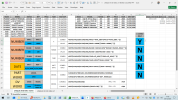
Hence on that Prospect, majority of feasible possibilities, attached is a file of useful UNIQUE FORMULA in EXCEL 2021for:

DATE -/+ MIN MAX
£ NUMBER -/+MIN MAX
PART WORD
EXCLUDE WORD
DATA VALIDATION COMBO A>B

Large COMBOs of Y (or No!) in Column P, display results in SPILL I2#

Not included the other useful formula of REGEX, as doesn't work in XL21, useful is looking for certain CODE!

Also any suggestions of other likely sesarch parameters or even vague possiblie scenarios is of use, thanks.

Screenshot (411).png

I work from Templates like this, as they work, and don't remember from fresh, blank, as there many expressions & exact layouts.

Also appreciate many descriptions of UNIQUE FILTER are like: =UNIQUE(FILTER(DATA, MAKE="AUDI")*(MODEL="QUATTRO"),)))

What I initially under appreciated is that UNIQUE FILTER its use of...AND * OR + fields can be other then just = EQUALS....

Hence lots of examples including COMPARE OPS (COMPARISON OERATORS):

Comparison operatorMeaning Example
= (Equal)Equal toA1=B1
> (Greater than)Greater thanA1>B1
< (Less than)Less thanA1<B1
>= (Greater or Equal)Greater than or equal toA1>=B1
<= (Less than or Equal)Less than or equal toA1<=B1
<> (not Equal)Not equal toA1<>B1
<>""IF NOT > BLANKA1<>""
=""IF BLANKA1=""
=OROR=OR (B1>100, B2>100, B3>100)
 

Attachments

File Template update additions.

Just to share, as question solved, & added to the Generic Formula solutions via common scenario theme of DATE WORD NUMBER CODE, to future proof, likely possibilities, with an answer already. Sometimes you have the solution but don't realise as you Re-consider Name Ranges, Values, Criteria, etc..

& I always find it annoying to read posts, without sample files, pages of threads with incremental changes, then several pages, later.. It's solved, really, what is it. Like I knew what the question was, knowing the answer Wud have been gd.. Etc hence the file..

So odd ppl don't like to share the final article.. Why not? A secret, you don't want other ppl to know.. Seek & u will find..

A bit retro clandestine, in my opinion, but obviously in today's society it is clearly an unspoken well integrated aspect thought to be witty or.. humourous.

Aka The Matrix... Words to the effect of: You don't know etc.. Smith: "What you know you can't explain".

In others cascade of consecutive jokes, to start solving 1 problem, starts several others... Then where to Start. A common theme in Excel, Forum posts & aledged sample files, generally leaving an odd precarious position to start solving, an unfamiliarity, of sorts, etc etc.

Hilarious... Not, The world needs to grow up really, as knowledge isn't a secret! & yes of course it is make persons apprehensive.. But to belittle ppl who don't know, well it not nice..

Anyways...

Cross (X +) Post

I know.. how.. Forums are v pro active @ cross word searches crawler bots! So here it is, question isn't same same relevant, but File is!


Attachments

Last edited:
Back
Top