
• Hi All

    Please note that at the Chandoo.org Forums there is Zero Tolerance to Spam

    Post Spam and you Will Be Deleted as a User

    Hui...

  • When starting a new post, to receive a quicker and more targeted answer, Please include a sample file in the initial post.

Time sheet Rounding

luv2salsa

New Member
=ROUND(IF((OR(C17="",D17="")),0,IF((D17<C17),((D17-C17)*24)+24,(D17-C17)*24))+IF((OR(F17="",G17="")),0,IF((G17<F17),((G17-F17)*24)+24,(G17-F17)*24)),2)

This is the current formula I have for my timesheets. I need to have them round up or down by 5 minutes. Can you help me with the formula?

Thank you.
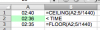
 
I've attached my timesheet. Example: if an employee clocks out a 5:11 it should read 5.25; if they clock out at 5:04 it should read 5.00

I hope I am not confusing you. I'm not very knowledgeable when it comes to formulas.
 

Attachments

@luv2salsa
Why You don't use Time (like hh:mm)?
Or what kind of clock do You use?
Anyway, now You'll need only ONE value - so,
You could use =MRound( t2-t2+t4-t3;5/1440)
Check that Yellow area.

ps. Enter all your hours like ...
8:00 AM ( 8: )
10:15 PM ( 20:15 )
 

Attachments

Last edited:
We do not have a clock. The employees write in their times on the time sheet. I will try your formula. Hopefully it will work for us.

Thank you.
 
@luv2salsa
I noticed that You count 'overtimes'
daily after 8hrs => 08:00 hrs
weekly after 40hrs => 40:00 hrs (format have to be right)
'Overtime Hrs' = 'Regular Hrs' - X6 ... of course, if 'Regular Hrs' > X6
and so on...
 
Back
Top