
Alex Legge
New Member
This is a tricky problem and may not even be possible in Excel, but I figured this forum would be my best shot.
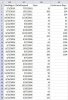
Below is a screenshot of my data with column AE unfinished (I manually entered the first few values, but the dataset is gigantic). I'm trying to devise a way to complete it. Basically, AE should show the sum of AD values within a stretch of dates only when it is continuous.
For instance, AB2:AC4 is a continuous stretch of dates from 7/1/2010-11/7/2004, but AB5 represents a new continuous stretch. The sum of AD2:AD4 is all within the continuous stretch, and I want that sum to be listed in each corresponding cell of AE. In other words, AE values are the total number of days within that continuous stretch of dates.
Any ideas?? And if this isn't possible in Excel, does anyone have an idea of how to solve it via other means?
Sincere thanks for your help and suggestions.
Below is a screenshot of my data with column AE unfinished (I manually entered the first few values, but the dataset is gigantic). I'm trying to devise a way to complete it. Basically, AE should show the sum of AD values within a stretch of dates only when it is continuous.
For instance, AB2:AC4 is a continuous stretch of dates from 7/1/2010-11/7/2004, but AB5 represents a new continuous stretch. The sum of AD2:AD4 is all within the continuous stretch, and I want that sum to be listed in each corresponding cell of AE. In other words, AE values are the total number of days within that continuous stretch of dates.
Any ideas?? And if this isn't possible in Excel, does anyone have an idea of how to solve it via other means?
Sincere thanks for your help and suggestions.
 )
)