Hi Leo ,
I am not sure but I think it works this way :
1. The criterion in a SUMIF function is always text.
2. The criterion can take several forms ; two of them are as follows :
equality / inequality symbol concatenated with a literal ( constant )
equality / inequality symbol concatenated with a cell reference
Now , suppose your column A had merely values such as 150,000 , 300,000 , 450,000 and so on. Your SUMIF formula could now be any one of the following :
=SUMIF($A:$A,"=300,000",$B:$B)
=SUMIF($A:$A,">300,000",$B:$B)
=SUMIF($A:$A,"<300,000",$B:$B)
These 3 forms are equivalent to the following :
=SUMIF($A:$A,"=" & "300,000",$B:$B)
=SUMIF($A:$A,">" & "300,000",$B:$B)
=SUMIF($A:$A,"<" & "300,000",$B:$B)
The first form could also be shortened to :
=SUMIF($A:$A,"300,000",$B:$B)
or even
=SUMIF($A:$A,300000,$B:$B)
since the SUMIF function treats both cases identically.
Note : When you enter the value 300000 without the quotes around it , you cannot use the comma within the 300000 ( 300,000 ) , since the comma will be taken as a parameter separator and not a thousands separator.
To summarize , if there is a constant value , all of the following are equivalent :
=SUMIF($A:$A,300000,$B:$B)
=SUMIF($A:$A,"300,000",$B:$B)
=SUMIF($A:$A,"=300000",$B:$B)
=SUMIF($A:$A,"=300,000",$B:$B)
=SUMIF($A:$A,"=" & 300000,$B:$B)
=SUMIF($A:$A,"=" & "300000",$B:$B)
=SUMIF($A:$A,"=" & "300,000",$B:$B)
Whether the literal ( constant ) is entered as a numeric value or a string is immaterial , whether the equality sign is included or not is immaterial.
--------------------------------------------------------------------------------
Once you go on to using a cell reference , then things change slightly.
Using a formula such as :
=SUMIF($A:$A,"=D2",$B:$B)
will tell Excel that you wish to see if any cell contains the text D2 ; this is certainly not what we want ; we want to use the contents of cell D2 as a value criterion.
In order to tell Excel this , the formula will have to be changed to :
=SUMIF($A:$A,"=" & D2,$B:$B)
Of course , with an equality criterion , the "=" is not required , and even the following formula will work identically :
=SUMIF($A:$A,D2,$B:$B)
When we wish to use inequalities , then the inequality symbols are mandatory.
-----------------------------------------------------------------------------------
Now to come to your specific case.
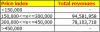
In your case , the data in column A is not just numeric values ; with the inclusion of the inequality symbols and the in between expression such as 150,000<=x<=300,000 , all of the data is text.
Thus , if we have data such as <150,000 , then a criterion in cell D2 of <150,000 will not work.
A formula such as :
=SUMIF($A:$A,D2,$B:$B)
where D2 contains the text string <150,000 , will be interpreted as :
=SUMIF($A:$A,"<150,000",$B:$B)
and since column A does not contain any numeric value less than 150,000 , the result will be 0.
To tell Excel to interpret the criterion in cell D2 as a literal text string , we will need to prefix the criterion with the equality sign as follows :
=SUMIF($A:$A,"=" & D2,$B:$B)
Now , Excel will translate this to its equivalent :
=SUMIF($A:$A,"=<150,000",$B:$B)
which will be interpreted as :
Look in column A for data which equals the text string <150,000 ; this is exactly what we want.
Narayan