Hi all,
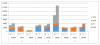
I am a newbie here and trying to solve a problem. I have the attached data and would like to see a stacked chart next to clustered to compare the baseline and forecast for each category of spend (i.e h/w, s/w, etc) against each phase and each region.
Attached is the sample data.
any suggestions, tips would be greatly appreciated.
Thanks
R17
I am a newbie here and trying to solve a problem. I have the attached data and would like to see a stacked chart next to clustered to compare the baseline and forecast for each category of spend (i.e h/w, s/w, etc) against each phase and each region.
Attached is the sample data.
any suggestions, tips would be greatly appreciated.
Thanks
R17