• Hi All

    Please note that at the Chandoo.org Forums there is Zero Tolerance to Spam

    Post Spam and you Will Be Deleted as a User

    Hui...

  • When starting a new post, to receive a quicker and more targeted answer, Please include a sample file in the initial post.

Simple issue with cell format

Peshal

New Member
Hi Every one, Though simple , I am stuck in this trifling issue for few hours now. Frankly speaking I am novice to EXCEL. I want to put my data entries in formatted cells look like 00:00 such that I do not need to type " : " every time I make an data entry. I tried it using custom format h:mm but still there I need to type " : " for each entry.
Is there any help regarding the issue?
It would be greatly appreciated.
 
Hi,

I think in this case you need to enter hour & minute in two different cells & later convert it by TIME function.

Like As!!

A1= Hour
B1= Minute
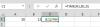
C1= TIME(A1,A2,0)
Screenshot 2014-05-18 17.29.21.png

or just want hour then

A1= Hour
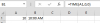
B1= TIME(A1,0,0)

upload_2014-5-18_17-36-46.png
 
Back
Top