
• Hi All

    Please note that at the Chandoo.org Forums there is Zero Tolerance to Spam

    Post Spam and you Will Be Deleted as a User

    Hui...

  • When starting a new post, to receive a quicker and more targeted answer, Please include a sample file in the initial post.

Show full value in formula bar instead of formula

Vivek D

Member
I have a formula which results in a certain value which could be in say 2 decimal places.
When I show the value in the spreadsheet I have it formatted to show upto 1 decimal place only.

However, when result of formula is say 0.03, the value shows up as 0.0 which is kind of misleading.

I was wondering if the formula bar could show the full value instead of showing the formula to the user.

Or is there a better / alternate solution/approach to this?
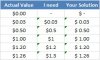
 
Or as an alternate approach can I format the number such that
1. When value is 0 show "" (Blank)
2. When value is < 0.1 show in 2 decimal places
3. Else show with 1 decimal place except if decimal is 0 then show just the non-decimal portion
e.g. 8 instead of 8.0
 
Hi Vivek,
You can achieve what you want using conditional formatting. The attached file has an example, which is conditionally formatted to use a currency number format with 3 decimal places if the value is between 0 and 0.01.
The default currency format has displayed 0 as $ - but if that's not what you want, you could add another condition to change the formatting of 0.
 

Attachments

Hi Vivek,
You can achieve what you want using conditional formatting. The attached file has an example, which is conditionally formatted to use a currency number format with 3 decimal places if the value is between 0 and 0.01.
The default currency format has displayed 0 as $ - but if that's not what you want, you could add another condition to change the formatting of 0.

Thanks Larena. However, I'm not getting exactly what I'm looking for through your solution.

See attached image.
 

Attachments

  • Custom Formatting.jpg
    Custom Formatting.jpg
    17.3 KB · Views: 3
Hi Vivek,

Sorry - I missed a couple of points in your original post. I've uploaded another copy that replicates your screenshot.

This one has the numbers formatted as currency with no decimal places, and then has three conditions:
  • If it's zero, custom format to display just -
  • If the remainder when divided by 1 is >0 AND the number is less than 1, show 1 decimal place
  • If the remainder when divided by 0.1 is >0 AND the number is less than 1, show 2 decimal places
I had to work around a known bug for the 2nd two - MOD just doesn't work properly when working with fractions (Google "Excel 2010 MOD bug" for more info), so I had to multiply the number by 100 in the MOD calculation. A bit messy, but it works.

Regards,

Larena
 

Attachments

Hi Vivek,

Sorry - I missed a couple of points in your original post. I've uploaded another copy that replicates your screenshot.

This one has the numbers formatted as currency with no decimal places, and then has three conditions:
  • If it's zero, custom format to display just -
  • If the remainder when divided by 1 is >0 AND the number is less than 1, show 1 decimal place
  • If the remainder when divided by 0.1 is >0 AND the number is less than 1, show 2 decimal places
I had to work around a known bug for the 2nd two - MOD just doesn't work properly when working with fractions (Google "Excel 2010 MOD bug" for more info), so I had to multiply the number by 100 in the MOD calculation. A bit messy, but it works.

Regards,

Larena
Thanks Larena. This worked perfectly.

The only issue I guess is that it may be a tad complicated if someone new looks at it and tries to figure out what's going on. Although, it won't be that big of a deal since it's really just formatting of the number.
 
Back
Top