
You are using an out of date browser. It may not display this or other websites correctly.
You should upgrade or use an alternative browser.
You should upgrade or use an alternative browser.
Ribbon Size Problems
- Thread starter Janice Vazquez
- Start date

udprocks
Member
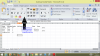
I attached a file.
This would help out a lot.
Thank you,
Janice Vazquez
what you want exactlty "ctrl+f1".......???
Janice Vazquez
New Member
I believe "ctrl+f1" minimizes the ribbon, but I believe my ribbon's font is too big. What I mean is the ribbon covers up 1/4 of my page. When I am working, I would like to be able to see the ribbon as I type in excel.
Janice Vazquez
New Member
Yes, my problem also applies to Microsoft Word as well.


NARAYANK991
Excel Ninja
Hi Janice ,
The same as Syedali's post , but you can avoid the download :
https://www.conetrix.com/Blog/post/Adjusting-the-Menu-Font-Size-in-Microsoft-Office-2007.aspx
Narayan
The same as Syedali's post , but you can avoid the download :
https://www.conetrix.com/Blog/post/Adjusting-the-Menu-Font-Size-in-Microsoft-Office-2007.aspx
Narayan